

Hi all,
First of all Hi everyone it's been a long time since I've posted here ( that's life ).
I just wanted to share some findings I've made that may help people trying to use Imacs with the unsupported radeon gpus
and don't have the possibility / skills to make the upgrade to a supported one.
- The context
I've recently decided to upgrade my 27" to Mojave to see how it would work and see if I could live with the limitations.
So I've applied Mojave using doddude1's patcher ( thanks again to him and all the ones who helped for these small miracles 😉)
After all the setup off course my graphics we're garbage colorwise ( orange colors ) and graphic anomalies wise ( weird effects while moving
windows and all around weirdness ).
So I've found some fixes / workarounds that go from 100% to 90% good for day to day work ( no gaming sorry 😉)
- The weird colors problem
What I've found is that this is a result of the color depth used by macos.
By default it's on billions of colors and this is what results in the orange / bad colors.
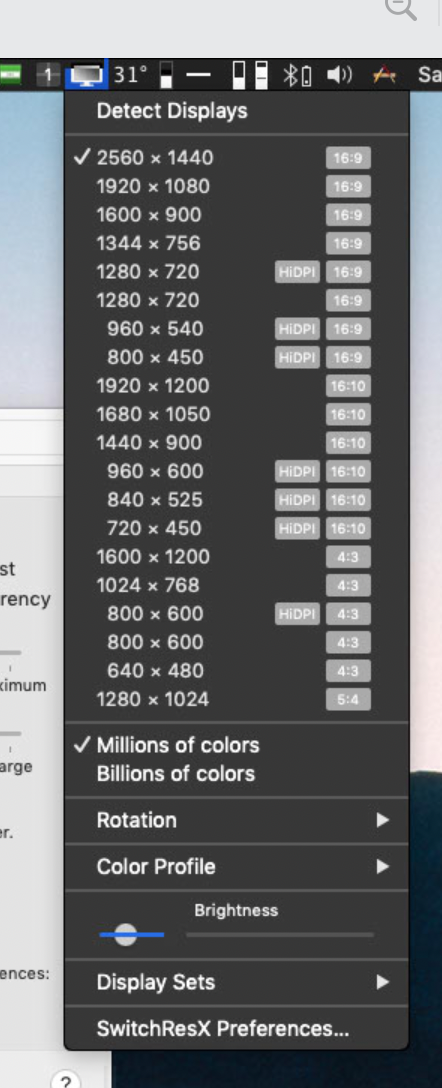
What I've done is using a tool like SwitchResX ( in my case I have a license but using it in trial mode will also work ) if you look
at the menu in the status bar at the bottom you have the possibility to select the color depth, just change it to millions and everything
gets the right color
This might not be a "solution" if you need some color accuracy like for photo / design work but for everything else I've not noticed
any difference.
For me this is a 100% fix I hope this helps others.
- The window moving / resizing graphics problems
For this I found a crazy workaround which is to have opera browser ( one of the last versions before the change of the opera engine ),
I'm using 10.63 which runs fine in Mojaveand the browser itself does not suffer from the graphics weirdness ( I think it must use different graphics libraries which are not accelerated by the gpu ).
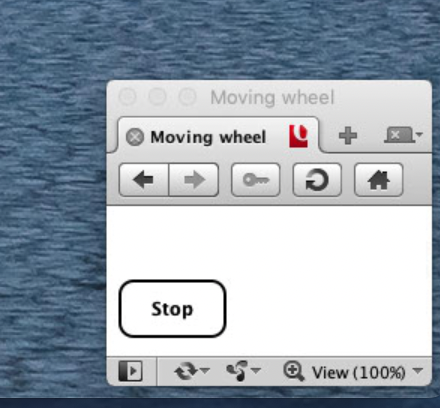
In Opera I just create a very small window size and open a local page I've created from some looking around the net.
This page basically runs a javascript function which I've tried to adjust to use the smallest amount of CPU possible ( not 0 I'm afraid but low
enough ).
This function keeps drawing in a loop a box moving from left to right, the box is white on a white background so we don't see it but
the SO has to draw the changes anyway so it forces display refreshes, etc and this makes all other windows "behave" normally and
the graphics weirdness is almost completely removed.
It's not 100% fluid but much better, some apps are perfect other as long as their window is not too big are perfect also the rest
I think are 90% there ( they really look like a normal window moving 😀 ).
Just make Opera start at login.
Adjust it's position to be in the bottom right corner for example and make it show in every space. After logging
in just click the start button.
The code is at the end of this post.
I know this is a crazy workaround but I've also tried other "animations" and they don't work, maybe someone can find
another better option.
I've tried automator with a bash script creating an always rotating cog in the status bar but it does not do it.
I've also tried a shell script in terminal drawing some character very fast like a "cog" but that does not work either.
I've also looked for apps that work and don't suffer from the graphics issue. I've found the following:
i. Terminal
ii. Disk Utility from Sierra
iii. Calculator
iv. iCab browser 5.8.6
v. Path Finder 5.7.6 ( Finder replacement )
vi. Bean Text Editor also works mostly with perfect graphics
vii. Justlooking ( Image Viewer to replace Preview )
Replacing the System Preferences app with the one from Sierra also makes it a lot better.
I'm going to try and copy the "Preference Panes" themselves to see if they make it smoother when opening them and
still work in Mojave.
I'm trying to find others and will update with any new ones.
- General UI effects
For this you can activate "Reduce Motion" in System Preferences / Accessibility / Display.
This helps but things are not completely smooth.
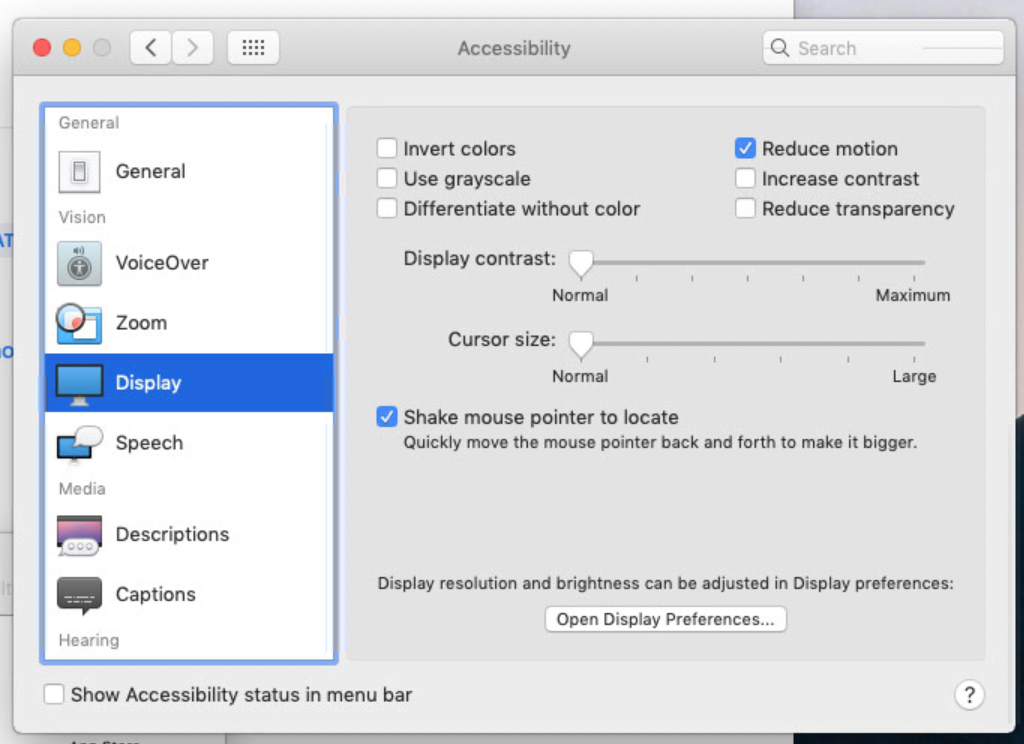
You can also change the "Minimize" effect to "Scale" that works much better.
( 20260216 edit ) - I think activating Reduce Transparency also helps ( I'm not 100% sure on this on it
may be just in a very small number of situations )
- Target Display Mode
For this as we have all been told by Apple this does not work from High Sierra onwards.
Well that's not true.
What I've found from searching everywhere is that you can change some SMC registers in a specific sequence
after connecting the Imac to another laptop ( and this can be 😵💫 also with windows, I'm actually using a Macbook Air M3 with an USBC adapter to the display ).
You can do this using terminal and running a shell script in the Imac after connecting to the laptop.
The script is this
For this script to run you need the smc binary which you can take from the smcFanControl app ( just do show package
contents in the app and go to the Resources folder inside Contents ).
Copy smc to the same folder where you created the script.
To stop just disconnect the display cable and that stops TDM of course.
PS. you can also tun this script using a remote connection ( SSH ) to your Imac so you don't need any keyboard / mouse attached
I hope this helps.
Best regards,
voidRunner
First of all Hi everyone it's been a long time since I've posted here ( that's life ).
I just wanted to share some findings I've made that may help people trying to use Imacs with the unsupported radeon gpus
and don't have the possibility / skills to make the upgrade to a supported one.
- The context
I've recently decided to upgrade my 27" to Mojave to see how it would work and see if I could live with the limitations.
So I've applied Mojave using doddude1's patcher ( thanks again to him and all the ones who helped for these small miracles 😉)
After all the setup off course my graphics we're garbage colorwise ( orange colors ) and graphic anomalies wise ( weird effects while moving
windows and all around weirdness ).
So I've found some fixes / workarounds that go from 100% to 90% good for day to day work ( no gaming sorry 😉)
- The weird colors problem
What I've found is that this is a result of the color depth used by macos.
By default it's on billions of colors and this is what results in the orange / bad colors.
What I've done is using a tool like SwitchResX ( in my case I have a license but using it in trial mode will also work ) if you look
at the menu in the status bar at the bottom you have the possibility to select the color depth, just change it to millions and everything
gets the right color
This might not be a "solution" if you need some color accuracy like for photo / design work but for everything else I've not noticed
any difference.
For me this is a 100% fix I hope this helps others.
- The window moving / resizing graphics problems
For this I found a crazy workaround which is to have opera browser ( one of the last versions before the change of the opera engine ),
I'm using 10.63 which runs fine in Mojave
In Opera I just create a very small window size and open a local page I've created from some looking around the net.
This page basically runs a javascript function which I've tried to adjust to use the smallest amount of CPU possible ( not 0 I'm afraid but low
enough ).
This function keeps drawing in a loop a box moving from left to right, the box is white on a white background so we don't see it but
the SO has to draw the changes anyway so it forces display refreshes, etc and this makes all other windows "behave" normally and
the graphics weirdness is almost completely removed.
It's not 100% fluid but much better, some apps are perfect other as long as their window is not too big are perfect also the rest
I think are 90% there ( they really look like a normal window moving 😀 ).
Just make Opera start at login.
Adjust it's position to be in the bottom right corner for example and make it show in every space. After logging
in just click the start button.
The code is at the end of this post.
I know this is a crazy workaround but I've also tried other "animations" and they don't work, maybe someone can find
another better option.
I've tried automator with a bash script creating an always rotating cog in the status bar but it does not do it.
I've also tried a shell script in terminal drawing some character very fast like a "cog" but that does not work either.
I've also looked for apps that work and don't suffer from the graphics issue. I've found the following:
i. Terminal
ii. Disk Utility from Sierra
iii. Calculator
iv. iCab browser 5.8.6
v. Path Finder 5.7.6 ( Finder replacement )
vi. Bean Text Editor also works mostly with perfect graphics
vii. Justlooking ( Image Viewer to replace Preview )
Replacing the System Preferences app with the one from Sierra also makes it a lot better.
I'm going to try and copy the "Preference Panes" themselves to see if they make it smoother when opening them and
still work in Mojave.
I'm trying to find others and will update with any new ones.
- General UI effects
For this you can activate "Reduce Motion" in System Preferences / Accessibility / Display.
This helps but things are not completely smooth.
You can also change the "Minimize" effect to "Scale" that works much better.
( 20260216 edit ) - I think activating Reduce Transparency also helps ( I'm not 100% sure on this on it
may be just in a very small number of situations )
- Target Display Mode
For this as we have all been told by Apple this does not work from High Sierra onwards.
Well that's not true.
What I've found from searching everywhere is that you can change some SMC registers in a specific sequence
after connecting the Imac to another laptop ( and this can be 😵💫 also with windows, I'm actually using a Macbook Air M3 with an USBC adapter to the display ).
You can do this using terminal and running a shell script in the Imac after connecting to the laptop.
The script is this
Bash:
sudo ./smc -k MVHR -w 01
sleep 1
sudo ./smc -k MVMR -w 02
For this script to run you need the smc binary which you can take from the smcFanControl app ( just do show package
contents in the app and go to the Resources folder inside Contents ).
Copy smc to the same folder where you created the script.
To stop just disconnect the display cable and that stops TDM of course.
PS. you can also tun this script using a remote connection ( SSH ) to your Imac so you don't need any keyboard / mouse attached
I hope this helps.
Best regards,
voidRunner
HTML:
<html lang="en">
<head>
    <meta charset="UTF-8">
    <title>Moving wheel</title>
    <style>
    #wheel{
        height:22px;
        width:22px;
        border-radius: 12px;
        border: 2px solid white;
        background:#fff;
    }
    #line1{
        width:5px;
        height:20px;
        background:white;
        margin-left:48px;
    }
    #line2{
        width:20px;
        height:5px;
        background:white;
        margin-top:-53px;
    }
    #line3{
        height:5px;
        width:175px;
        background:iblack;
    }
    #start-btn{
        padding: 10px 20px;
        margin-top:10px;
        color:#000;
        background-color:#fff;
        border:2px solid black;
        border-radius:10px;
        font-weight:900;
    }
    #start-btn:hover{
        background-color:#eee;
    }
   </style>
</head>
<body>
    <div id="wheel">
        <div id="line1"></div>
        <div id="line2"></div>
    </div>
    <div id="line3"></div>
    <button id="start-btn" onclick="start()">Start</button>
    <script>

    //global variables
    var timer;
    var left=0;
    var degree=0;

    //method to move the wheel
    function moveWheel () {
        var line1=document.getElementById("line1");
        var line2=document.getElementById("line2");
        var wheel=document.getElementById("wheel");
        left +=5;
        degree+=2;
        wheel.style.marginLeft= left+"px";
        //line1.style.transform = "rotate("+degree+"deg)";
        //line2.style.transform = "rotate("+degree+"deg)";
        if(left==150){
            left=0;
        }
        if(degree==360){
            degree=0;
        }
    }

    //method to handle start/stop of wheel
    function start(){
        var btn=document.getElementById("start-btn");
        if(btn.innerHTML.trim()==='Start'){
            //start moving the wheel
            timer=setInterval(function () {
                moveWheel();
            },5);
            btn.innerHTML='Stop';
        }else{
            //stop moving the wheel
            clearInterval(timer);
            btn.innerHTML='Start';
        }
    }
    </script>
</body>
</html>
Last edited:


