Become a MacRumors Supporter for $50/year with no ads, ability to filter front page stories, and private forums.

Dawirt

macrumors newbie
Original poster
Hello everyone .
After a windows 10 Bootcamp install I did an update through the windows environment for what I think was some5to with an intel chipset.
Now the computer will only boot to windows.
The keyboard is not responding to any commands. Reset, recovery etc.
Just straight into windows. Tried a windows USB keyboard borrowed from the neighbor. Nothing. Windows is working but that's no good to me.
Taking into account that the hard drive is corrupted what might be options.
A USB startup stick? Tried one that the neighbor made for me but it didn't work
A USB cable connection with another apple computer? (But I still need to access the defect computer or??.).
Format the hard drive using a Microsoft programm presuming I can boot into the windows environment using a windows startup USB, eg O&O defrag.
Data loss is irrelevant at the moment. I have most of my data backed up. iMac retina 2021 using Tahoe OS Ithink.
ANY help would be much appreciated.
Thanks again.
 
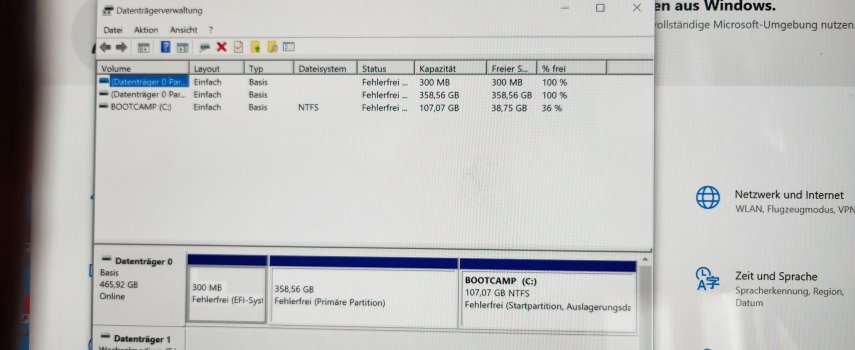
These are photos from the windows environment. Sorry the language is German but someone might be able to make sense of them.
 

Attachments

  • 20260725_111827.jpg
    20260725_111827.jpg
    1 MB · Views: 17
  • 20260725_111351.jpg
    20260725_111351.jpg
    812.5 KB · Views: 17
Yes.
Nothing
Not too sure if it's relevant but the Apple keyboard will only work with windows when it's plugged into a USB port.
Tried starting the computer using the usb cable.
No good. Starts into windows every time.
 
Should have mentioned this earlier but the bootcamp icon which would have allowed me to revert back to the Mac is not appearing on my windows taskbar. It never did.
 
A few things worth trying before you assume it's bricked. What year/model is the iMac? If it's a T2 machine (2017 or later), the safest path is a DFU restore over USB-C from another Mac using Apple Configurator 2 — that reflashes it and clears whatever startup lock the Windows update may have set. The BridgeOS/T2 side owns the boot picker on those models, and if it got wedged, no amount of Option-holding will pull you out from within.

On the keyboard-at-boot side: Apple wired keyboards do work in the boot picker, but only when plugged directly into one of the Mac's own USB ports (not through a hub or a display's downstream USB), and you have to hold Option before the chime and keep holding until the picker appears. Bluetooth won't do anything pre-boot.

If a wired keyboard still doesn't get you to the picker, pull mains power for 60 seconds, then power on and start pressing Option within the first second — that resets the SMC state on most Intel iMacs. If none of that lands, the T2 DFU restore is the fallback that doesn't need the keyboard at all.
 
  • Like
Reactions: ProTruckDriver
Tried that Keyboard directly plugged into the Mac. No joy.
Will a DFU restore work even though I've no access to my computer?
Thanks.
 

Attachments

  • Screenshot_20260725_143056_Opera.jpg
    Screenshot_20260725_143056_Opera.jpg
    129.5 KB · Views: 11
If a wired keyboard still doesn't get you to the picker, pull mains power for 60 seconds, then power on and start pressing Option within the first second — that resets the SMC state on most Intel iMacs.

I don't believe it. Just tried that and it worked. I have no idea how you acquired that, what might seem a bit of trivial information but THANKS. Thanks a million. Now to reinstall my computer.😃😃😃
 

Attachments

  • 17849834288468936765732688442086.jpg
    17849834288468936765732688442086.jpg
    1.4 MB · Views: 16
Before I do something else stupid could anyone advise me on how to proceed hear taking into account the mouse is not installed?
 

Attachments

  • 1784985483630666622034064606101.jpg
    1784985483630666622034064606101.jpg
    609.1 KB · Views: 11
Try this:

1. Power down -- all the way off (pull out the plug if you have to)

2. Press and hold these three keys:
command-option-r
DO NOT LET GO of these keys.

3. Press and release the power on button.
DO NOT LET GO of those three keys, keep holding them down!

4. You can let go when...
a. You see the spinning globe
or
b. You're asked for your wifi password.

Now wait a little while "as the globe spins".
In time, you should see the internet utilities.

Can you get this far?
WHY you are doing this:
You need to see if you can "get to" internet recovery.

OK, if you CAN get to internet recovery, next steps:

PATH ONE - try an OS restore (only).
Open the OS installer.
Accept whatever version of the OS you're offered.
See if it will install a new copy of the Mac and get the iMac going again.

PATH TWO - ERASE and reinstall
YOU MUST BE BACKED UP BEFORE GOING FURTHER, YOU ARE GOING TO ERASE EVERYTHING!
Open disk utility
IMPORTANT - go to the "view" menu and choose "show all devices"
Look at the list on the left. The topmost item is the physical drive inside.
Click on the drive to select it, then...
Click the erase button.
Select APFS, GUID partition format.
Erase the drive.

Once the erase is done, open the OS installer.
Again, do a brand-new OS install onto the drive.
When the install is done, you should see the initial setup screen (choose your language)
At this point, connect your backup if you have one.
Start clicking through.
When Setup Assistant asks if you wish to migrate, point-the-way to the backup drive.
Let setup assistand "digest" everything.
I suggest you "accept the defaults" and migrate it all.

Good luck !
 
  • Like
Reactions: ProTruckDriver
Register on MacRumors! This sidebar will go away, and you'll see fewer ads.