
Become a MacRumors Supporter for $50/year with no ads, ability to filter front page stories, and private forums.

Freshmen

macrumors member
Original poster
its just on my account, I have another account and it works there. By opening animation I mean when you open a folder it looks like its coming out of the folder. Hold down shift and close a folder and you'll know what i'm talking about. How can i fix this? I can always just make a new account and transfer everything but i dont wanna do that
 
Last edited:
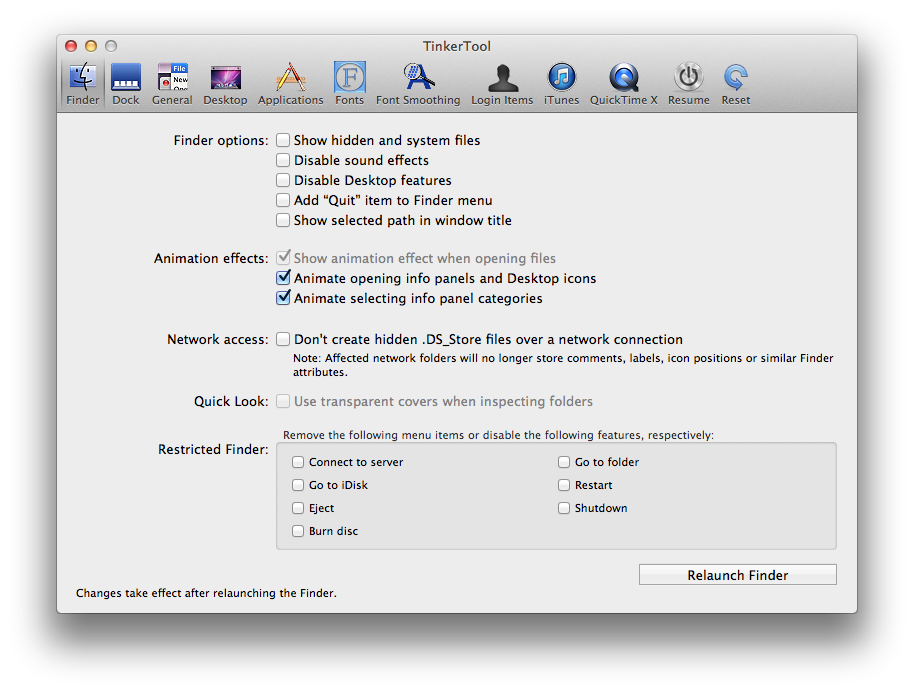
I even downloaded tinkertool and selected the checkmark for the animation and it still doesn't work
SMSFdGv.png

wtf

this all happened when i downloaded the trial for total finder
 
Hi,

launch the Terminal.

Copy/paste :

defaults write com.apple.finder DisableAllAnimations -bool false

Enter

Then copy /paste:

killall Finder

Enter
 
Hi,

launch the Terminal.

Copy/paste :

defaults write com.apple.finder DisableAllAnimations -bool false

Enter

Then copy /paste:

killall Finder

Enter

omg thank you so fkn much! How tf did you know how to fix this?
 
Register on MacRumors! This sidebar will go away, and you'll see fewer ads.