Become a MacRumors Supporter for $50/year with no ads, ability to filter front page stories, and private forums.

Banshee19

macrumors newbie
Original poster
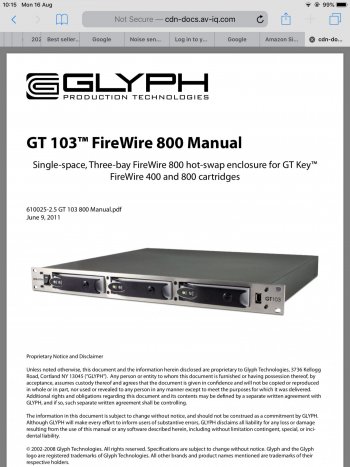
Hi , I have a 2020 IMac Pro black version, I need to connect a Glyph GT 103 set of removable hard drives to the IMac Pro .The lead from the Glyph is a FireWire 800 , it’s nine pin at each end , it used to be connected to a Mac Intel machine 2011 . I have already purchased two different Mac thunderbolt adapters that don’t fit the FireWire 800 connection . Hope someone can verify if it’s even possible to connect the Glyph drives and what adapter I need . The Mac Intel machine obviously had FireWire inputs on the front and back .
Thanks .
 
There is no 2020 iMac Pro, there is only a 2017 iMac Pro. There is a 2020 iMac though but it’s only available in silver so I assume you mean the 2017 iMac Pro. There is no 2011 Intel Mac with FW800 in front and back, closest would be 2010 Mac Pro or Mid-2012 Mac Pro.

To answer your question you need an Apple Thunderbolt to FireWire adapter which costs $29 in US or you could get a cheaper knock off version of the same.
 
  • Like
Reactions: Banshee19
There is no 2020 iMac Pro, there is only a 2017 iMac Pro. There is a 2020 iMac though but it’s only available in silver so I assume you mean the 2017 iMac Pro. There is no 2011 Intel Mac with FW800 in front and back, closest would be 2010 Mac Pro or Mid-2012 Mac Pro.

To answer your question you need an Apple Thunderbolt to FireWire adapter which costs $29 in US or you could get a cheaper knock off version of the same.
LoL , thanks for correcting my lack of knowledge on older macs 👍
 
I used to use - Apple Thunderbolt 3 to Thunderbolt 2 cable and then a Thunderbolt 2 to Firewire 800 connector, which worked for me.


Thank you for your prompt reply , I now know what to try . 👍
 
Will this lead work with thunderbolt 3 to 2 ?
 

Attachments

  • 626E5DF6-5565-4870-A18B-C656201E228A.jpeg
    626E5DF6-5565-4870-A18B-C656201E228A.jpeg
    185.1 KB · Views: 308
Your best bet if you want it to work without any hassles is to get the Apple adapters - I certainly had no problems with them! You might be able to pick up some second hand ones?
 
  • Like
Reactions: Banshee19
Your best bet if you want it to work without any hassles is to get the Apple adapters - I certainly had no problems with them! You might be able to pick up some second hand ones?
Yes , I have no problem buying legit Apple adapters 👍
 
The cable IEEE1394B 9 pin 800 FireWire from my glyph gt 103 drives is the same at each end , that’s whats throwing me regarding Apple adapters .
 
The cable IEEE1394B 9 pin 800 FireWire from my glyph gt 103 drives is the same at each end , that’s whats throwing me regarding Apple adapters .
The Apple Thunderbolt to FireWire adapter is 9 pin. Your glyph is 9 pin. What's the issue?

The iMac is Thunderbolt 3 so you need the Apple Thunderbolt 3 to Thunderbolt 2 Adapter to connect the Apple Thunderbolt to FireWire Adapter.
 
  • Like
Reactions: Banshee19
That’s 800 to 400 FW, so no
Well, the cable would work...

iMac Pro Thunderbolt 3 port > Apple Thunderbolt 3 to 2 adapter > Apple Thunderbolt 2 to FireWire (800, 9-pin) adapter > pictured cable > FireWire 400 (6-pin) device

...at FireWire 400 speed. For an external hard drive, that would limit throughput to about half of a FireWire 800 connection - and just barely above USB 2.0 speeds.

Since OP stated that his external drives have 9-pin FW 800 connectors, the cable is not recommended (not even if the drive have or had a 6-pin FW 400 port).
 
Last edited:
  • Like
Reactions: Banshee19
I'll report success with the daisy-chained Apple Thunderbolt adaptors ending up in the small FW 4 pin, which worked fine connecting an old Sony DV deck to an iMac Pro. I mention this only to add to the chorus, in case anybody's counting heads (or adaptors).
 
  • Like
Reactions: Banshee19
So my lead from the glyph GT 103 is this 9 pin FireWire 800 fitting at both ends , are people saying the FireWire 400 6 pin connector on the lead in the picture will work with the Apple thunderbolt to FireWire adapter ?
 

Attachments

  • 8A09B39B-96E2-4AD1-A4D4-4C50D2A3B44A.jpeg
    8A09B39B-96E2-4AD1-A4D4-4C50D2A3B44A.jpeg
    177.3 KB · Views: 362
  • D19165E5-3CE9-4BF6-8401-2E074E953AFD.jpeg
    D19165E5-3CE9-4BF6-8401-2E074E953AFD.jpeg
    213.6 KB · Views: 416
Well, the cable would work...

iMac Pro Thunderbolt 3 port > Apple Thunderbolt 3 to 2 adapter > Apple Thunderbolt 2 to FireWire (800, 9-pin) adapter > pictured cable > FireWire 400 (6-pin) device

...at FireWire 400 speed. For an external hard drive, that would limit throughput to about half of a FireWire 800 connection - and just barely above USB 2.0 speeds.

Since OP stated that his external drives have 9-pin FW 800 connectors, the cable is not recommended (not even if the drive have or had a 6-pin FW 400 port).
Thank you for your input 👍
 
Well, the cable would work...

iMac Pro Thunderbolt 3 port > Apple Thunderbolt 3 to 2 adapter > Apple Thunderbolt 2 to FireWire (800, 9-pin) adapter > pictured cable > FireWire 400 (6-pin) device

...at FireWire 400 speed. For an external hard drive, that would limit throughput to about half of a FireWire 800 connection - and just barely above USB 2.0 speeds.

Since OP stated that his external drives have 9-pin FW 800 connectors, the cable is not recommended (not even if the drive have or had a 6-pin FW 400 port).
Thanks for the info 👍
 
I'll report success with the daisy-chained Apple Thunderbolt adaptors ending up in the small FW 4 pin, which worked fine connecting an old Sony DV deck to an iMac Pro. I mention this only to add to the chorus, in case anybody's counting heads (or adaptors).
Thank you 👍
 
So my lead from the glyph GT 103 is this 9 pin FireWire 800 fitting at both ends , are people saying the FireWire 400 6 pin connector on the lead in the picture will work with the Apple thunderbolt to FireWire adapter ?
There exists 9 pin (FW 800), 6 pin, and 4 pin connectors. The last two are FW 400.
You can get cables with any type of connector at either end (so 6 different combinations).
The left image you showed is a 9 pin / 6 pin FireWire cable (they are bidirectional) with the 6 pin circled in red.
https://en.wikipedia.org/wiki/IEEE_1394
The Apple adapter in the right image has the 9 pin female connector.
https://www.apple.com/ca/shop/product/MD464LL/A/apple-thunderbolt-to-firewire-adapter
You can connect any cable with a 9 pin connector to the Apple adapter. The other end can be 9 pin, 6 pin, or 4 pin (but 9 pin is preferable since it is faster).
 
OP:

You will need:
1. Thunderbolt 3 to thunderbolt 2 adapter.

2. Thunderbolt 2 to firewire 800 adapter.

3. The appropriate firewire cable to connect your drive to the firewire 800 port on the tbolt2-to-firewire800 adapter.

I suggest you buy the adapters used on ebay -- could be significantly cheaper.

BUT I HAVE QUESTIONS FOR YOU:
What is a "set of removable drives"?

Are you talking about this thing:
This has a firewire 400 connector, plainly visible in the pics.
You would need a firewire 800 to firewire 400 connecting cable.

Hmmm....
Does this require software drivers?
If so, will they still work on a modern Mac?
 
  • Like
Reactions: Banshee19
Is there any specific reason (RAID or something) that OP has to connect via Firewire rather than taking out the drives and use USB enclosure to extract data.
Isn't it a single time deal for data saving?
 
  • Like
Reactions: Banshee19
OP:

You will need:
1. Thunderbolt 3 to thunderbolt 2 adapter.

2. Thunderbolt 2 to firewire 800 adapter.

3. The appropriate firewire cable to connect your drive to the firewire 800 port on the tbolt2-to-firewire800 adapter.

I suggest you buy the adapters used on ebay -- could be significantly cheaper.

BUT I HAVE QUESTIONS FOR YOU:
What is a "set of removable drives"?

Are you talking about this thing:
This has a firewire 400 connector, plainly visible in the pics.
You would need a firewire 800 to firewire 400 connecting cable.

Hmmm....
Does this require software drivers?
If so, will they still work on a modern Mac?
Hi , the lead from the Glyph GT 103 is 800 FireWire 9pin at both ends . No software drivers needed . They called the Glyph drives ( hot swap ) as you could lock them into the chassis with a physical key and unlock them and pull them out if needed.
 

Attachments

  • 898EB567-4531-4409-A525-E222BABE017A.jpeg
    898EB567-4531-4409-A525-E222BABE017A.jpeg
    309.3 KB · Views: 134
The Gt 103 has 9pin FireWire 800 inputs on the back and 400 six pin on the front . The lead I have looks the same shape at both ends IE 9 pin 800 FireWire and was plugged into the back inputs , so the fact the chassis has 400 six pin FireWire input on the front .
 

Attachments

  • B6537A00-EA85-4C7F-B21F-9B7456C82952.jpeg
    B6537A00-EA85-4C7F-B21F-9B7456C82952.jpeg
    463 KB · Views: 165
  • 1EAC4B0A-73C7-40A5-8DA9-97A63C33D844.png
    1EAC4B0A-73C7-40A5-8DA9-97A63C33D844.png
    1.2 MB · Views: 123
  • F647E3BD-F2FA-429A-AE24-6128B7BC3298.png
    F647E3BD-F2FA-429A-AE24-6128B7BC3298.png
    984.1 KB · Views: 132
FireWire devices have more than one port so they can be chained and hubbed like USB and Thunderbolt 3/4.
 
Register on MacRumors! This sidebar will go away, and you'll see fewer ads.