I have an audio recording which I want to present as a movie along with some scans of related documentation. The different images should change to where it's relevant the the audio.
Both the audio (MP3) and scanned images (JPG) import fine into iMovie, and I've even added some of the images alongside the audio and extended their lengths accordingly and added transitions between them. My problem is that only a portion of the images are shown. It seems that iMovie "detects" that one of them containing a photo should zoom in on the photo while doing a Ken Burns effect, and another scanned image containing text automatically scrolls from top to bottom. Very nice, but not what I inteded. Is there a way to display the images in full or have some more control over where they zoom into/scroll etc.?
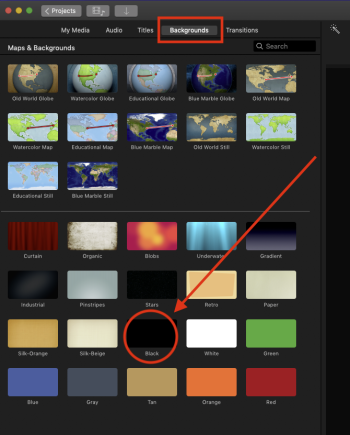
Another thing: is it possible to insert empty spaces in between photos (i.e. just a completely black background)? Would I have to place an actual black image file in there, or is it possible to do without?
I'm using iMovie 10.1.12 in MacOS Mojave 10.14.6.
Both the audio (MP3) and scanned images (JPG) import fine into iMovie, and I've even added some of the images alongside the audio and extended their lengths accordingly and added transitions between them. My problem is that only a portion of the images are shown. It seems that iMovie "detects" that one of them containing a photo should zoom in on the photo while doing a Ken Burns effect, and another scanned image containing text automatically scrolls from top to bottom. Very nice, but not what I inteded. Is there a way to display the images in full or have some more control over where they zoom into/scroll etc.?
Another thing: is it possible to insert empty spaces in between photos (i.e. just a completely black background)? Would I have to place an actual black image file in there, or is it possible to do without?
I'm using iMovie 10.1.12 in MacOS Mojave 10.14.6.
Last edited: