Become a MacRumors Supporter for $50/year with no ads, ability to filter front page stories, and private forums.

Kryzstof

macrumors newbie
Original poster
Is it possible to import iMovie vids into Premiere Pro? I'm not having any luck. Thanks in advance!
 
Some more information would be nice, for example, which versions of iMovie and Premiere do you use, what exact steps with what files do you take and what is the error message?

Have you tried opening/importing the original media or the one that has been stored (converted or captured) by iMovie?
 
Some more information would be nice, for example, which versions of iMovie and Premiere do you use, what exact steps with what files do you take and what is the error message?

Have you tried opening/importing the original media or the one that has been stored (converted or captured) by iMovie?


I am using iMovie 09 v8.0.6 and working in CS4. I have been trying to open files that have been converted in iMovie. In iMovie I have both the original clips and clips I've worked on. I was hoping to capture the clips I've already worked on and tweak them a bit. I get no error message. The problem is I get no response at all. Or that the filed cannot be loaded.
 
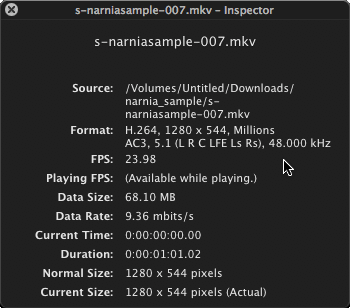
Then take a look at the original files, and the ones iMovie used (converted), via QuickTime Player and its Inspector to see what settings they use.

This window looks like this:
movie_inspector.gif


How_to_Check_Video_Information_by_Movie_Inspector_in_QuickTime_X_2.png


and can be opened via CMD+I.

What settings do you use in Premiere Pro?


PS: You can quote a post via the
quote.gif
button.


Example:

Then take a look at the original files, and the ones iMovie used (converted), via QuickTime Player and its Inspector to see what settings they use.

This window looks like this:
movie_inspector.gif


How_to_Check_Video_Information_by_Movie_Inspector_in_QuickTime_X_2.png


and can be opened via CMD+I.

What settings do you use in Premiere Pro?


PS: You can quote a post via the
quote.gif
button.
 
Register on MacRumors! This sidebar will go away, and you'll see fewer ads.