
Got a tip for us?
Let us know
Become a MacRumors Supporter for $50/year with no ads, ability to filter front page stories, and private forums.
In ios 14 is there any way to turn off mobile data when using Wifi?
- Thread starter shankar2
- Start date
- Sort by reaction score
You are using an out of date browser. It may not display this or other websites correctly.
You should upgrade or use an alternative browser.
You should upgrade or use an alternative browser.

cupcakes2000
Suspended

Mr. Awesome
macrumors 65816
You could accomplish this by setting up an Automation in Shortcuts.
- Go to the Automations tab in Shortcuts, then create a new Personal Automation for when WiFi connects to any network.
- Add a “Set Cellular Data” action that disables data
- Add an “Add Reminder” action: Add [Turn data on] to [Reminders] (or another Reminders list you would rather use) with [Alert] [When I Leave] from [Current Location]
- Save the automation, making sure to disable “Ask Before Running”.
Last edited:


mj_
macrumors 68000
What are you trying to achieve? If you want to prevent your iPhone from using mobile data while connected via Wi-Fi all you need to disable is Wi-Fi assist (which I believe is under Cellular). If you want your mobile data to disable itself when you're connected to Wi-Fi and re-enable itself when you disconnect I fail to see the point. For all other cases there's a mobile data switch in control center, which has been around for over a year now I believe.
The iPhone should not be using any mobile data when connected to Wi-Fi with Wi-Fi assist disabled.
The iPhone should not be using any mobile data when connected to Wi-Fi with Wi-Fi assist disabled.

EM2013
macrumors 68030
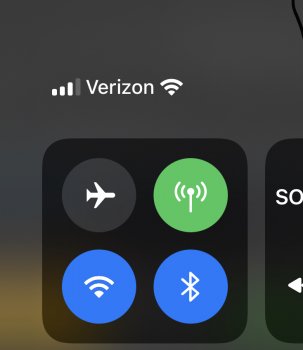
Where exactly did you try setting mobile data off? And what made you think that it wasn't actually turning off?Thanks all! Mr. Awesome I did try setting a mobile data off when connected to wifi, but for whatever reason it's not turning off mobile data even though I've set the Set mobile data to OFF. I wonder why?
Mr. Awesome
macrumors 65816
So this automation shortcut seems to want me to press RUN to run this shortcut. Is it not automated? Please advise. Thanks!
Was there an option for “Ask Before Running”?

badatusernames
macrumors 6502
Hi so for my iphone running ios 14, I searched on google and all guides are old ones, on how to turn off mobile data completely when using WIFI.
Can anyone please guide me how to turn off mobile data during wifi connection? Thanks in advance!
You can do this with a shortcut automation.

zorinlynx
macrumors G3
By the way, there is little point in doing this. If you're on WiFi your phone will not use mobile data if you have the "Wi-Fi Assist" feature off.
One way you can test this is disconnecting the Internet connection from your router but leaving your router up. You'll notice you can't do anything online anymore as long as you're connected to the isolated WiFi.
One way you can test this is disconnecting the Internet connection from your router but leaving your router up. You'll notice you can't do anything online anymore as long as you're connected to the isolated WiFi.
What are you trying to achieve? If you want to prevent your iPhone from using mobile data while connected via Wi-Fi all you need to disable is Wi-Fi assist (which I believe is under Cellular). If you want your mobile data to disable itself when you're connected to Wi-Fi and re-enable itself when you disconnect I fail to see the point. For all other cases there's a mobile data switch in control center, which has been around for over a year now I believe.
The iPhone should not be using any mobile data when connected to Wi-Fi with Wi-Fi assist disabled.
That's basically it -- the phone already takes care of this essentially automatically on its own.By the way, there is little point in doing this. If you're on WiFi your phone will not use mobile data if you have the "Wi-Fi Assist" feature off.
One way you can test this is disconnecting the Internet connection from your router but leaving your router up. You'll notice you can't do anything online anymore as long as you're connected to the isolated WiFi.

Sheldonsmith
macrumors 6502
I am located on the edge of a coverage shadow. I am finding that on the iPhone 12 Pro <Verizon> that the amount of "No Mobile Coverage" utilization in the Battery app increased to 20+%. My guess is that the phone is searching for 5G and not reconciling with the local tower. Once I turned off mobile data overnight, the "No Mobile Coverage" decreased to less than 10%.
I'll try the Disable WiFi Assist route. Thanks for suggesting it.
~ Sheldon
I'll try the Disable WiFi Assist route. Thanks for suggesting it.
~ Sheldon
If it's in relation to that, then yes, either disabling mobile data or even turning on Airplane Mode and then separately enabling WiFi (and Bluetooth if needed) should help with that.I am located on the edge of a coverage shadow. I am finding that on the iPhone 12 Pro <Verizon> that the amount of "No Mobile Coverage" utilization in the Battery app increased to 20+%. My guess is that the phone is searching for 5G and not reconciling with the local tower. Once I turned off mobile data overnight, the "No Mobile Coverage" decreased to less than 10%.
~ Sheldon