
i would like to gather results from other aluminum intel iMac owners (2006+) running windows
i dont know which fans are which, and in the application support threads and screenshots, other people have labeled fans and no error.
If you have an aluminum intel imac 2006+ running windows: http://sourceforge.net/projects/macfan/
If you have an aluminum intel imac 2006+ running OSX and you dont want to run windows in a bootcamp (no parallels): http://www.macupdate.com/app/mac/23049/smcfancontrol
NOTE: MacFan for windows is a CommandLine application, type cmd into start search, right click cmd.exe, run as administrator, cd /users/username/downloads/extractedfolderudownloaded type: "macfan(x64).exe /temperature 20" and then hit enter, then hit Prt Scr (print screen) keyboard and paste into Paint application and save. then upload to imgur.com and post link in this thread 😉
Mine:
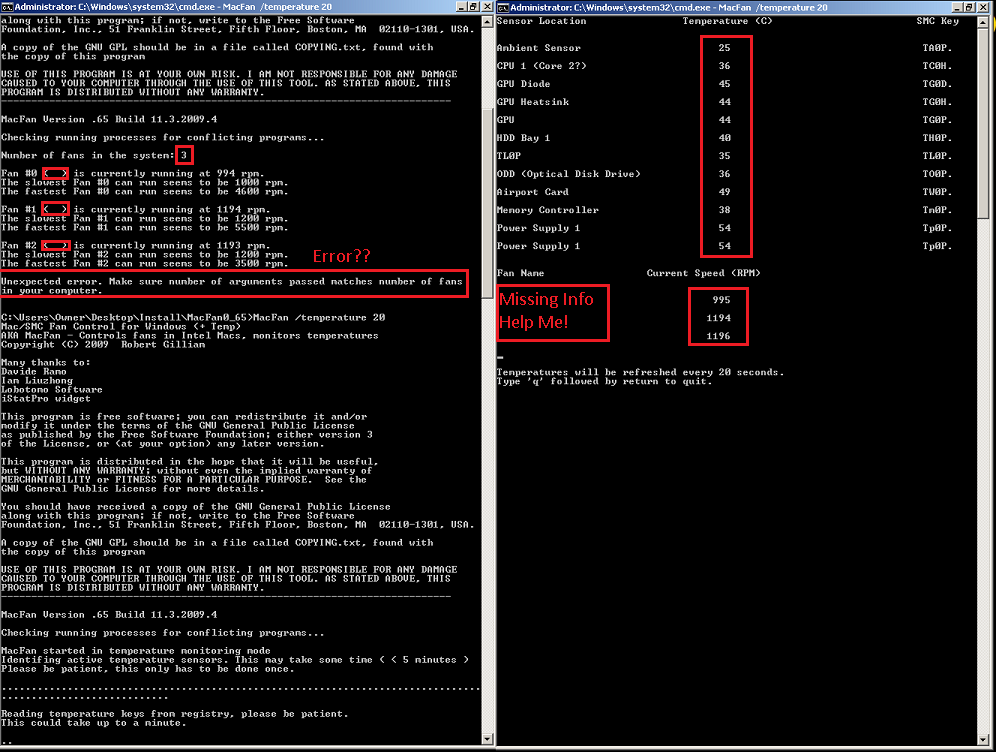
i dont know which fans are which, and in the application support threads and screenshots, other people have labeled fans and no error.
If you have an aluminum intel imac 2006+ running windows: http://sourceforge.net/projects/macfan/
If you have an aluminum intel imac 2006+ running OSX and you dont want to run windows in a bootcamp (no parallels): http://www.macupdate.com/app/mac/23049/smcfancontrol
NOTE: MacFan for windows is a CommandLine application, type cmd into start search, right click cmd.exe, run as administrator, cd /users/username/downloads/extractedfolderudownloaded type: "macfan(x64).exe /temperature 20" and then hit enter, then hit Prt Scr (print screen) keyboard and paste into Paint application and save. then upload to imgur.com and post link in this thread 😉
Mine: