
Got a tip for us?
Let us know
Become a MacRumors Supporter for $50/year with no ads, ability to filter front page stories, and private forums.
info from discontinued iphone app
- Thread starter BradleyinDC
- Start date
- Sort by reaction score
You are using an out of date browser. It may not display this or other websites correctly.
You should upgrade or use an alternative browser.
You should upgrade or use an alternative browser.

Thanks, but that won't work for me. Emphasis on the discontinued app--it won't update to a current or recent iOS. This is the root of the problem.I don't know a way to get data from the cloud - it's usually just a backup to restore the app used to create it. The only way I know would be to use the old app to open the records and use copy/paste into a Word document.

Per sig, since have a Mac, can try looking under '~/Library/Mobile Documents' to see if a folder there that corresponds to the app.
Might be able to see the folder in the Files app on the phone: some apps will create their sandbox for data and make it visible. For example, a snippet from my phone:

Mac programs like iMazing can make navigable backups of iDevices where one can maybe export whatever sandboxes the apps make.
But in all these (most) cases, files/data might be in a proprietary format, so will need to decode that.
Might be able to see the folder in the Files app on the phone: some apps will create their sandbox for data and make it visible. For example, a snippet from my phone:
Mac programs like iMazing can make navigable backups of iDevices where one can maybe export whatever sandboxes the apps make.
But in all these (most) cases, files/data might be in a proprietary format, so will need to decode that.

I downloaded iMazing, but the free version didn't do what I needed (that's as far as I got).Per sig, since have a Mac, can try looking under '~/Library/Mobile Documents' to see if a folder there that corresponds to the app.
Might be able to see the folder in the Files app on the phone: some apps will create their sandbox for data and make it visible. For example, a snippet from my phone:
View attachment 2644868
Mac programs like iMazing can make navigable backups of iDevices where one can maybe export whatever sandboxes the apps make.
But in all these (most) cases, files/data might be in a proprietary format, so will need to decode that.
can try looking under '~/Library/Mobile Documents'
Forgot to mention: this needs to be done via a Terminal window as Finder will "hide" the hidden folders.
Thanks, I wasn't finding it under Finder!Forgot to mention: this needs to be done via a Terminal window as Finder will "hide" the hidden folders.
More explicit Terminal instructions?
Thanks I got a list of lots of stuff but not everything (I know some current app info is missing) and not what I'm looking for--but this is the closest I've got!Code:cd ~/Library/Mobile\ Documents ls
Should list all the subfolders that are iCloud-ed. Rinse repeat for other folders. Put names in double quotes to escape special characters, space, etc. Otherwise will get error messages.
Might help to provide the app name as maybe someone else has gone through this, but otherwise, that's the basics/options of trying to locate where the data is.
And as mentioned earlier, when found, bigger issue is trying to get data in some usable form. For example, app might be using an SQLite database to store info, so will need SQL skills to extract the records.
Might be out of luck at this point unfortunately.
And as mentioned earlier, when found, bigger issue is trying to get data in some usable form. For example, app might be using an SQLite database to store info, so will need SQL skills to extract the records.
Might be out of luck at this point unfortunately.
Thanks for your help with this. It was an app to record auto maintenance. I'm trying to find the app name (i had a couple of car ones). I use DBeaver to open SQL databases.Might help to provide the app name as maybe someone else has gone through this, but otherwise, that's the basics/options of trying to locate where the data is.
And as mentioned earlier, when found, bigger issue is trying to get data in some usable form. For example, app might be using an SQLite database to store info, so will need SQL skills to extract the records.
Might be out of luck at this point unfortunately.
I think if I had a much older iOS on a phone, I could download the app and my data.

goldmac2006
macrumors 604
To locate the backup folder, open Finder, select Go on the menu bar, and choose Go to Folder.Forgot to mention: this needs to be done via a Terminal window as Finder will "hide" the hidden folders.
📁 The file path is ~/Library/Application Support/MobileSync/Backup/, where the tilde points to your local user directory.
If you access it from your user folder, open your home directory and use the keyboard shortcut Shift-Cmd-Period to reveal hidden folders such as Library.
Drag the backup folder containing your iPhone backup into iMazing via the plus sign ➕; it should then be available for viewing and downloading app files from your iPhone backup.
WOWTo locate the backup folder, open Finder, select Go on the menu bar, and choose Go to Folder.
📁 The file path is ~/Library/Application Support/MobileSync/Backup/, where the tilde points to your local user directory.
If you access it from your user folder, open your home directory and use the keyboard shortcut Shift-Cmd-Period to reveal hidden folders such as Library.
Drag the backup folder containing your iPhone backup into iMazing via the plus sign ➕; it should then be available for viewing and downloading app files from your iPhone backup.
goldmac2006
macrumors 604
Yep, this is the approach, sir. I use iMazing to view the sole backup of my old iPhone 7 as a temporary photo viewer, since the device stalled and disconnected during a security update and became bricked. The backup file, completed before the failed update, grew unusually large due to the macOS 27 Golden Gate beta I used on my MBP for a local copy, because I am not fond of iCloud+ or paying for extra storage that would not fit everywhere.
However, iMazing is only temporary; the permanent destination for the files will be an iPad I might obtain in the future.
Library/Application Support/MobileSync/Backu
Oh no!Yep, this is the approach, sir. I use iMazing to view the sole backup of my old iPhone 7 as a temporary photo viewer, since the device stalled and disconnected during a security update and became bricked. The backup file, completed before the failed update, grew unusually large due to the macOS 27 Golden Gate beta I used on my MBP for a local copy, because I am not fond of iCloud+ or paying for extra storage that would not fit everywhere.
However, iMazing is only temporary; the permanent destination for the files will be an iPad I might obtain in the future.
goldmac2006
macrumors 604
OOF! This commonly occurs when users haven’t saved their backup files in the specified root user directory at ~/Library/Application Support/MobileSync/Backup/ .
I encountered difficulties finding my iPhone 7 backups when the Lead Genius downgraded my MacBook Pro to Tahoe due to corruption on macOS Golden Gate 27 beta. We hoped the backup file would be restored or reduced in size, but after the procedure, the backup file couldn't even go through on Tahoe, so the file size caused a permanent change in the backup.
He taught me how to locate it using the Finder without the Go to Folder directory:
Navigate to Macintosh HD or a Time Machine backup containing your local iPhone backup. Then, select the home folder, which displays your Mac’s name (e.g., the name you set for the home folder).
Once in the Home Folder, the Library folder is hidden. He mentioned that you can access it using a keyboard shortcut: ⇪, ⌘, and the period (.). The lightly shaded folder should contain the Library, as shown below:
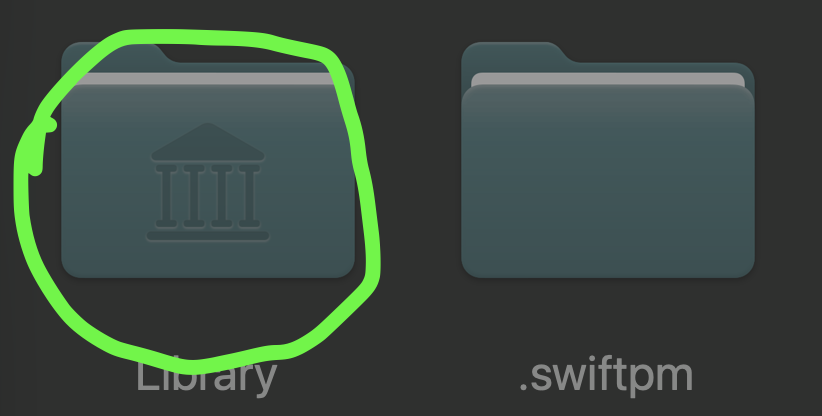
Click on that folder, then select Application Support. Click on it again, then Mobile Sync.
You’ll find the backup folder, which will have a string of numbers and letters. This is the folder you’ll import into iMazing.
I encountered difficulties finding my iPhone 7 backups when the Lead Genius downgraded my MacBook Pro to Tahoe due to corruption on macOS Golden Gate 27 beta. We hoped the backup file would be restored or reduced in size, but after the procedure, the backup file couldn't even go through on Tahoe, so the file size caused a permanent change in the backup.
He taught me how to locate it using the Finder without the Go to Folder directory:
Navigate to Macintosh HD or a Time Machine backup containing your local iPhone backup. Then, select the home folder, which displays your Mac’s name (e.g., the name you set for the home folder).
Once in the Home Folder, the Library folder is hidden. He mentioned that you can access it using a keyboard shortcut: ⇪, ⌘, and the period (.). The lightly shaded folder should contain the Library, as shown below:
Click on that folder, then select Application Support. Click on it again, then Mobile Sync.
You’ll find the backup folder, which will have a string of numbers and letters. This is the folder you’ll import into iMazing.
From the Terminal commands (but this is just my current iPhone I think, not the previous saves)
Code:
jbjMonterey@Bradleys-MBP-2013 ~ % cd ~/Library/Mobile\ Documents


ls


242G43S5X3~com~interare~ios~Wisdom2


3L68KQB4HG~com~readdle~Scanner


3Q8QT2DP7K~com~WattchIT


48ZNHF574T~com~hgtviphone


4R6749AYRE~com~pixelmatorteam~pixelmator


57T9237FN3~net~whatsapp~WhatsApp


6372P8EH2J~com~boinx~iStopMotion~iOS


6372P8EH2J~com~boinx~iStopMotion~iOS~iStopMotionExports


7M87D9Y4E4~com~xper2solutions~AutoCare


A7U8LMF757~de~zuhanden~filemanagerpro


BBV3YFBS9Q~com~craigotis~iprocrastinate~mac


com~apple~Automator


com~apple~CloudDocs


com~apple~creator-studio~app-data


com~apple~Grab


com~apple~iBooks~cloudData


com~apple~iBooks~secureData


com~apple~Keynote


com~apple~mail


com~apple~mail~preferences


com~apple~mobilemail


com~apple~notes


com~apple~Numbers


com~apple~Pages


com~apple~Preview


com~apple~productkit~b389personalization


com~apple~productkit~personalization


com~apple~QuickTimePlayerX


com~apple~SafariShared~History


com~apple~ScriptEditor2


com~apple~shoebox


com~apple~TextEdit


com~apple~TextInput


DA33APV56V~com~aetn~history~ios~watch


E42JNQGQC5~com~futuremind~wpad


F3LWYJ7GM7~com~apple~garageband10


F3LWYJ7GM7~com~apple~mobilegarageband


F3LWYJ7GM7~com~apple~musicmemos~ideas


F6266T9T75~com~apple~iMovie


FETDC8KG9W~com~handmark~tweetcaster


iCloud~airnect


iCloud~ch~protonmail~protonmail


iCloud~com~abbyy~finescanner


iCloud~com~adobe~Adobe-Reader


iCloud~com~ancestry~Tree-To-Go


iCloud~com~apple~DocumentsApp


iCloud~com~apple~iBooks


iCloud~com~apple~iBooks~iTunesU


iCloud~com~apple~itunesu


iCloud~com~apple~mobilesafari


iCloud~com~apple~MobileSMS


iCloud~com~apple~ncplugin~weather


iCloud~com~apple~passd


iCloud~com~apple~shortcuts~runtime


iCloud~com~barebones~bbedit


iCloud~com~bittorent~BitTorrent-Sync


iCloud~com~centriq~centriq


iCloud~com~citrixonline~iOS~GoToWebinar


iCloud~com~evernote~iPhone~Evernote


iCloud~com~flipboard~flipboard-ipad


iCloud~com~getdropbox~Dropbox


iCloud~com~google~container


iCloud~com~grindrguy~grindrx~chatbackup


iCloud~com~leapfitness~fasting


iCloud~com~leisterpro~reuniontouch-changes


iCloud~com~leomehlig~today


iCloud~com~leomehlig~today~analytics


iCloud~com~linecorp~line


iCloud~com~logmein~gotowebinar


iCloud~com~mewe


iCloud~com~mobisystems~OfficeSuite


iCloud~com~nuance~Dragon-Anywhere~cloud


iCloud~com~readdle~Scanner~PDF


iCloud~com~signnow~signnow


iCloud~com~sonetel~sonetel-2


iCloud~com~swishly~webtv


iCloud~com~syniumsoftware~familytree10


iCloud~com~syniumsoftware~familytree11


iCloud~com~syniumsoftware~familytree9


iCloud~com~syniumsoftware~macfamilytree8


iCloud~com~transferwise~Transferwise


iCloud~com~waze~iphone


iCloud~de~2kit~cast-browser


iCloud~is~workflow~my~workflows


iCloud~net~doo~kolibri-free


iCloud~net~doo~scanbot


iCloud~org~whispersystems~signal


iCloud~ph~telegra~Telegraph


iCloud~QW9YDLAY9G~com~hotels~HotelsNearMe


iCloud~Seek


iCloud~us~zoom~videomeetings


JJ4W5YPCRT~com~kiwiobjects~MV02


KQE2ZLGQ86~com~ivysoft~powerrecordlite


LWL9XTYF8Q~com~syniumsoftware~macfamilytree7


M28Q9HQMUK~com~mobisystems~OfficeSuite


MVUUK83754~com~itvshowsapp~itvshows3


Q47QW2YTWF~cn~easycost


U3FNBSFU75~com~saygoodnight~LOCPix


U72ZNZG42Y~com~apptime~fhmedia


V8ESB5NKXH~com~dopplerthepom~keypadplus


VFBSD3EVJ3~com~nbcuni~nbc~portal


VFBSD3EVJ3~com~nbcuni~syfy~syfychannel


WF4P7DN39E~com~appadvice~appsgonefree


jbjMonterey@Bradleys-MBP-2013 Mobile Documents
Last edited by a moderator:
goldmac2006
macrumors 604
Excuse me sir is this from your iCloud backup tho ?From the Terminal commands (but this is just my current iPhone I think, not the previous saves)
jbjMonterey@Bradleys-MBP-2013 ~ % cd ~/Library/Mobile\ Documents
ls
242G43S5X3~com~interare~ios~Wisdom2
3L68KQB4HG~com~readdle~Scanner
3Q8QT2DP7K~com~WattchIT
48ZNHF574T~com~hgtviphone
4R6749AYRE~com~pixelmatorteam~pixelmator
57T9237FN3~net~whatsapp~WhatsApp
6372P8EH2J~com~boinx~iStopMotion~iOS
6372P8EH2J~com~boinx~iStopMotion~iOS~iStopMotionExports
7M87D9Y4E4~com~xper2solutions~AutoCare
A7U8LMF757~de~zuhanden~filemanagerpro
BBV3YFBS9Q~com~craigotis~iprocrastinate~mac
com~apple~Automator
com~apple~CloudDocs
com~apple~creator-studio~app-data
com~apple~Grab
com~apple~iBooks~cloudData
com~apple~iBooks~secureData
com~apple~Keynote
com~apple~mail
com~apple~mail~preferences
com~apple~mobilemail
com~apple~notes
com~apple~Numbers
com~apple~Pages
com~apple~Preview
com~apple~productkit~b389personalization
com~apple~productkit~personalization
com~apple~QuickTimePlayerX
com~apple~SafariShared~History
com~apple~ScriptEditor2
com~apple~shoebox
com~apple~TextEdit
com~apple~TextInput
DA33APV56V~com~aetn~history~ios~watch
E42JNQGQC5~com~futuremind~wpad
F3LWYJ7GM7~com~apple~garageband10
F3LWYJ7GM7~com~apple~mobilegarageband
F3LWYJ7GM7~com~apple~musicmemos~ideas
F6266T9T75~com~apple~iMovie
FETDC8KG9W~com~handmark~tweetcaster
iCloud~airnect
iCloud~ch~protonmail~protonmail
iCloud~com~abbyy~finescanner
iCloud~com~adobe~Adobe-Reader
iCloud~com~ancestry~Tree-To-Go
iCloud~com~apple~DocumentsApp
iCloud~com~apple~iBooks
iCloud~com~apple~iBooks~iTunesU
iCloud~com~apple~itunesu
iCloud~com~apple~mobilesafari
iCloud~com~apple~MobileSMS
iCloud~com~apple~ncplugin~weather
iCloud~com~apple~passd
iCloud~com~apple~shortcuts~runtime
iCloud~com~barebones~bbedit
iCloud~com~bittorent~BitTorrent-Sync
iCloud~com~centriq~centriq
iCloud~com~citrixonline~iOS~GoToWebinar
iCloud~com~evernote~iPhone~Evernote
iCloud~com~flipboard~flipboard-ipad
iCloud~com~getdropbox~Dropbox
iCloud~com~google~container
iCloud~com~grindrguy~grindrx~chatbackup
iCloud~com~leapfitness~fasting
iCloud~com~leisterpro~reuniontouch-changes
iCloud~com~leomehlig~today
iCloud~com~leomehlig~today~analytics
iCloud~com~linecorp~line
iCloud~com~logmein~gotowebinar
iCloud~com~mewe
iCloud~com~mobisystems~OfficeSuite
iCloud~com~nuance~Dragon-Anywhere~cloud
iCloud~com~readdle~Scanner~PDF
iCloud~com~signnow~signnow
iCloud~com~sonetel~sonetel-2
iCloud~com~swishly~webtv
iCloud~com~syniumsoftware~familytree10
iCloud~com~syniumsoftware~familytree11
iCloud~com~syniumsoftware~familytree9
iCloud~com~syniumsoftware~macfamilytree8
iCloud~com~transferwise~Transferwise
iCloud~com~waze~iphone
iCloud~de~2kit~cast-browser
iCloud~is~workflow~my~workflows
iCloud~net~doo~kolibri-free
iCloud~net~doo~scanbot
iCloud~org~whispersystems~signal
iCloud~ph~telegra~Telegraph
iCloud~QW9YDLAY9G~com~hotels~HotelsNearMe
iCloud~Seek
iCloud~us~zoom~videomeetings
JJ4W5YPCRT~com~kiwiobjects~MV02
KQE2ZLGQ86~com~ivysoft~powerrecordlite
LWL9XTYF8Q~com~syniumsoftware~macfamilytree7
M28Q9HQMUK~com~mobisystems~OfficeSuite
MVUUK83754~com~itvshowsapp~itvshows3
Q47QW2YTWF~cn~easycost
U3FNBSFU75~com~saygoodnight~LOCPix
U72ZNZG42Y~com~apptime~fhmedia
V8ESB5NKXH~com~dopplerthepom~keypadplus
VFBSD3EVJ3~com~nbcuni~nbc~portal
VFBSD3EVJ3~com~nbcuni~syfy~syfychannel
WF4P7DN39E~com~appadvice~appsgonefree
jbjMonterey@Bradleys-MBP-2013 Mobile Documents
I don't think so, but I'm trying to follow suggestions hereExcuse me sir is this from your iCloud backup tho ?
goldmac2006
macrumors 604
got it, and U are checking it thru iMazing correct ?I don't think so, but I'm trying to follow suggestions here