Hello everyone!
I'm having some issues with Big Sur on my Mac Pro. Essentially, I need to install some drivers for an audio device but the installer tells me that I can't write to /System/Library/Extesnsions. I need to place a file "MOTUAudio.kext" in there.
I have disabled FileVault, Disabled SIP and Disabled Authenticated-root. I can confirm these are off by using the status command.
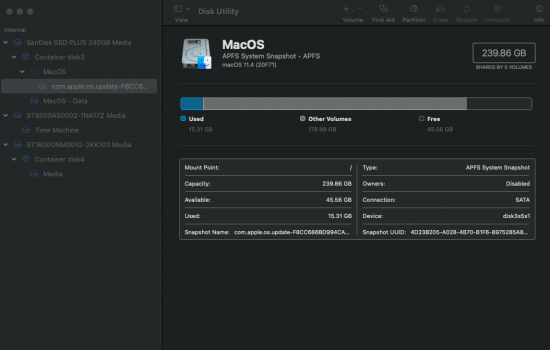
However, all the guide I have seen regarding mounting the system drive say something along the lines of "Find your root mount's device - run mount and chop off the last s, e.g. if your root is /dev/disk1s2s3, you'll mount /dev/disk1s2"
However, when I run the command "mount /dev/disk3s5" i recieve the following error "mount: /dev/disk3s5: unknown special file or file system."
It seems I am unable to mount anything in terminal. What am I doing wrong?
Is there an easier way to use this .kext file? I'm from Windows, so this terminology is not second nature to me. I believe the kext file is a 'driver'. I did somethign similar to this in Calatina and it worked a treat, but I'm really struggling with this one becuase the system volume is write only.
I've included some screenshots incase I'm doing something really stupid.
I'm having some issues with Big Sur on my Mac Pro. Essentially, I need to install some drivers for an audio device but the installer tells me that I can't write to /System/Library/Extesnsions. I need to place a file "MOTUAudio.kext" in there.
I have disabled FileVault, Disabled SIP and Disabled Authenticated-root. I can confirm these are off by using the status command.
However, all the guide I have seen regarding mounting the system drive say something along the lines of "Find your root mount's device - run mount and chop off the last s, e.g. if your root is /dev/disk1s2s3, you'll mount /dev/disk1s2"
However, when I run the command "mount /dev/disk3s5" i recieve the following error "mount: /dev/disk3s5: unknown special file or file system."
It seems I am unable to mount anything in terminal. What am I doing wrong?
Is there an easier way to use this .kext file? I'm from Windows, so this terminology is not second nature to me. I believe the kext file is a 'driver'. I did somethign similar to this in Calatina and it worked a treat, but I'm really struggling with this one becuase the system volume is write only.
I've included some screenshots incase I'm doing something really stupid.