I guess today we´ll see beta 9So I am showing 13.1, but do not want to update. I have never seen two listed updates, so I am assuming there will not be another 13.0 update? Strange sequence for sure.

Got a tip for us?
Let us know
Become a MacRumors Supporter for $50/year with no ads, ability to filter front page stories, and private forums.
All Devices iOS 13.1 Beta 1 ― Bug Fixes, Changes, and Improvements
- Thread starter Banglazed
- WikiPost WikiPost
- Start date
- Sort by reaction score
You are using an out of date browser. It may not display this or other websites correctly.
You should upgrade or use an alternative browser.
You should upgrade or use an alternative browser.
- Status
- The first post of this thread is a WikiPost and can be edited by anyone with the appropiate permissions. Your edits will be public.
matthewadams
macrumors 6502
Wouldn't hold my breath, otherwise 13.1 wouldve gotten its own Dev ProfileI guess today we´ll see beta 9

You might consider upgrading the watch to WatchOS 6 if you are running the 13.x betas. Many have found that this fixes this issue.Apple Watch S4 battery on WatchOS 5.3.1 seems to be draining really fast again, now with iOS 13.1 beta.

vbctv
macrumors 65816
Very unlikely, they took away the dev profiles for the 13.0 betas and only show profiles for 13.1 beta now. So it's likely that either...I guess today we´ll see beta 9
1.) They will continue iOS 13 beta only in the public beta
2.) Beta 8 was a GM Candidate without them labeling as
3.) They are scrapping 13 an planning on releasing 13.1 as a new phone day fix.
It could literally be anything, we don't know what apple has planned, but seeing how a .1 beta has never been before a GM is released, there will 90% be no more 13.0 betas.

digitalexplr
macrumors 65816
No issues with wifi here, phone or ipad.How is the WIFI stability on 13.1? I'm having issues with it on 13, needing to switch airplane mode on/off.

gwhizkids
macrumors G5
Try resetting your Network Settings to see if this helps.How is the WIFI stability on 13.1? I'm having issues with it on 13, needing to switch airplane mode on/off.

teeshot44
macrumors 65816
Try resetting your Network Settings to see if this helps.
Done many times but still happening. Complete fresh restore and installation of current beta only momentarily helps. (XS on Verizon)
digitalexplr
macrumors 65816
The only iPad related issue I have found it that when choosing Portrait on my iPP 11 the camera switch to the selfie camera and will let you switch to the main camera. Great if all you want to do is take portrait selfies!
Feedback sent.
Feedback sent.
It repeatedly crashes on XS Max and I've rebooted, hard rebooted.... try going into a message.
Yep...me too. Crashes every time I go into a message with iOS 13.1. <sigh>


gank41
macrumors 603
I will say explain this again: this is not a big, but is like this if you have automatic updates enabled. If you disabled automatic updates, you will get the badge. This is not a big but a feature. Stop complaining.
I think this “feature” would be great if updates installed automatically like they’re supposed to. I’m not sure I can remember seeing any of my apps update automatically going back to early days of iOS 12. So, complaining is valid. If apps don’t update automatically like they’re supposed to, a badge number should be listed with the available number of updates. It’s pretty simple.
[doublepost=1567002312][/doublepost]
I have zero issues with this beta! What ever people are reporting I’m unable to replicate those issues! So I don’t know! I know I did a clean install of iOS 13 so maybe that’s why? Who knows, but everyone comparing have to tried wiping the phone and restore your data from the cloud first? I think it’s mostly people phones! If u were to do clean install I bet 90 percent of the issue you having will go away, I know it did for me once I wiped it clean and started fresh
Unfortunately the masses of people that upgrade from iOS 12.4.1 to iOS 13 will not be wanting to wipe there phone and restore from a backup or start fresh. FWIW I’m still having a lot of the same issues with 13.1 that I did in the last 13 beta, and I’ve tried restoring from backup. I’ve filed my radars.

Computers 4 U LLC
Suspended
I'm going back to beta 8. 13.1 isn't playing well with WatchOS 6 beta 9. Major battery drain.
Works just fine for me, I will even go as far as saying that battery life appears to be better. I updated yesterday around 3pm, my watch was at 100%, it is now 9:30am the next day and my watch is sitting at 87%.
gwhizkids
macrumors G5
Similar battery "non-issue" for me. I've been off the charger for about 3 hours now and at 97%. I'll take 1% per hour any day of the week!Works just fine for me, I will even go as far as saying that battery life appears to be better. I updated yesterday around 3pm, my watch was at 100%, it is now 9:30am the next day and my watch is sitting at 87%.

macintoshmac
Suspended
it's crazy how much I've already come to rely on the recent/frequent contacts on the share sheet. missing it a lot.
what's interesting is if you press on any of the blurred boxes, it seems to add a new one lol.
https://streamable.com/gl3v3
ALSO, twitter is back on the share sheet?
I have come to appreciate the contacts in the share sheet as well.


AZhappyjack
Suspended
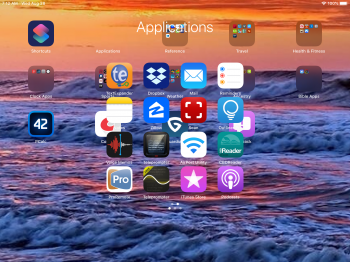
More anomalies with folders… on my iPad, when I open a folder, there is no background at all… just “floating” icons for the apps that are in that folder… not that way on my iPhone..

amill9601
macrumors member
Now Playing panel is now taller in landscape orientation.
It’s not just that. It isn’t a floating window anymore.


Computers 4 U LLC
Suspended
More anomalies with folders… on my iPad, when I open a folder, there is no background at all… just “floating” icons for the apps that are in that folder… not that way on my iPhone..
View attachment 855076
This is not the case on my iPad. Folders/Icons appear as normal.

PhatManDiamond
macrumors member
Im updated to 13.1 OS and all is behaving well except iCloud backup. When I go to Back Up Now on my XS it seems to hang at updating Cloud. Is the iCloud sever that slow. Ive tried signing out of iCloud and back in same story. Anyone else have this. I would like to know I have a full backup.
Attachments


furbzv1
macrumors 68000
Still cant get whatsapp backup to work! Since Im on beta, It just doesnt want to back up my convos. Did anyone found a solution? Please, im going crazy
im not having issues backing up my chats. just did a backup right now.
Computers 4 U LLC
Suspended
I feel that 13.1 is much more responsive as we
I agree, 13.1 does feel much more responsive, beta 8 was pretty responsive as well though. Overall it feels like a great beta.
Is it only me? 13.1b1 seems more responsive than 13.0b8 on both my iPhone X and iPad Pro 10.5
Is it only me? 13.1b1 seems more responsive than 13.0b8 on both my iPhone X and iPad Pro 10.5
I agree, 13.1 does feel much more responsive, beta 8 was pretty responsive as well though. Overall it feels like a great beta.

john991
macrumors 601
im not having issues backing up my chats. just did a backup right now.
FWIW I’ve never been able to get automatic WhatsApp backups to work automatically. This is with 12.x and now 13.x.
driving me nuts too. (Gave up for awhile and doing manual backups that seem to work).
AZhappyjack
Suspended
This is not the case on my iPad. Folders/Icons appear as normal.
lucky you... 😀