Become a MacRumors Supporter for $50/year with no ads, ability to filter front page stories, and private forums.
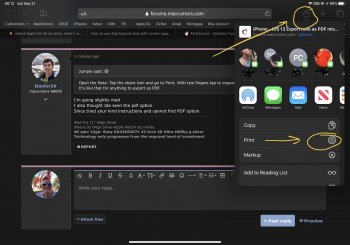
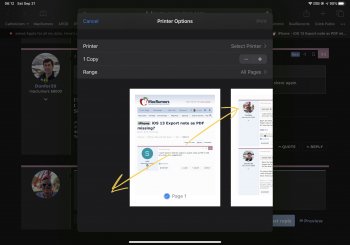
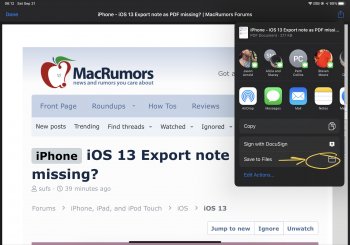
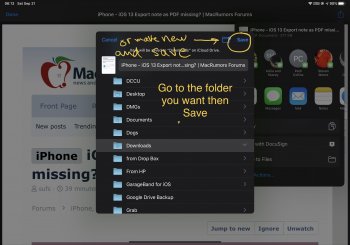
Open the Note. Tap the share icon and go to Print. With two fingers tap to expand the Note and then share again.
It’s like that for anything to export as PDF.

I'm going slightly mad
I also thought Ide seen the pdf option
Since tried your kind instructions and cannot find PDF option
 
I'm going slightly mad
I also thought Ide seen the pdf option
Since tried your kind instructions and cannot find PDF option
[automerge]1569061184[/automerge]
@Jumpie

amazing the user doesn't have to search for a pdf export tab
Your instructions work
Thanks!

You're welcome. I just took screenshots and marked it up.
[automerge]1569061252[/automerge]
I can't seem to find the option to export notes as PDF in iOS any more. Any suggestions?
I posted screenshots below
 

Attachments

  • 9318355F-C4AF-4E48-A4A4-FE0B1FAE9E2D.jpeg
    9318355F-C4AF-4E48-A4A4-FE0B1FAE9E2D.jpeg
    410.9 KB · Views: 386
  • A49E83C8-7709-4780-9BCF-448218722CAD.jpeg
    A49E83C8-7709-4780-9BCF-448218722CAD.jpeg
    293.6 KB · Views: 383
  • B5D8F972-84A5-4587-BB1E-A796164F4ACD.jpeg
    B5D8F972-84A5-4587-BB1E-A796164F4ACD.jpeg
    371.4 KB · Views: 394
  • 797DFD8E-2576-4035-A1E9-2EA9A6C446A5.jpeg
    797DFD8E-2576-4035-A1E9-2EA9A6C446A5.jpeg
    375.5 KB · Views: 402
  • 04B21A04-1A5B-447C-A042-680B181A149A.jpeg
    04B21A04-1A5B-447C-A042-680B181A149A.jpeg
    311.7 KB · Views: 403
Lovely mark up
Since noticed it's the expansion part of jumpies instructions that creates the pdf file from chosen iCloud note.
 
Register on MacRumors! This sidebar will go away, and you'll see fewer ads.