Become a MacRumors Supporter for $50/year with no ads, ability to filter front page stories, and private forums.
Status
The first post of this thread is a WikiPost and can be edited by anyone with the appropiate permissions. Your edits will be public.
For anyone who is searching as of today June 6, 2021. The RingCentral App does NOT work. And error comes up saying "App update required. RingCentral needs to be updated to the latest version from the App Store in order for new features to work properly". Pressing OK brings you to the App Store and the only option is OPEN and there starts the loop where it opens RingCentral and then sends you back to the App Store.

You can receive calls and join a RingCentral meeting. But anything that require initiating anything from the App does not work.
 

Attachments

  • IMG_3212.jpg
    IMG_3212.jpg
    97.6 KB · Views: 188
Is anyone elses App Library acting kind of wonky on iPadOS? Like I’ll remove some apps from the Home Screen but they will automatically reappear
Yes, happening often for me too. Long hold for the x to pop up, remove, and then quickly lock your iPad. Worked for me.
 
  • Like
Reactions: mvdw84
I have not had a chance to install the beta on either my iPhone or iPad today.

I’m most likely to install on my iPad tomorrow And I’m interested in the following:

-multitasking
-files app changes
-Shortcuts changes
-widgets

For those of you interested in doing a deep dive, recommend watching the platform state of the union Keynote, where they do a very deep dive on more features. Not sure if this is available to non-developers…?
 
I checked St. Louis, the maps do not show those details.

Well…Maps tends to rollout new features over the beta period when announced at WWDC. Only San Francisco has the detailed city info right now even though NYC, London, etc are mentioned.
 
Does anyone know the actual distinctions among those three mic modes? Any write up anywhere?

I was just hoping for something that could reduce background noise for me when I’m speaking
 
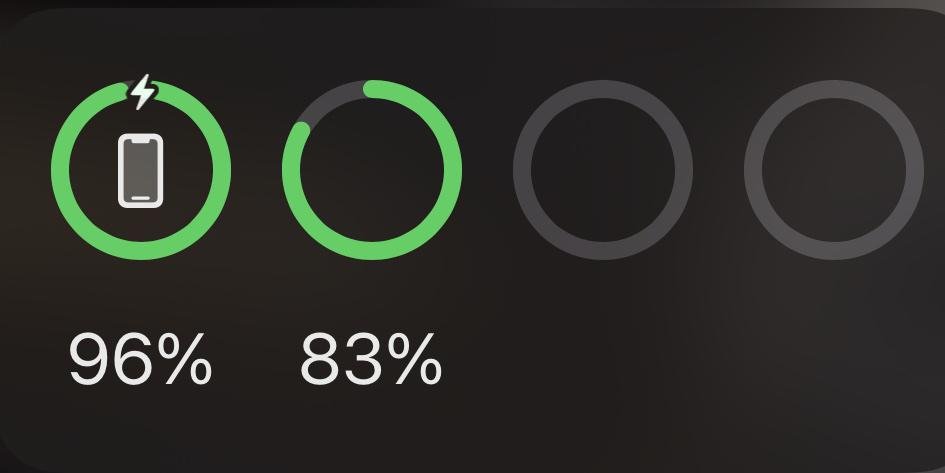
Anyone notice battery widget is broken? Doesn’t show Apple Watch and the smart battery case for XS is missing an icon. Also smart battery case on my XS no longer works in iOS 15.
 
Menu, also it says Dolby if it’s that and lossless if the song has that version.
 

Attachments

  • CE911D95-7FC0-40D1-974E-5271C4BF6CA4.png
    CE911D95-7FC0-40D1-974E-5271C4BF6CA4.png
    298.6 KB · Views: 168
  • D8948C02-7020-4000-A7F2-8A22F824A57A.png
    D8948C02-7020-4000-A7F2-8A22F824A57A.png
    327.8 KB · Views: 169
  • 32903632-7C13-465A-B61E-70B1FB895454.png
    32903632-7C13-465A-B61E-70B1FB895454.png
    1.7 MB · Views: 170
  • EF90343A-8813-495D-BA97-5B1A77AA53B7.png
    EF90343A-8813-495D-BA97-5B1A77AA53B7.png
    1.2 MB · Views: 173
CarPlay still takes over the whole page when someone calls, they could of at least changed it like iOS to make a banner, there’s zero CarPlay improvements, it’s annoying when someone calls maps goes
This. After fixing it on the phone in iOS 14, I was hopeful they’d fix it here.
I use directions all the time, taking calls becomes a hinderance.
 
  • Like
Reactions: Freakonomics101
While a UI/ Lock Screen tweak would’ve been welcome, I’m liking the functional additions to iOS 15. Running smoothly on 12mini and I’m considering installing it on my 12PM.
Safari is great. Loving the new gestures to swipe between tabs and swipe up to tab view.
New iCloud and Mail along with so many other Small improvements across the board are great!
 
Anyone notice battery widget is broken? Doesn’t show Apple Watch and the smart battery case for XS is missing an icon. Also smart battery case on my XS no longer works in iOS 15.

Removed the battery a few times and not It’s working as it should, but all no icon, Ave no Apple Watch battery percent listed

f87de1cdfe92f794617e47911b81b894.jpg
 
Menu, also it says Dolby if it’s that and lossless if the song has that version.
HomePod's on OS 14 does not reproduce Lossless or Dolby Atmos, the tags disappear when played and the son re downloads.
(HomePods not in 15 Beta because I don't have apple stores near by to rescue them if something happens lol)
 
Register on MacRumors! This sidebar will go away, and you'll see fewer ads.