Same setup as before the update. VPN is deactivated while using Bitwarden. Strange thing is, when using Cellular and connect to my home router via wireguard, Bitwarden syncs as expected.You using VPN or any other network stuff that could cause this? Is it the same on cellular as on WiFi?

Got a tip for us?
Let us know
Become a MacRumors Supporter for $50/year with no ads, ability to filter front page stories, and private forums.
iOS 26.3.1 ― Bug Fixes, Changes, and Improvements
- Thread starter Banglazed
- WikiPost WikiPost
- Start date
- Sort by reaction score
You are using an out of date browser. It may not display this or other websites correctly.
You should upgrade or use an alternative browser.
You should upgrade or use an alternative browser.
- Status
- The first post of this thread is a WikiPost and can be edited by anyone with the appropiate permissions. Your edits will be public.

BR4DOKYBrazil
macrumors 6502a
I was out of range of a WiFi for activation and, until the moment of arriving home to connect to WiFi, I was, all this time, afraid that a Factory Reset had happened too!I had this happen to me once on 26.2.1. I thought that my phone got factory reseted somehow 😳

Reverend Benny
macrumors 68000
Try and uninstall the VPN client and test again, we had an odd case with 26.3 where an uninstall and install of the nordVPN app restored WiFi connectivity again.Same setup as before the update. VPN is deactivated while using Bitwarden. Strange thing is, when using Cellular and connect to my home router via wireguard, Bitwarden syncs as expected.
Also, turn off the privacy stuff in the WiFi settings and check again. If you have rotating macadress that can cause problems. Set it to off, reconnect to the router and see if it works.
Happened to me not 10 minutes ago. Thought it was a factory reset! scary stuff.I had this happen to me once on 26.2.1. I thought that my phone got factory reseted somehow 😳


Anyone else having WiFi issues? Once or twice a day I will be connected to WiFi and randomly lose internet access and remain connected to WiFi. I’m a network engineer and I’m pretty sure I’ve isolated it down to a device level issue. Started after I updated my 16 pro max to 26.3.1. I just now factory reset network settings and I am gonna try this out

Coming from IOS 17 - a simple question - can one entirely make IOS 26 look like IOS 17? What I mean by that is turn off/ deactivate the glass look?

StumpyBloke
macrumors 603
Coming from IOS 17 - a simple question - can one entirely make IOS 26 look like IOS 17? What I mean by that is turn off/ deactivate the glass look?
No, unfortunately.

FILIPSN007
macrumors regular
Check lease time.Anyone else having WiFi issues? Once or twice a day I will be connected to WiFi and randomly lose internet access and remain connected to WiFi. I’m a network engineer and I’m pretty sure I’ve isolated it down to a device level issue. Started after I updated my 16 pro max to 26.3.1. I just now factory reset network settings and I am gonna try this out
Don’t do it unless you’re certain. I’d pay hundreds of dollars to revert to iOS 18 at this point. Be prepared to trade your beautiful Gaussian blur for milky bubbles everywhere.Coming from IOS 17 - a simple question - can one entirely make IOS 26 look like IOS 17? What I mean by that is turn off/ deactivate the glass look?

UliBaer
macrumors 65816
Coming from IOS 17 - a simple question - can one entirely make IOS 26 look like IOS 17? What I mean by that is turn off/ deactivate the glass look?
Just like Brettka7 answered you: Don't do it, if you're not absolutely sure, cause there is absolutely no way back!Don’t do it unless you’re certain. I’d pay hundreds of dollars to revert to iOS 18 at this point. Be prepared to trade your beautiful Gaussian blur for milky bubbles everywhere.
For what it's worth, I'm still rocking iOS 17.7.2, because 18 was already a **** show for me and 26 is just an afterburner to that mess...
Last edited by a moderator:
The question was ill-produced perhaps.
On my new phone the preinstalled version will be v26 [rolling my eyes]
Also, on my friends phone - iPhone 13 - v26 looks quite ok to me. She never noticed anything disturbing/ concerning having upgraded to v26. Perhaps it is the dark mode being enabled? Or I should have my eyes checked by a specialist lol
On my new phone the preinstalled version will be v26 [rolling my eyes]
Also, on my friends phone - iPhone 13 - v26 looks quite ok to me. She never noticed anything disturbing/ concerning having upgraded to v26. Perhaps it is the dark mode being enabled? Or I should have my eyes checked by a specialist lol

Dust-by-Monday
macrumors 6502a
Not everyone has a problem with Liquid Glass. For me, it's fine. I have no issues with it besides some glitches here and there. Overall, it's really nice. I don't miss iOS 18 at all, in fact it feels quite outdated.The question was ill-produced perhaps.
On my new phone the preinstalled version will be v26 [rolling my eyes]
Also, on my friends phone - iPhone 13 - v26 looks quite ok to me. She never noticed anything disturbing/ concerning having upgraded to v26. Perhaps it is the dark mode being enabled? Or I should have my eyes checked by a specialist lol
I also never noticed the liquid-part of liquid glass when updating to 26. Turned out it was thanks to a settings I had already enabled from way back when: turning ON 'reduce motion' (Settings -> Accessibility -> Motion) gets rid of the 'liquid' behavior of liquid glass (i.e. the disturbing (to me) fast color changes of whatever is below a liquid glass pane when scrolling, as well as the shiny/moving app edges).
When you can live with less animations, I hope this helps 🤞
When you can live with less animations, I hope this helps 🤞

Seems to occur randomly in my experience. Also sometimes a phone will give a notification “your phone was updated to version..”. And sometimes it doesn’t.26.3.1 update booted into a multi language “Hello” screen.
I thought the “hello”screen was only for the first version of a major update, like 26.0.
I’ve seen a couple of oddities that I’ve not seen before on my Mac too.
Any thoughts on this?
I appreciate your help. Thanks!!!
ValerieDurden
macrumors 6502a

ValerieDurden
macrumors 6502a
It comes and goes it seems, now my phone is overall smooth again, so weird.Laggy animations are back with this update on my 17 pro max. Phone feels slow because of this
I have the 26 3 1 both on the iMac and the iPhone. And I made a "shared album" in Photos on the iMac. All invited members have the album. I being the "owner" can see that album only on the iMac, on my iPhone it is not visible. I tried already to restart both but still no result. I can see that on both "machines" I am working with the same Apple account.


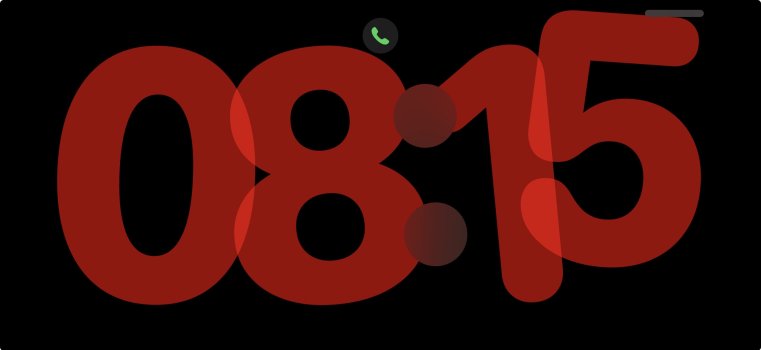
Anyone else have the issue where your phone is still in dark mode when you take it out of standby mode in the morning?
I use the “light mode from sunrise to sunset, dark mode from sunset to sunrise” schedule and every morning when I take the phone off the charger, it’s still in dark mode. Simply locking the phone for a couple seconds triggers the switch to light mode, but just wondering if anyone else sees this.
This only happens when using standby mode overnight. “Regular” overnight charging without standby mode always finds iOS in light mode when I wake up.
I use the “light mode from sunrise to sunset, dark mode from sunset to sunrise” schedule and every morning when I take the phone off the charger, it’s still in dark mode. Simply locking the phone for a couple seconds triggers the switch to light mode, but just wondering if anyone else sees this.
This only happens when using standby mode overnight. “Regular” overnight charging without standby mode always finds iOS in light mode when I wake up.