


Become a MacRumors Supporter for $50/year with no ads, ability to filter front page stories, and private forums.

MacRumors

macrumors bot
Original poster
Apr 12, 2001
70,361
41,966


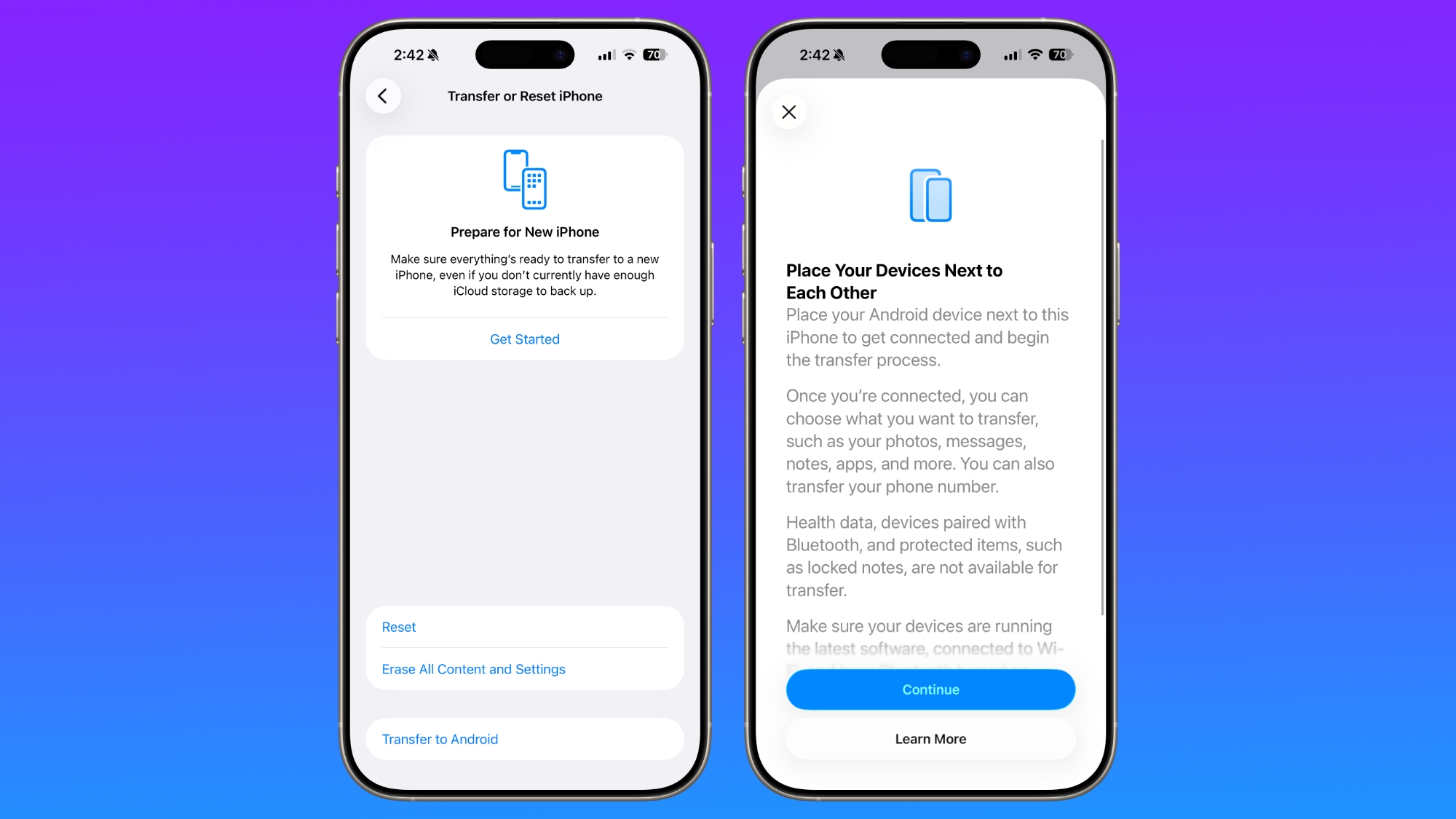
With iOS 26.3, Apple is making it simpler for iPhone users to transition to an Android smartphone, with new built-in tools for transferring data.
ios-26-3-android-transfer.jpg

The new transfer tool allows an iPhone user to place their device next to an Android device to initiate a transfer process. With the two smartphones connected, users can opt to move over photos, messages, notes, apps, passwords, phone number, and more. Data transfers occur with no need to download and use a separate app, making the process simpler.

Health data, devices paired with Bluetooth, and protected items like locked notes are not transferred over to the new device.

Transferring data from an iPhone to an Android device wirelessly requires both devices to have the latest software, and to be connected to Wi-Fi with Bluetooth enabled. There will be an option to display a QR code on the Android device that the iPhone can scan to initiate the process, or there is an option to use a session ID and pairing code instead.

Google has also implemented a similar feature for transferring data from an Android to an iPhone, so it is a two-way process between the platforms.

Last week, the European Commission said that Apple and Google designed and implemented the new transfer system to comply with the Digital Markets Act in the European Union, but it is not a Europe-only feature. The new setting is available worldwide in the iOS 26.3 beta, and it can be found under Settings > General > Transfer or Reset iPhone > Transfer to Android.

Article Link: iOS 26.3 Makes It Easier to Switch From iPhone to Android
 
Absolutely! IOS 26 is so horrible, so badly conceived by a purse designer named Alan Dye who loved to play with Liquid Ass toys all day, that Android starts to look less badly designed. Personally sticking with iOS 18 on all my devices as long as possible and Sequoia on all Macs.
 
esim hotswap - can we make esim hot swapping between iPhone and Android a regular thing? With zero carrier involvement - just like regular sim swapping allows.

Regular sim card hot swapping between multiple devices requires zero carrier involvement.

Esims are supposed to be "the future" and "better". Until esim supports hot swapping back and forth and iPhone and Android and vice versa on a daily basis, as much as we want, I don't think it's true.

Some might say this involves carriers but I kind of disagree and think Apple and Google should take a leadership role here and *bring* this ability *to* carriers. Make the front end and back end technology so easy that carriers will support it. And eventually require them to do so.


With iOS 26.3, Apple is making it simpler for iPhone users to transition to an Android smartphone, with new built-in tools for transferring data.

ios-26-3-android-transfer.jpg

The new transfer tool allows an iPhone user to place their device next to an Android device to initiate a transfer process. With the two smartphones connected, users can opt to move over photos, messages, notes, apps, passwords, phone number, and more. Data transfers occur with no need to download and use a separate app, making the process simpler.

Health data, devices paired with Bluetooth, and protected items like locked notes are not transferred over to the new device.

Transferring data from an iPhone to an Android device wirelessly requires both devices to have the latest software, and to be connected to Wi-Fi with Bluetooth enabled. There will be an option to display a QR code on the Android device that the iPhone can scan to initiate the process, or there is an option to use a session ID and pairing code instead.

Google has also implemented a similar feature for transferring data from an Android to an iPhone, so it is a two-way process between the platforms.

Last week, the European Commission said that Apple and Google designed and implemented the new transfer system to comply with the Digital Markets Act in the European Union, but it is not a Europe-only feature. The new setting is available worldwide in the iOS 26.3 beta, and it can be found under Settings > General > Transfer or Reset iPhone > Transfer to Android.

Article Link: iOS 26.3 Makes It Easier to Switch From iPhone to Android
Step 1, remove 50 IQ points.
Step 2, follow the prompts.
 
  • Haha
Reactions: awshucks
Register on MacRumors! This sidebar will go away, and you'll see fewer ads.