

Become a MacRumors Supporter for $50/year with no ads, ability to filter front page stories, and private forums.

MacRumors

macrumors bot
Original poster


The upcoming iOS 27 update that is currently in beta testing includes many new features and enhancements for Apple's Wallet app on the iPhone.
iOS-27-Adds-These-New-Features-to-Your-iPhones-Wallet-Feature.jpg

Below, we have outlined six additions to the Apple Wallet app on iOS 27.

New Features

Enhanced Passes

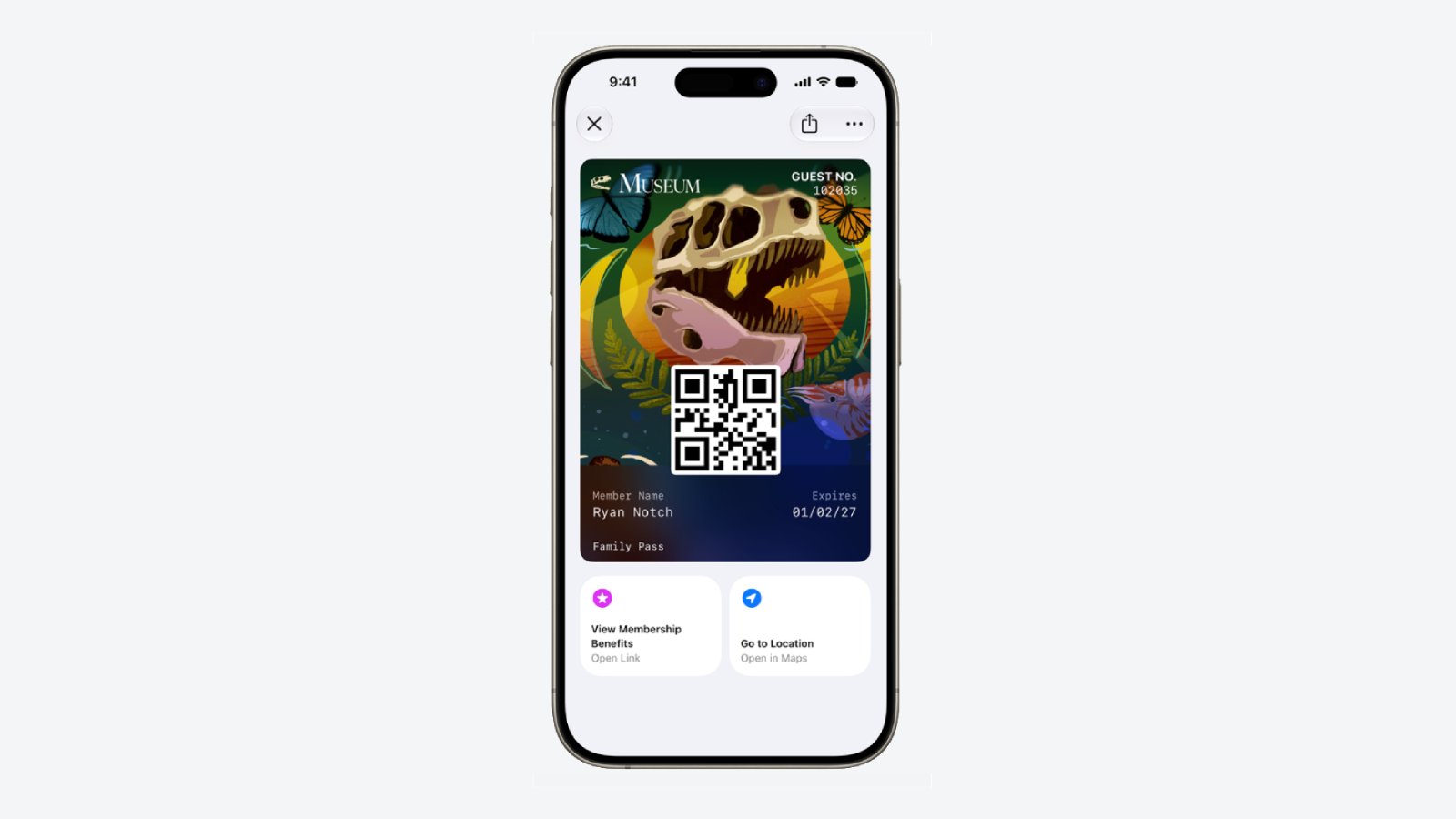
iOS 26 introduced enhanced Apple Wallet boarding passes, and iOS 27 will gradually expand this improved experience to all other types of passes in the app, including for loyalty, rewards, membership, and gift cards.
Apple-Wallet-Enhanced-Pass-iOS-27.jpg

The newer passes have an elevated design with more detailed background images, and there are tiles below them that provide relevant information.

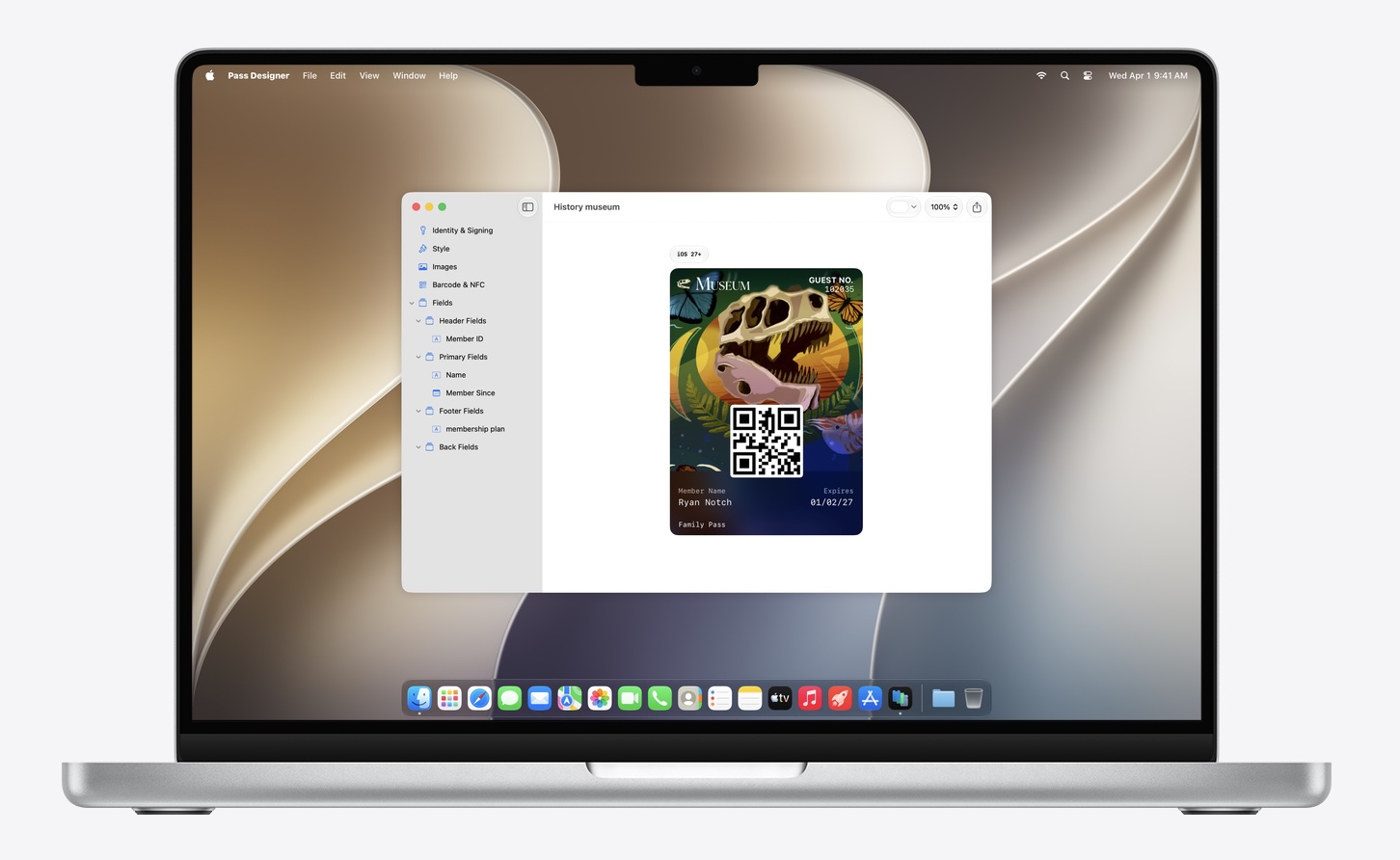
Apple has introduced a new macOS app called Pass Designer for creating and previewing passes.
Pass-Designer-App.jpg

Pass Designer is available in beta on macOS 27.

Enhanced Hotel Keys

iOS 27 supports enhanced Apple Wallet digital keys at participating hotels and resorts. You can view more details about your trips, receive updates about booked activities, access services available during your stay, and more. Apple did not share a list of hotel brands or locations that will be offering these upgraded keys.

Create Passes

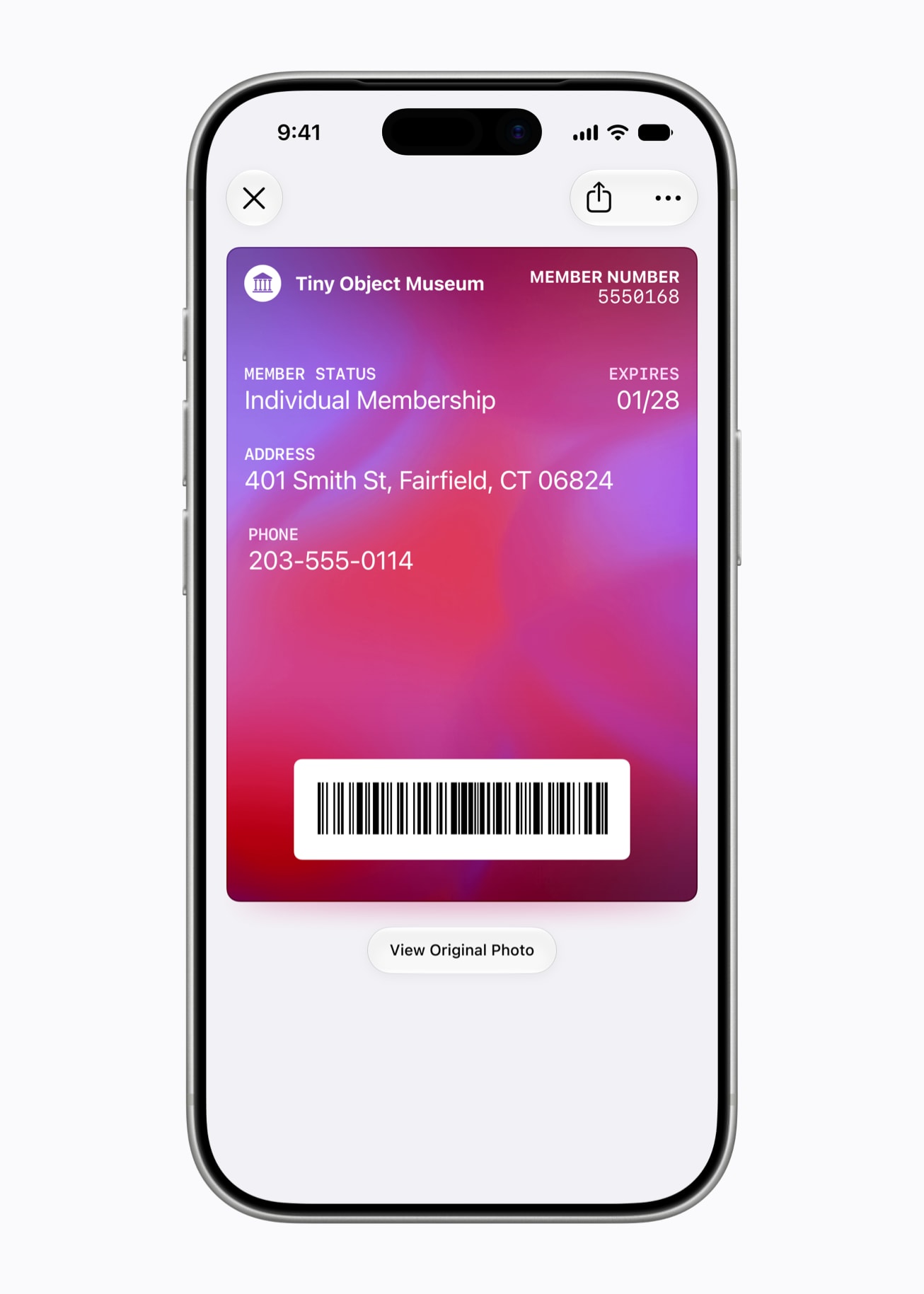
You can now create custom passes in Apple Wallet by scanning physical cards, like loyalty or membership cards.
Apple-Wallet-Create-a-Pass.jpg

With the new Siri mode in the Camera app, you can simply point your iPhone at any physical card with a barcode and save it to Apple Wallet. Once added, passes are ready to present as a barcode or QR code right from the iPhone.

New Barcode Types

Apple Wallet passes can display four new barcode types: EAN-13, Code 39, Codabar, and ITF.

Split Bills With Apple Cash

In the U.S. only, iOS 27 allows you to split bills with a new feature powered by Apple Cash and Apple Intelligence. This capability is available in the Apple Wallet and Messages apps, or by using the new Siri mode in the Camera app.
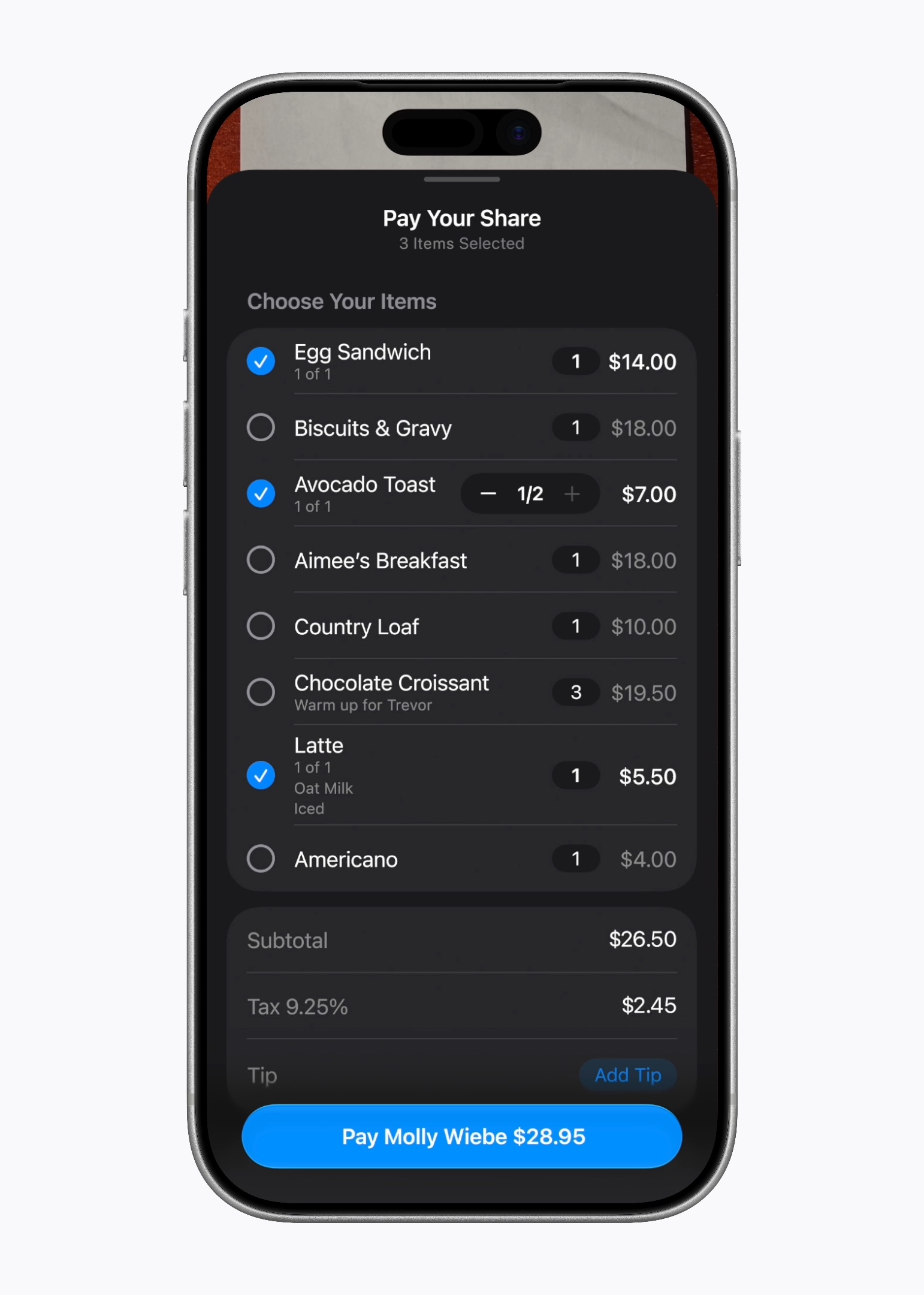
Apple-Cash-Bill-Splitting-iOS-27.jpeg

"When users point their iPhone at a receipt using Siri mode, it can surface the relevant action to split a bill with Apple Cash and identify the items on the receipt," said Apple. "As users select their items, their total payment is calculated, including their share of tax and tip, so they can pay back exactly what they owe with Apple Cash."

Wallet Order Tracking in More Countries

Starting with iOS 27, Apple Wallet's order tracking feature is available in Australia and Canada. The feature was limited to the U.S. and the U.K. previously.

Learn More

Apple shared a WWDC 2026 video outlining new features coming to the Wallet app this year, and it has a page on its developer website with more details.


Following beta testing, iOS 27 should be released in September.

Article Link: iOS 27 Adds Six New Features to Apple Wallet on Your iPhone
 
Last edited:
  • Wow
Reactions: Z-4195
Would be nice if Apple eventually added the ability for enhanced organizational capabilities within the wallet app

Right now, you can store up to 16 credit cards on Apple Pay (in the wallet app) but it would be very beneficial if you could organize those cards (as well as the other available pass types) within separate folders - each for specific purposes (or however the individual would like their wallet organized)
 
A move in the right direction, but they really need to do more to properly support membership cards, etc.
They allow this now...but I don't want to be the first one to use it anywhere. I had issues in the mid 2010's with Apple pay at a store where they claimed it wasn't supported after the transaction had completed. That was a fun conversation to have.
 
Great to see more improvement to apps that people actually use every day. Many of the core apps have really fallen behind due to neglect.
 
How about being able to SORT THE DAMN PASSES BY CATEGORY

I've got about 30 cards/passes in there when I add in all my payment cards, supermarket cards, travel passes, gig tickets and they're all just in a big pile. Why can't they be ordered by category?
 
Last edited:
IDs are also streamlined for transmitting credentials as you now have the option to automatically send your information at TSA locations by removing the need to authenticate twice.
 
looking forward to using the custom wallet pass creation. will be creating my costco card from the physical card so i can use it at the petrol pumps.

to note:

Yes i know there is already a digital card in the app, and no it doesnt work on the pumps. Im assuming they have done this deliberately to prevent usage on the pumps.

Phones being a hazard at petrol stations is a very old and much debunked myth that it causes fires. Costco may not want it to take place, but it is not illegal in the UK to use your phone whilst at a station or a pump.

And yes I know i can take a picture of the card and keep it in the photos app. Thats what I already do, but i would like to have it in the wallet app instead which this will now let me do.
 
  • Like
Reactions: AstonSmith
Split the bill is cool, but does anyone, and I mean absolutely anyone, actually use Apple Cash?

The chances of everyone in your dinner party having Apple Cash enabled, and linked to their bank account, has to be almost zero right?

Everyone uses Venmo.
 
  • Like
Reactions: jimthing and Ankaa
I can get Hotel keys on the phone? That would be amazing feature. I can't tell you how many times I've been locked out of a room because I left the key in the room. It seems like something like this would be easy to impliment. I've even though of the possibility of putting Casino rewards (Like the Ceasers Card) in wallet. That might lead to more privacy concerns but those reward cards do demagnitize easily.
 
I can get Hotel keys on the phone? That would be amazing feature. I can't tell you how many times I've been locked out of a room because I left the key in the room. It seems like something like this would be easy to impliment. I've even though of the possibility of putting Casino rewards (Like the Ceasers Card) in wallet. That might lead to more privacy concerns but those reward cards do demagnitize easily.
I am pretty sure Hilton group have digital keys now.

Anything that makes the Wallet app more useful and easier to use would help. Card/Pass grouping would be great - I would like to separate store cards, event passes and payment cards for a start. If I download the family tickets to a couple of events it gets hard to find them.

I would love as well for one of my storecards that is now in the Wallet to show the barcode and be a digital tap as for some reason the app designer for that card (Woolworths in Australia) requires the barcode for using their scan and go device but use the tappable card for the checkouts. I now have to open wallet, find the store card, tap on the card i icon and then get the card info to show the barcode to release the scan and go device - a tap would be nice.
 
looking forward to using the custom wallet pass creation. will be creating my costco card from the physical card so i can use it at the petrol pumps.

to note:

Yes i know there is already a digital card in the app, and no it doesnt work on the pumps. Im assuming they have done this deliberately to prevent usage on the pumps.

Phones being a hazard at petrol stations is a very old and much debunked myth that it causes fires. Costco may not want it to take place, but it is not illegal in the UK to use your phone whilst at a station or a pump.

And yes I know i can take a picture of the card and keep it in the photos app. Thats what I already do, but i would like to have it in the wallet app instead which this will now let me do.
I don't know what you're talking about. I use my iPhone at the Costco gas station to scan my membership and tap to pay (via ApplePay) all the time.
 
  • Like
Reactions: Ankaa
Yes i know there is already a digital card in the app, and no it doesnt work on the pumps. Im assuming they have done this deliberately to prevent usage on the pumps.

I don't know what you're talking about. I use my iPhone at the Costco gas station to scan my membership and tap to pay (via ApplePay) all the time.

I agree with RealE. I can only talk for the US, but here, you can use the the Costco App to scan the membership at the gas station without issues. It's a bit tedious having to switch between the app for membership and Wallet for payment (ApplePay), but it does work without issues. (I'm in one of the states that had the fob for a while and gosh did I love that convenience and seamlessness). If you have the Costco credit card, you don't even need Wallet and only need to scan the membership once and it's already linked to your payment.

I really would love to have the (dynamic) costco membership QR code in the wallet instead of having to use the Costco app and/or having to switch app (if one doesn't have the Costco credit card).
 
Last edited:
  • Like
Reactions: RealE
I agree with RealE. I can only talk for the US, but here, you can use the the Costco App to scann the membership at the gas station without issues. It's a bit tedious having to switch between the app for membership and Wallet for payment (ApplePay), but it does work without issues. (I'm in one of the states that had the fob for a while and gosh did I love that convenience and seamlessness). If you have the Costco credit card, you don't even know wallet and only need to scan the membership once and it's already linked to your payment.

I really would love to have the (dynamic) costco membership QR code in the wallet instead of having to use the Costco app and/or having to switch app (if one doesn't have the Costco credit card).
you can't in the UK. it doesnt work.
 

Attachments

  • SCR-20260614-olrk.png
    SCR-20260614-olrk.png
    278.7 KB · Views: 48
  • Wow
Reactions: RealE
Would be nice if Apple eventually added the ability for enhanced organizational capabilities within the wallet app

Right now, you can store up to 16 credit cards on Apple Pay (in the wallet app) but it would be very beneficial if you could organize those cards (as well as the other available pass types) within separate folders - each for specific purposes (or however the individual would like their wallet organized)
Totally with you there - what with money stuff, loyalty cards, membership cards, travel passes & tickets & who knows what else it is getting quite busy in my Wallet. Folders would be a start, the ability to sort meaningfully would be helpful as would a “favourites” section
 
  • Like
Reactions: Justin Cymbal
Totally with you there - what with money stuff, loyalty cards, membership cards, travel passes & tickets & who knows what else it is getting quite busy in my Wallet. Folders would be a start, the ability to sort meaningfully would be helpful as would a “favourites” section

It amazes me we've got this far without this being at least an option, it's so obvious. As you say card has a category and it should be easy just to organise them by category, maybe with the option to set some favourites so you can quickly jump to them.
 
Register on MacRumors! This sidebar will go away, and you'll see fewer ads.