

Become a MacRumors Supporter for $50/year with no ads, ability to filter front page stories, and private forums.

MacRumors

macrumors bot
Original poster


Apple updated the Home app with some useful new features that rely on Apple Intelligence. The updates improve the way HomeKit Secure Video cameras work on Apple's HomeKit platform.

iOS-27-10-HomeKit-Features.jpg

Apple Intelligence Summaries

The Home app generates written summaries for motion alerts and what's detected, using AI to determine what's been recorded. It can recognize people, animals, vehicles, packages, and general motion, giving a summary of what's happening even if you're not looking at the video footage.

It is intelligent enough to give detail, so you'll see alerts like "a person walked through the room," "two people were in the room," "a dog sat on the floor," or "a cat played in the room."

HomeKit Secure Video cameras have facial recognition, so they can also recognize people who are in your Photo Library, sending alerts and summaries with names.

Grouped Footage

Along with analyzing footage, the Home app can now group footage from separate cameras capturing the same event. If a person walks by one camera and continues on to another, the Home app knows those two events are related. During video playback, you can see relevant footage from multiple cameras with a summary of something that happened across the entire home.

Highlights

If there are noteworthy recordings available, they are shown in a separate section above the general recordings in the camera view.

Search

The Home app supports natural language search for camera footage, so if you're looking for something like when a package was delivered, you can search for it. It can recognize objects, colors, and more. Search works in the Home app and directly in Spotlight.

Notification Summaries

Notifications update in real-time and related alerts are combined instead of being shown as separate notifications. The net result is fewer Home app notifications. Summaries can be turned on in the Home app settings on a per-camera basis, plus there are options for multiple languages.

Video Previews

Long pressing on an incoming video notification plays a preview clip of the footage and includes access to nearby accessories like lights that you might want to turn on quickly.

Reduce Notifications

There is an Apple Intelligence section in the Home app where you can turn on video summaries and cut down on notifications. The Reduce Notifications toggle combines related activities like someone arriving and unlocking the door.

4K Recording

HomeKit Secure Video cameras are no longer limited to 1080p recording. If supported, cameras can stream and record at up to 4K.

Energy Monitoring

Accessories able to track energy usage like smart plugs now display that information in the Home app in the Energy tab. There is no way to create automations based on the data as of now.

Remote Apple TV Updates

It's now possible to update the Apple TV remotely using the Home app, similar to how HomePod updates are installed.
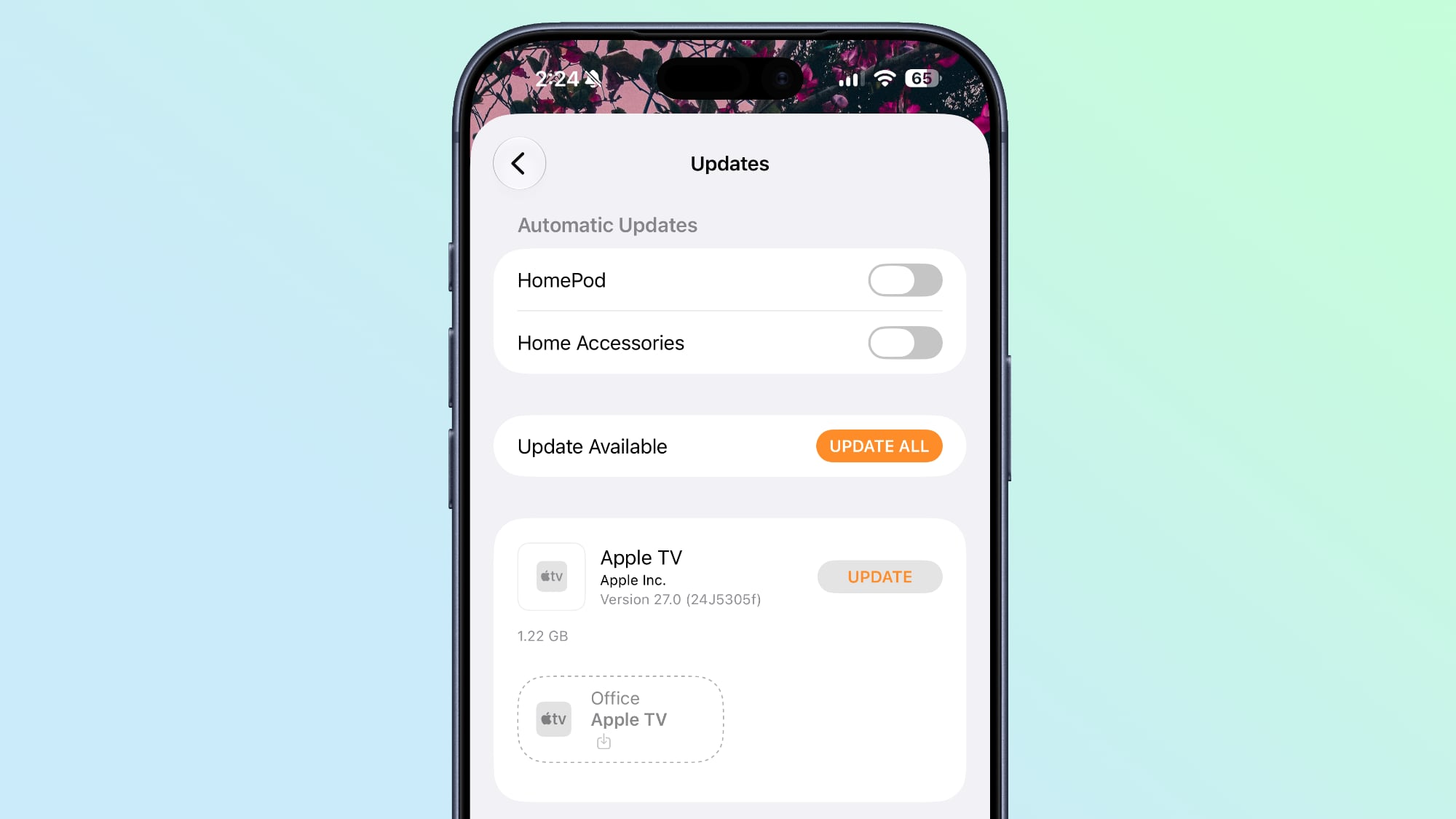
ios-27-apple-tv-home-app.jpg

Reliability

Apple says capturing and storing HomeKit Secure Video footage is more reliable than it was before and it is less likely to miss activity.

Connectivity for Thread home accessories has also been improved with Apple adopting Thread 1.4, and HomeKit accessories now pair faster. Apple also says smart home accessory updates are faster than before.

When adding a new device to the Home app, there's a simplified interface that's useful for configuring Matter accessories in particular.

Compatibility and Requirements

The Apple Intelligence features in the Home app require a device that supports Apple Intelligence, which includes the iPhone 15 Pro and later. The Home features also need an Apple TV running tvOS 27 or a HomePod running the HomePod Software 27.

HomeKit Secure Video requires an iCloud+ plan. The 50GB plan supports a single camera, the 200GB plan supports up to five cameras, and the 2TB and above plans support unlimited cameras.

4K video recording does not require Apple Intelligence.

Article Link: iOS 27 Home App: 10+ New HomeKit Features
 
  • Haha
Reactions: Z-4195
HomeKit is just so... fragile. Every update terrifies me.

And right when I get complacent because everything has been reliable for a while, boom, 26.4 comes along and ruins it. Now suddenly my Home Hubs "haven't been responding for a while" every single time I go into the Home app. Wait about a minute, and then it is fine again. This is across 3 different homes, and began on all three literally the instant I did the 26.4 update. :/
 
Hell yes! These are such welcome improvements after the total neglect the Home app’s video UI has suffered over the years since it was first introduced (along with users of it…).

Anyone who has HomeKit secure video cameras knows how bad and buggy the playback UI has been: hard to pinch and zoom, doesn’t stay zoomed in the right spot if you scrub the video, playback gets stuck sometimes, occasionally has a paused thumbnail stuck over the playing video underneath, hard to scrub videos to the right position, loads the history slowly (and only once you tap into a camera), date picker is glitchy (and sometimes even shows the incorrect day names!), hard to switch between cameras but the tap target takes up too much space in landscape making it easy to accidentally tap that control, the volume and export buttons are glitchy and sometimes disappear, exporting a video sometimes gets stuck, all sorts of weird glitchy animations between states (like when rotating the iPhone) and frequent crashes on macOS!

The list is almost endless and they never once fixed any of the bugs, like they knew they’d eventually be rewriting it completely so they didn’t want to waste any time touching the original code (and probably thought this would all be released two years ago when their new “home hub” device was released, except it all got delayed by the new Siri not being ready).

So… thank goodness! I hope the Home app continues to get these kinds of much-needed improvements each year now that Apple is rumoured to be getting more into home devices like the mystery “home hub” and cameras.
 
  • Sad
Reactions: _Mitchan1999
4K Recording

HomeKit Secure Video cameras are no longer limited to 1080p recording. If supported, cameras can stream and record at up to 4K.
Now they have my attention. There was no shot I was going to upgrade my 10 year old Ring cameras to something that was still 1080p. Now I need to research what existing HomeKit cameras might be able to already do 4K, and if there are any planning to add the feature or offer an upgraded model. Might have to wait until CES and upgrade in the spring. I think there was also a rumored Apple camera device? I want to get rid of Ring and their spyware. If I turn on end to end encryption, it basically makes my Ring devices useless as it neuters most of the features. I’m over it and the rising subscription cost when I can get unlimited secure camera storage and a bunch of storage for everything from my photo albums to files in iCloud that I can share with my family for $9.99/mo. It’s such a better deal.
 
With the Gemini foundation are we now able to use products that are advertised as Google Home with HomeKit? Hey Siri is missing from so many products and I’m hoping this partnership helps resolve that?
 
  • Haha
Reactions: brn2prgrm2
With the Gemini foundation are we now able to use products that are advertised as Google Home with HomeKit? Hey Siri is missing from so many products and I’m hoping this partnership helps resolve that?
I hope so. I think because of the rumors with the HomeHub and the updated versions of the HomePods and Apple TV, there might be a chance it will work much better. The IOS27 betas already show much promising results.
 
It's about time we could update the Apple TV remotely. I've been asking for this for years. It was annoying having to turn on multiple TVs just to update them.
Or you could do nothing and they’ll update themselves. It’s not like you’re missing out.
 
With the Gemini foundation are we now able to use products that are advertised as Google Home with HomeKit? Hey Siri is missing from so many products and I’m hoping this partnership helps resolve that?
Absolutely not.
I hope so. I think because of the rumors with the HomeHub and the updated versions of the HomePods and Apple TV, there might be a chance it will work much better. The IOS27 betas already show much promising results.

Gemini foundations are about Siri AI intelligence and its responses. It has no impact whatsoever on which hardware you can add to Apple Home.
 
With the Gemini foundation are we now able to use products that are advertised as Google Home with HomeKit? Hey Siri is missing from so many products and I’m hoping this partnership helps resolve that?
No. It won’t. The good news is that most of the smart home products are using matter now. Which is platform agnostic. Some 3rd party products allow “hey Siri”, but not many. These are things like hvac stuff, and a few speakers. You’ll probably never be able to use a google branded product with any ai other then google ai.
 
I hope we will be able to delete items from rooms freely. Here I have an old entry of the same LED light strip as the item to the right that I just cannot delete. 🙁
No option to delete in Accessory Settings either.

IMG_8529.jpeg
 
HomeKit is just so... fragile. Every update terrifies me.

And right when I get complacent because everything has been reliable for a while, boom, 26.4 comes along and ruins it. Now suddenly my Home Hubs "haven't been responding for a while" every single time I go into the Home app. Wait about a minute, and then it is fine again. This is across 3 different homes, and began on all three literally the instant I did the 26.4 update. :/

No idea what you are doing? I have 200+ devices and it's rock solid. Wired Apple TV 4K as main hub. TURN OFF Auto select hubs and it's been rock solid for 2 years.

BUT it still has a lot of other issues.
No search for devices.
Saying a scene has failed but not why ( I've hard switched a light off normally )
No debug status anywhere.

The Ui is still poop since the removed swiping from room to room.

Edit* Actually the "not responded in a while" was always a Wifi issue - even if you are hardwired. I had it with my old netgear Mesh... upgraded to unifi and It's great now.
 
HomeKit is just so... fragile. Every update terrifies me.

And right when I get complacent because everything has been reliable for a while, boom, 26.4 comes along and ruins it. Now suddenly my Home Hubs "haven't been responding for a while" every single time I go into the Home app. Wait about a minute, and then it is fine again. This is across 3 different homes, and began on all three literally the instant I did the 26.4 update. :/
Hmm - never have had one issue with HomeKit. Rock solid for me.
 
  • Like
Reactions: Baron Thompson
HomeKit is just so... fragile. Every update terrifies me.

And right when I get complacent because everything has been reliable for a while, boom, 26.4 comes along and ruins it. Now suddenly my Home Hubs "haven't been responding for a while" every single time I go into the Home app. Wait about a minute, and then it is fine again. This is across 3 different homes, and began on all three literally the instant I did the 26.4 update. :/
2 things created a stable HomeKit experience for me:
  1. Solid mesh network. For me that’s an eero mesh that has a wired backhauls. Their wireless backhauls are very good as well. I have 4 that cover the house (3 stories). I could use 1 more for my office and garage where it’s weakest but don’t need to. If I were to upgrade I’d go UniFi. Good price, very solid, free features that eero charges for, easy enough to administer. For set it and forget it, eero is king.
  2. Forcing the HomeKit hub to the most stable device I have even if it’s wireless. For me that’s a lowly HomePod mini in my kitchen (which is central to the house). When I put it on wired AppleTVs they ALL eventually presented issues on the HomeKit network. I usually got no response errors after a few weeks. My Apple TVs range from the HD up to the 2nd gen 4K (IIRC). Hardware is plenty fast enough.
One mention is that even with that stable network there is 1 device that refuses to stay stable, that’s an old IKEA Tradfri outlet. Sometimes it just … stops working. No other device I have does that. I have had zero issues with Matter devices. I’m too lazy to replace it with a solid device like the Tapo Matter outlet.
 
Is one of those features turning off all your cameras (while b1 was installing on all of my devices) and at first, still having a button for them in their appropriate rooms?

Seriously. I took this screenshot while my iPhone (and likely other devices) were in the Preparing stage.

Was the advancement of that feature removing them from Home entirely (b2)?

Edit:

I got my cameras working. I had to try adding them to Home so that Home could tell me they already exist and take me to the accessory so I could remove them from HomeKit.

Then I had to remove them from Eufy twice.

Then add them in Eufy, shut them off there (so Eufy doesn’t get my data), then re-add them to HomeKit.
 

Attachments

  • IMG_1501.png
    IMG_1501.png
    1.5 MB · Views: 23
Last edited:
Is it too much to ask for a screen that logs all activity? I don't necessarily want notifications for every event, but if i'm doing some troubleshooting or want to look at past events, it would be really great to see when sensors are triggered, when scenes were activated (or not activated) etc.
 
  • Like
Reactions: Eddie Beeps
I am hoping that the new updates will allow two separate audio controls in one scene.

I have a “Dinner Time” scene that I want to both pause an Apple TV and start playing music on a Home Pod. But today, you can only perform one of those (pause or play, not both).
 
  • Like
Reactions: Eddie Beeps
Register on MacRumors! This sidebar will go away, and you'll see fewer ads.