

Become a MacRumors Supporter for $50/year with no ads, ability to filter front page stories, and private forums.

MacRumors

macrumors bot
Original poster


Apple in iOS 27 has made a small but significant change to how the Now Playing widget works on your iPhone's Lock Screen – you can now swipe it away to get rid of it.
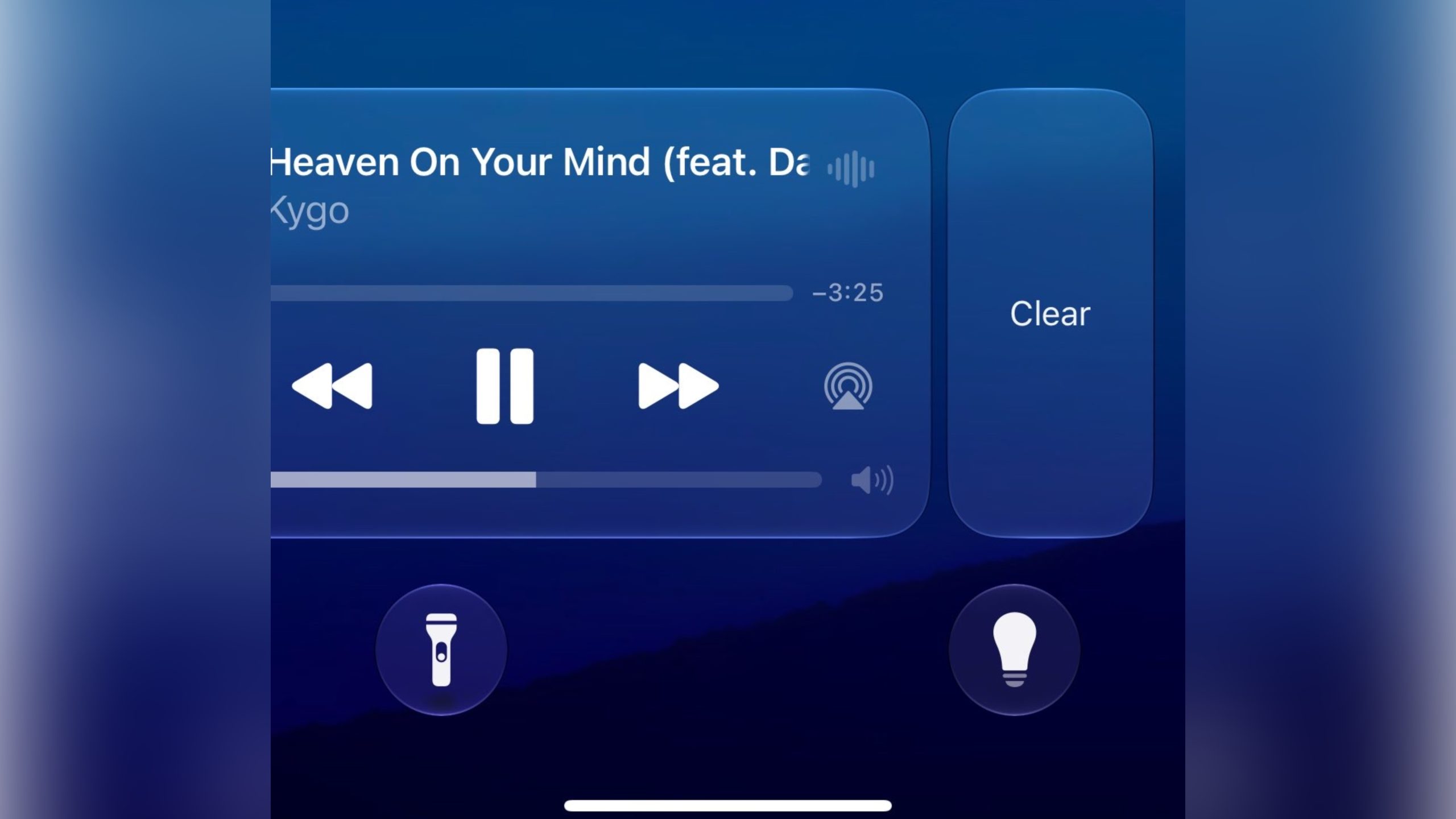
lock-screen-now-playing-ios-27@2x-scaled.jpg

Previously, there was no way to dismiss the Now Playing interface on the Lock Screen. But in the first iOS 27 developer build released yesterday, a leftward swipe on the playback controls slides in a Clear button from the right.

Clearing the controls from the screen also removes the smaller Now Playing widget from the Dynamic Island.

It's not quite clear yet how to bring the widgets back immediately – as 9to5Mac notes, the only workaround appears to be pausing whatever's playing, waiting a few minutes, and then resuming it. It also seems to depend on which app you're using for playback. For example, switching from a podcast to video playback re-invokes the Lock Screen widget.

New in iOS 27: You can now swipe away the now playing controls on the lock screen. Unclear how to get it back at the moment pic.twitter.com/NuEbyiHgok— Aaron (@Aaronp613) June 8, 2026

Being able to make the Now Playing widget go away is admittedly a small tweak, but it will be welcomed by anyone who likes to dismiss whatever is taking up space on their Lock Screen, playback controls included. Apple will make iOS 27 available in public beta next month, with a general release expected in the fall.

Article Link: iOS 27 Lets You Dismiss the 'Now Playing' Lock Screen Widget
 
this sounds more annoying than useful. what would actually be great is swipe controls on the widget so when you are on a bike, skateboard or something else you don’t have to carefully press the little buttons to skip tracks. you could just swipe your finger left or right.

(oh, and a real 10 band system wide EQ that remembers your settings for each audio output device. but after two decades of crappy presets that don’t work well on anything, now I’m dreaming for sure😂)
 
Last edited:
Sure but is it just going to come back anyway if you don't exit the corresponding app too?
If you push play again the 'now playing' widget will probably come back as people need a quick way to stop media playing, should they need to. With media stopped there's now an easy way to dismiss though which will please many people.
 
  • Like
Reactions: Vernon2X
Oh thank God! Literally no trick you see online works to get rid of this, it's just always there for Apple TV users. Hopefully watchOS gets the same.
 
  • Like
Reactions: Malkie0831
Nice, as I've accidentally changed a track, paused it etc. when putting my phone back into my pocket whilst I was playing something.
 
  • Love
Reactions: drmacnut
As someone who exclusively uses Apple TV and has a toddler who loves taking the remote and my phone… this is so exciting!
 
  • Like
Reactions: drmacnut
I just tried it, and everything from Music goes away from the lock screen, including album cover. As for it moves to Dynamic Island, it doesn't for me. There isn't a way for me to get Music back on the lock screen, even after closing the app. I now have to unlock and go to the Music app to do anything now. This is probably a bug, so hope it gets fixed in the next update
 
They should make it so it becomes an icon instead of disappearing completely. That way if you want it back, you could simply tap the icon to bring it back
 
  • Like
Reactions: drmacnut
I just tried it, and everything from Music goes away from the lock screen, including album cover. As for it moves to Dynamic Island, it doesn't for me. There isn't a way for me to get Music back on the lock screen, even after closing the app. I now have to unlock and go to the Music app to do anything now. This is probably a bug, so hope it gets fixed in the next update
Same here. Not sure how to bring it back to lock screen or Dynamic Island.
 
I just tried it, and everything from Music goes away from the lock screen, including album cover. As for it moves to Dynamic Island, it doesn't for me. There isn't a way for me to get Music back on the lock screen, even after closing the app. I now have to unlock and go to the Music app to do anything now. This is probably a bug, so hope it gets fixed in the next update
I did the step below, closed music app and reopen played another song. Problem solved.

Toggle Live Activities: Ensure your Live Activities and Lock Screen Widgets permissions are turned on in Settings > Face ID & Passcode. [1, 2]
 
Register on MacRumors! This sidebar will go away, and you'll see fewer ads.