

Become a MacRumors Supporter for $50/year with no ads, ability to filter front page stories, and private forums.

MacRumors

macrumors bot
Original poster


Apple is making more of an effort to turn the iPhone into a physical wallet replacement in iOS 27, and there are several upgrades to the Wallet app.
iOS-27-Adds-These-New-Features-to-Your-iPhones-Wallet-Feature.jpg

Pass Upgrades

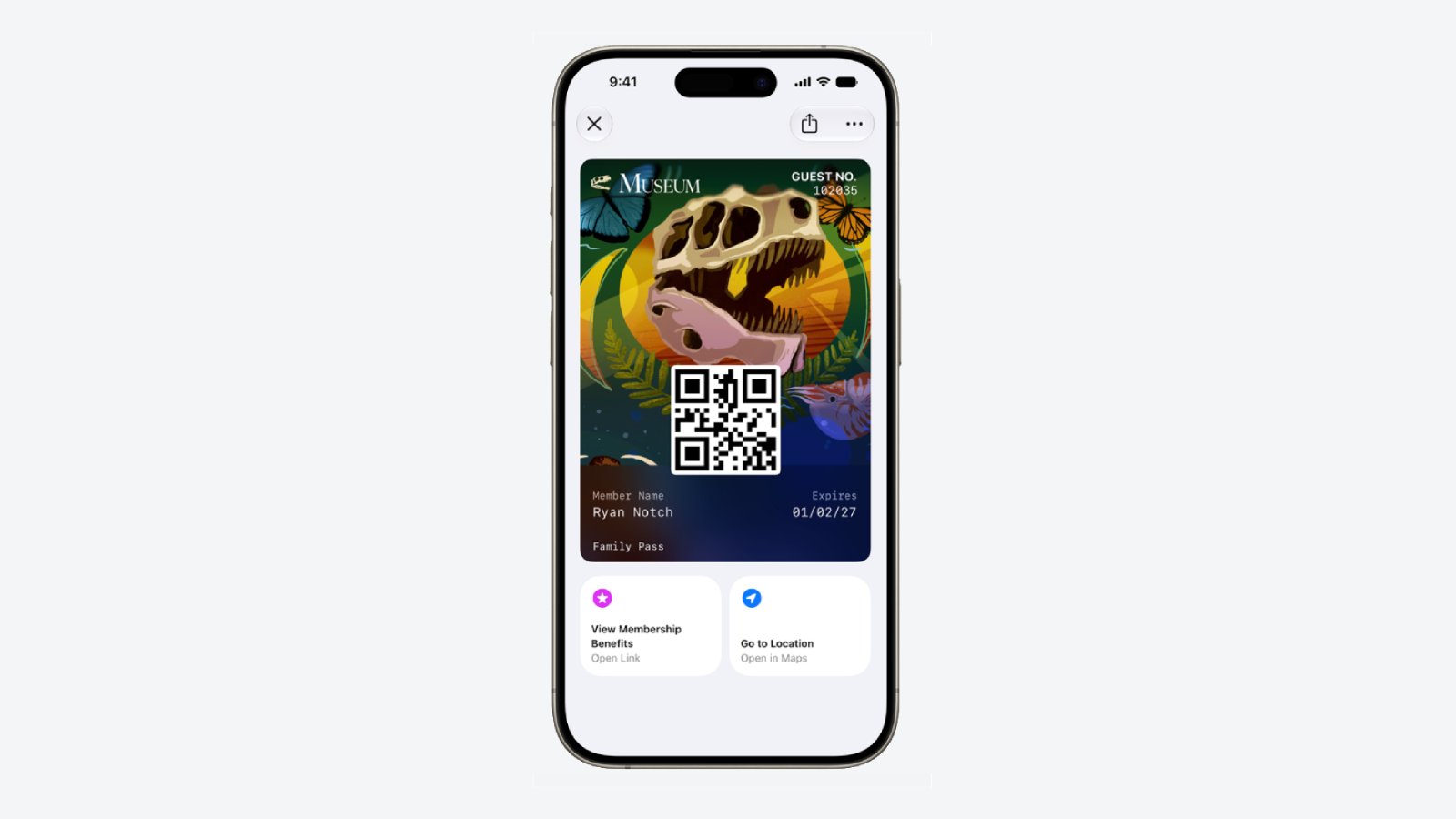
Apple upgraded airline boarding passes in the Wallet app with iOS 26, and in iOS 27, upgrades are available for more types of passes. Memberships, gift cards, loyalty cards, and rewards cards can use a bolder "Poster Generic" card style with full background images, primary logo, header fields, footer field, primary fields, and an optional barcode.
Apple-Wallet-Enhanced-Pass-iOS-27.jpg

Each pass is able to include up to two actions that can be tapped from the bottom of the pass, such as getting directions to a venue or checking a rewards point balance.

Apple is also allowing users to check the pass issuer certificate to ensure that a digital pass is legitimate (not applicable to Create a Pass), and there are four new barcode types supported, including EAN–13, Code 39, Codabar, and ITF.

There is a new Pass Designer Mac app for developers that makes it easier to create a pass using a WYSIWYG editor.

Create a Pass

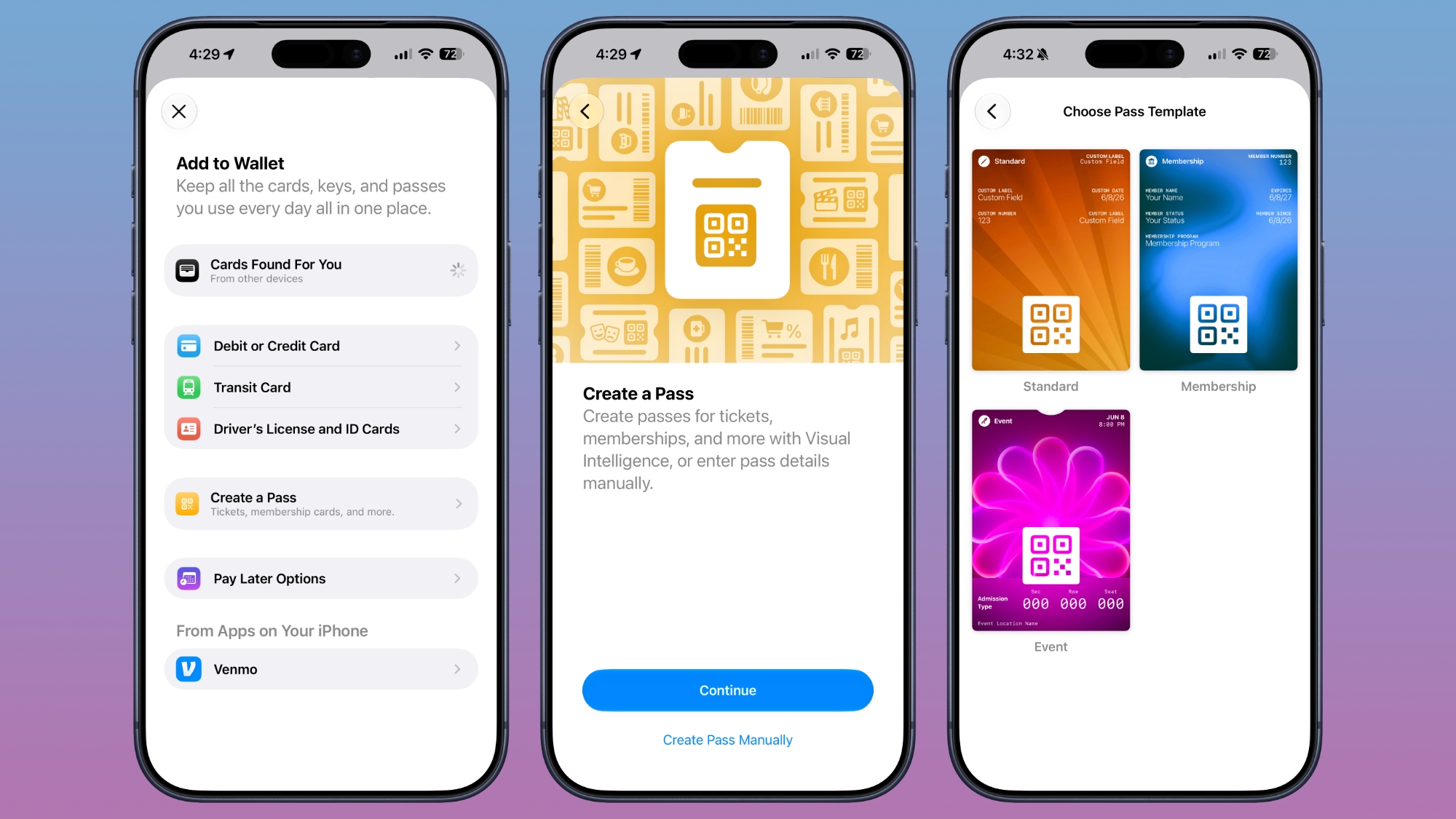
There's a "Create a Pass" feature in the Wallet app for adding tickets, memberships, and more using Visual Intelligence. If you have a ticket for an event and there's not a digital version available for the Wallet app already, you can create one using the physical pass.
ios-27-wallet-create-pass.jpg


You can scan a pass and add it with Visual Intelligence if there's a barcode or QR code, or a pass can be added manually. Pass templates include Standard, Membership, and Event.

Each type includes relevant information like name, location, or admission type, along with a scannable code drawn from an included barcode or QR code that you take a photo of. There are 12 background colors to choose from with different texture options, or seven custom backgrounds for categories like theater, music, sports, and movies.

Fields can be added or removed as needed when creating a custom pass, with options like label, date, membership, contact, coupon code, VIN, insurance, and more, so most physical cards are able to be stored digitally.

Hotel Keys

When you add a digital hotel key from a participating hotel to the Wallet app, you can now view more details about the trip. Hotels can provide updates on booked activities and allow access to different services.

AI Bill Splitting

Using the new Siri Mode in the Camera app, or a feature in the Messages and Wallet apps, you can take a photo of a bill and use Apple Intelligence to figure out what each person owes. Visual Intelligence scans the receipt and makes a digital copy of everything on the list, and each person can select what they consumed. Tax and tip portions are also calculated automatically.

Payments can be made using Apple Cash, which is a U.S.-only feature.
Insights

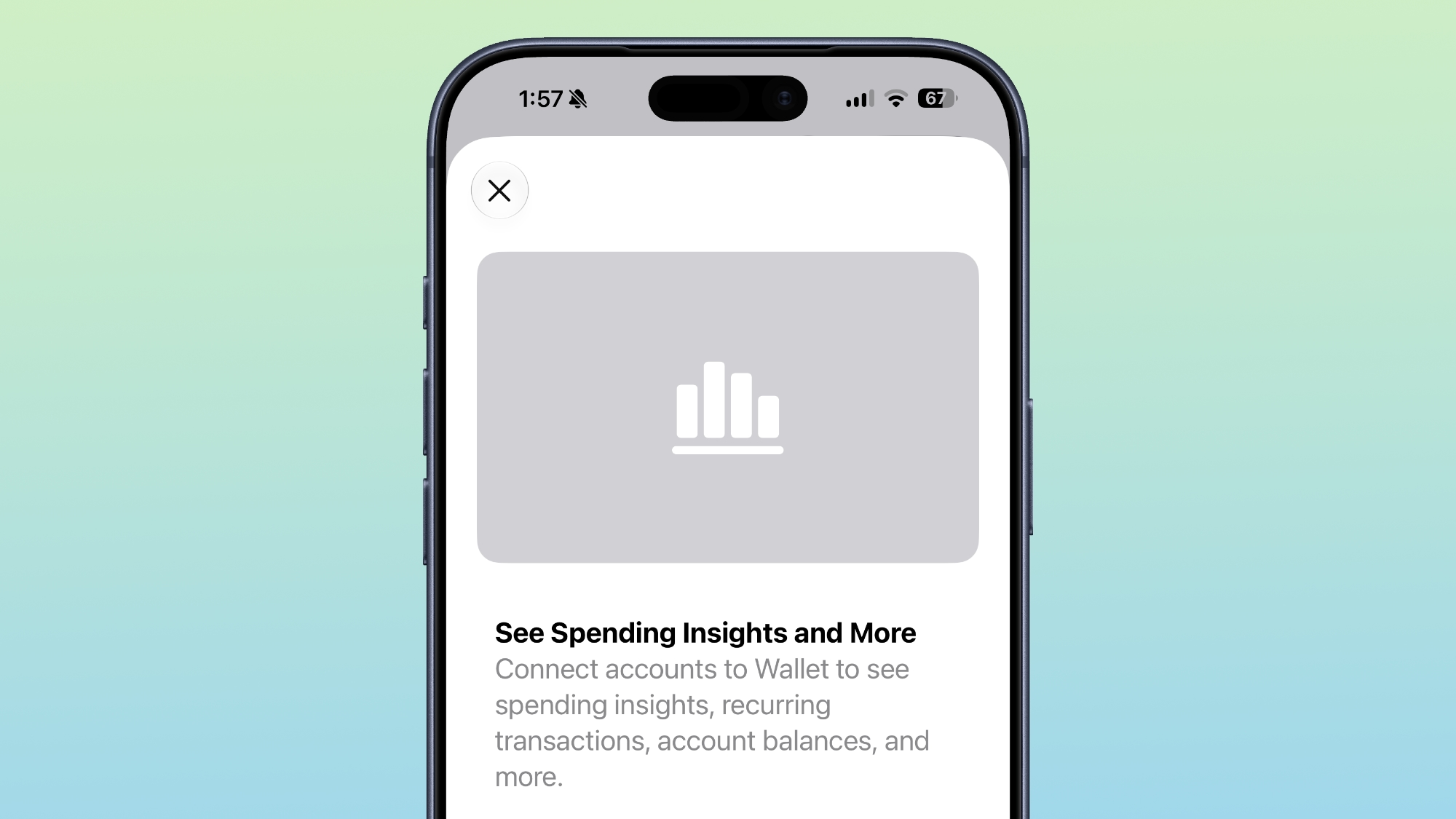
iOS 27 includes an "Insights" feature where you can add financial accounts to the Wallet app to monitor spending.
wallet-app-insights.jpg


Insights is an expansion of the Connected Accounts feature in earlier versions of iOS, and it includes spending, recurring transactions, account balances, and more. It works for financial institutions that have implemented Connected Cards support, including several UK banks.

Order Tracking

Order tracking in the Wallet app expanded to Australia and Canada in iOS 27. In iOS 26, it was limited to the United States and UK.

Tap to Share

Tap to Share is an iOS 27 feature that lets customers connect to a participating merchant's iPhone for quicker digital checkout.

Device Requirements

Visual Intelligence is an Apple Intelligence feature requiring an iPhone 15 Pro or newer. Many of the other features should work on all iPhones.

Launch Date

iOS 27 is available to developers and public beta testers right now, and it is set to launch in September.

Article Link: iOS 27 Wallet App Gets 7 New Features
 
Last edited:
  • Haha
Reactions: Z-4195
Something that would be nice would be the ability to add a (short) label to cards. I have my debit card and my wife's in it. She has the reverse. They look identical so a way to tell them apart would be nice. I did feedback for it a few years ago.
 
  • Like
Reactions: CalebOfReese


Apple is making more of an effort to turn the iPhone into a physical wallet replacement in iOS 27, and there are several upgrades to the Wallet app.

iOS-27-Adds-These-New-Features-to-Your-iPhones-Wallet-Feature.jpg

Pass Upgrades

Apple upgraded airline boarding passes in the Wallet app with iOS 26, and in iOS 27, upgrades are coming to additional types of passes. Memberships, gift cards, loyalty cards, and rewards cards can use a bolder "Poster Generic" card style with full background images, primary logo, header fields, footer field, primary fields, and an optional barcode.

Apple-Wallet-Enhanced-Pass-iOS-27.jpg

Each pass is able to include up to two actions that can be tapped from the bottom of the pass, such as getting directions to a venue or checking a rewards point balance.

Apple is also allowing users to check the pass issuer certificate to ensure that a digital pass is legitimate (not applicable to Create a Pass), and there are four new barcode types supported, including EAN–13, Code 39, Codabar, and ITF.

There is a new Pass Designer Mac app for developers that makes it easier to create a pass using a WYSIWYG editor.
Create a Pass

There's a "Create a Pass" feature in the Wallet app for adding tickets, memberships, and more using Visual Intelligence. If you have a ticket for an event and there's not a digital version available for the Wallet app already, you can create one using the physical pass.

ios-27-wallet-create-pass.jpg


You can scan a pass and add it with Visual Intelligence if there's a barcode or QR code, or a pass can be added manually. Pass templates include Standard, Membership, and Event.

Each type includes relevant information like name, location, or admission type, along with a scannable code drawn from an included barcode or QR code that you take a photo of. There are 12 background colors to choose from with different texture options, or seven custom backgrounds for categories like theater, music, sports, and movies.

Fields can be added or removed as needed when creating a custom pass, with options like label, date, membership, contact, coupon code, VIN, insurance, and more, so most physical cards are able to be stored digitally.
Hotel Keys

When you add a digital hotel key from a participating hotel to the Wallet app, you can now view more details about the trip. Hotels can provide updates on booked activities and allow access to different services.
AI Bill Splitting

Using the new Siri Mode in the Camera app, or a feature in the Messages and Wallet apps, you can take a photo of a bill and use Apple Intelligence to figure out what each person owes. Visual Intelligence scans the receipt and makes a digital copy of everything on the list, and each person can select what they consumed. Tax and tip portions are also calculated automatically.

Payments can be made using Apple Cash, which is a U.S.-only feature.
Insights

iOS 27 includes an "Insights" feature where you can add financial accounts to the Wallet app to monitor spending.

wallet-app-insights.jpg


Insights is an expansion of the Connected Accounts feature in earlier versions of iOS, and it includes spending, recurring transactions, account balances, and more. It works for financial institutions that have implemented Connected Cards support, including several UK banks.
Order Tracking

Order tracking in the Wallet app is expanding to Australia and Canada in iOS 27. In iOS 26, it was limited to the United States and UK.
Tap to Share

Tap to Share is an iOS 27 feature that lets customers connect to a participating merchant's iPhone for quicker digital checkout.
Device Requirements

Visual Intelligence is an Apple Intelligence feature requiring an iPhone 15 Pro or newer. Many of the other features should work on all iPhones.

Article Link: iOS 27 Wallet App Gets 7 New Features
Additional features for connected accounts sounds great. That’ll be a huge upgrade from the current feature set, which is “does not work at all.”
 
Insights

iOS 27 includes an "Insights" feature where you can add financial accounts to the Wallet app to monitor spending.

wallet-app-insights.jpg


Insights is an expansion of the Connected Accounts feature in earlier versions of iOS, and it includes spending, recurring transactions, account balances, and more. It works for financial institutions that have implemented Connected Cards support, including several UK banks.

As a UK resident I typed "Which UK banks have implemented Connected Cards support?" into Google. This is the main bit of the AI summary that I got back...

In the UK, Starling Bank pioneered a dedicated "Connected Card" feature allowing a secondary user to shop from a capped, separate app space. Additionally, Apple Wallet introduced an Open Banking-powered "Connected Cards" integration for balances and history supporting Barclays, HSBC, Lloyds, and Monzo.

AI does make mistakes but if that is correct then the options for us in the UK seem to be just those 4 banks - Barclays, HSBC, Lloyds and Monzo. The reference to Starling Bank seems to be about some different feature that is specific to Starling but is called by the same name.

Of the major UK banks NatWest seems to me to be the most obvious one missing but also, given how it positions itself as a high-tech challenger bank, I'm a bit surprised to not see Revolut on that list as well.

Does anyone know of any banks that Google AI missed that should be added to the list because they do have Connected Cards support or is that it?
 
In iOS26 touch a card in wallet, touch 3 dots and then Card Details. If “Connected Card” is available this appears in the Card Details. My understanding is NatWest offer this option.

Edit: Typo
 
  • Like
Reactions: JulianL
In iOS26 touch a card in wallet, touch 3 dots and then Card Details. If “Connected Card” is available this appears in the Card Details. My understanding is NatWest offer this option.

Edit: Typo

Thank you, that's very helpful information. I have a NatWest debit card in my wallet and just checked - it does have a "Connected Account" section under Card Details so NatWest is indeed supported whereas my Amex card has no such section so, while it does list all of my transactions for me in the Wallet, it presumably can't link to my account to show the running total for my balance.
 
Register on MacRumors! This sidebar will go away, and you'll see fewer ads.