

Become a MacRumors Supporter for $50/year with no ads, ability to filter front page stories, and private forums.

MacRumors

macrumors bot
Original poster


The Wallet app in iOS 27 has a new "Create a Pass" option that's designed to let you add passes for tickets, memberships, and more using Visual Intelligence. If you have a ticket for an event and there's not a digital version available in the Wallet app already, you can create one using the physical pass.
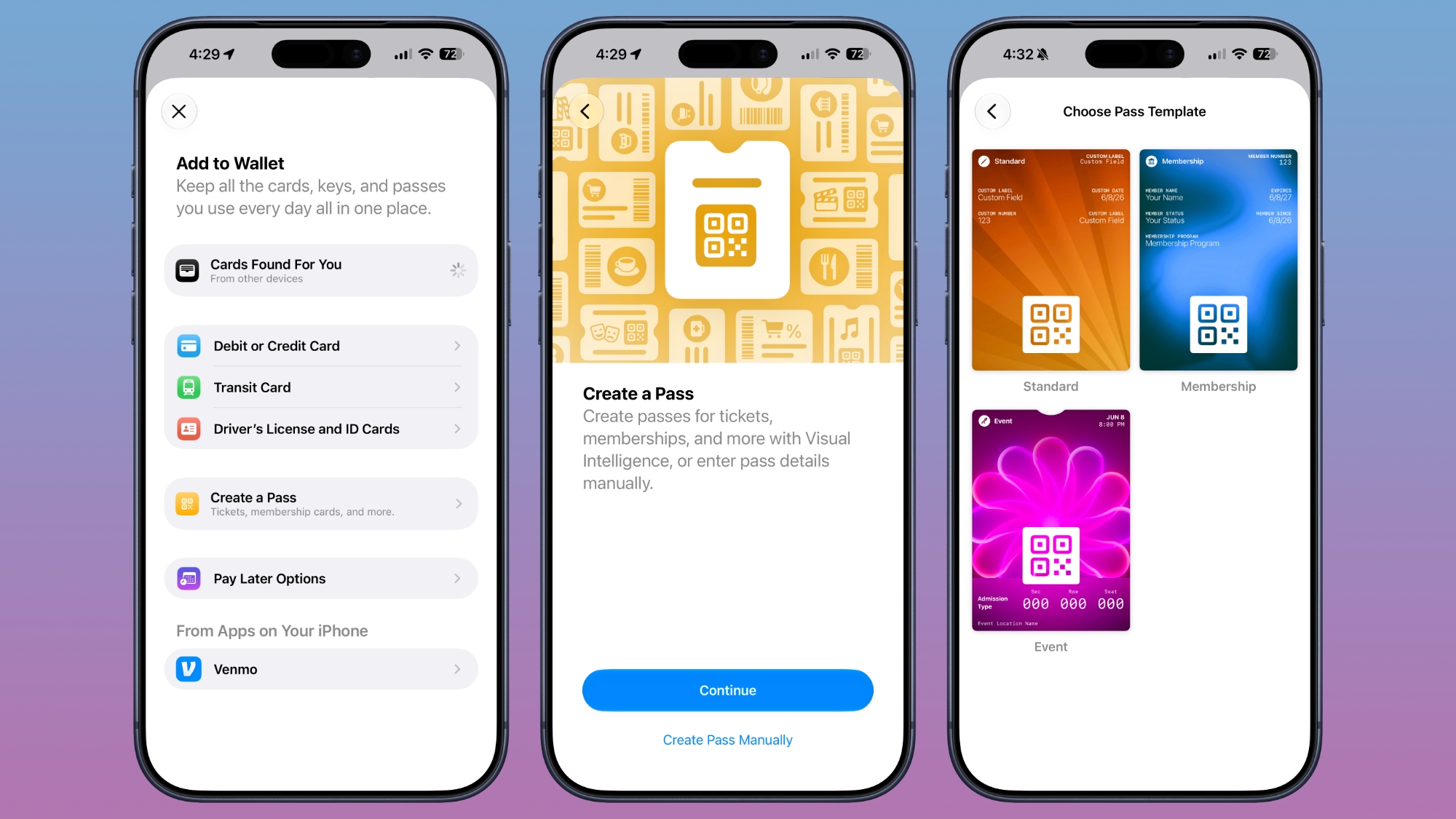
ios-27-wallet-create-pass.jpg

By default, the Wallet app uses Visual Intelligence to scan a pass and add it, but there's also a "Create Pass Manually" option. Pass templates include Standard, Membership, and Event.

Each type includes relevant information like name, location, or admission type, along with a scannable code drawn from an included barcode or QR code that you take a photo of. There are 12 background colors to choose from, or seven custom backgrounds for categories like theater, music, sports, and movies.

Fields can be added or removed as needed when creating a custom pass, with options like label, date, membership, contact, coupon code, VIN, insurance, and more, so most physical cards should be able to be stored digitally.

Article Link: iOS 27 Wallet App Gets 'Create a Pass' Feature
 
  • Like
Reactions: Baron Thompson
Finally!! I use other apps to create discount cards and other information I need to keep in my digital wallet. Even if they can’t be scanned (and they should have that functionality- a bar code is a bar code!), this will help!
 
The question is... will the event, store, etc. accept your newly created pass...? 🤔
Depends on the pass type and store.

For instance, Costco generates a new pass every N number of seconds for a given user. That won't work.

But my local rec center uses barcode reader, so it should work without issue.

I'd expect any unchanging barcode or QR code to work, assuming the scanner can see it.
 
I’m surprised by how limited this functionality is. Maybe the AI features that I don’t have access to yet can do more but the manual pass creation is lacking IMO (speaking as a developer of a Wallet pass management app myself so I’m somewhat biased haha)
 
The question is... will the event, store, etc. accept your newly created pass...? 🤔
Honestly, I doubt it.

Do you really think some cashier who is looking forward to their next break gives a crap what you scan?

I've used custom passes for years with other apps and sometimes just the photo of the card and not once did I get questioned. It's just a barcode.
 
Do you really think some cashier who is looking forward to their next break gives a crap what you scan?

I've used custom passes for years with other apps and sometimes just the photo of the card and not once did I get questioned. It's just a barcode.
Same - I use Stocard/Klarna to save all my passes and it works fine
 
The question is... will the event, store, etc. accept your newly created pass...? 🤔
I've got a handful of loyalty cards generated by a 3rd party app (that is, it's my membership number but an app prepared the artwork and turned the membership number into the proper barcode / QR code, and made a card Apple Wallet would accept), and they work just fine. You occasionally get a slightly astonished when you hold up a phone to scan instead of a plastic card, but they scan it and it works.
 
  • Like
Reactions: Tirea and Unity451
What I really want to see in Apple Wallet...

First, support for additional barcode formats - for instance, a lot of libraries use Codabar format.

Second, support (presumably including an API) for codes that change with time - Target and Costco come to mind - they have codes that change every minute or so, specifically to keep people from screenshotting them and potentially giving the image to other people. But opening a specific app and navigating is much less convenient. So give the companies an API where Apple can say, "user is trying to display your XYZ card in Apple Wallet, please give the correct current payload and format to use for QR/barcode", and new app can answer as needed, and then you can use Apple Wallet at whatever store, rather than digging out the right app, potentially logging in, and navigating to the right page, and hitting the "show membership card" button.
 
I’m surprised by how limited this functionality is. Maybe the AI features that I don’t have access to yet can do more but the manual pass creation is lacking IMO (speaking as a developer of a Wallet pass management app myself so I’m somewhat biased haha)
I'm curious, which app?
 
But can I create one from a screenshot?

I sometimes get digital tickets (PDF for example) with no option to add to wallet. It would be nice to be able to add those without needing a second device to take a photo of it.
 
The question is... will the event, store, etc. accept your newly created pass...? 🤔
My grocery store’s gas rewards card is a static barcode. I used the “create manually” option and it created a card that works at the checkout. The cashier didn’t seem to care that I scanned that instead of a physical card. (They don’t have an app).
 
Just added my library card. I had to scan the barcode with the camera and then enter the details like my name manually since Visual Intelligence wasn’t available (presumably because I’m on the waitlist for the “new Siri”?).

The barcode from my physical library card shows up on the digital pass so presumably it will work the same as if I scanned the barcode on the physical card.
 
What I really want to see in Apple Wallet...

First, support for additional barcode formats - for instance, a lot of libraries use Codabar format.

Second, support (presumably including an API) for codes that change with time - Target and Costco come to mind - they have codes that change every minute or so, specifically to keep people from screenshotting them and potentially giving the image to other people. But opening a specific app and navigating is much less convenient. So give the companies an API where Apple can say, "user is trying to display your XYZ card in Apple Wallet, please give the correct current payload and format to use for QR/barcode", and new app can answer as needed, and then you can use Apple Wallet at whatever store, rather than digging out the right app, potentially logging in, and navigating to the right page, and hitting the "show membership card" button.
That would solve a lot of the transit systems that use QR codes as well, like Valley Metro, PRONTO, Cats-Pass etc.
 
Atm i use Pass2U wallet and send it to apple wallet because i made custom cards thst give password for gate locations it shows the card in notification when i am in that area
 
Register on MacRumors! This sidebar will go away, and you'll see fewer ads.