

Become a MacRumors Supporter for $50/year with no ads, ability to filter front page stories, and private forums.

MacRumors

macrumors bot
Original poster


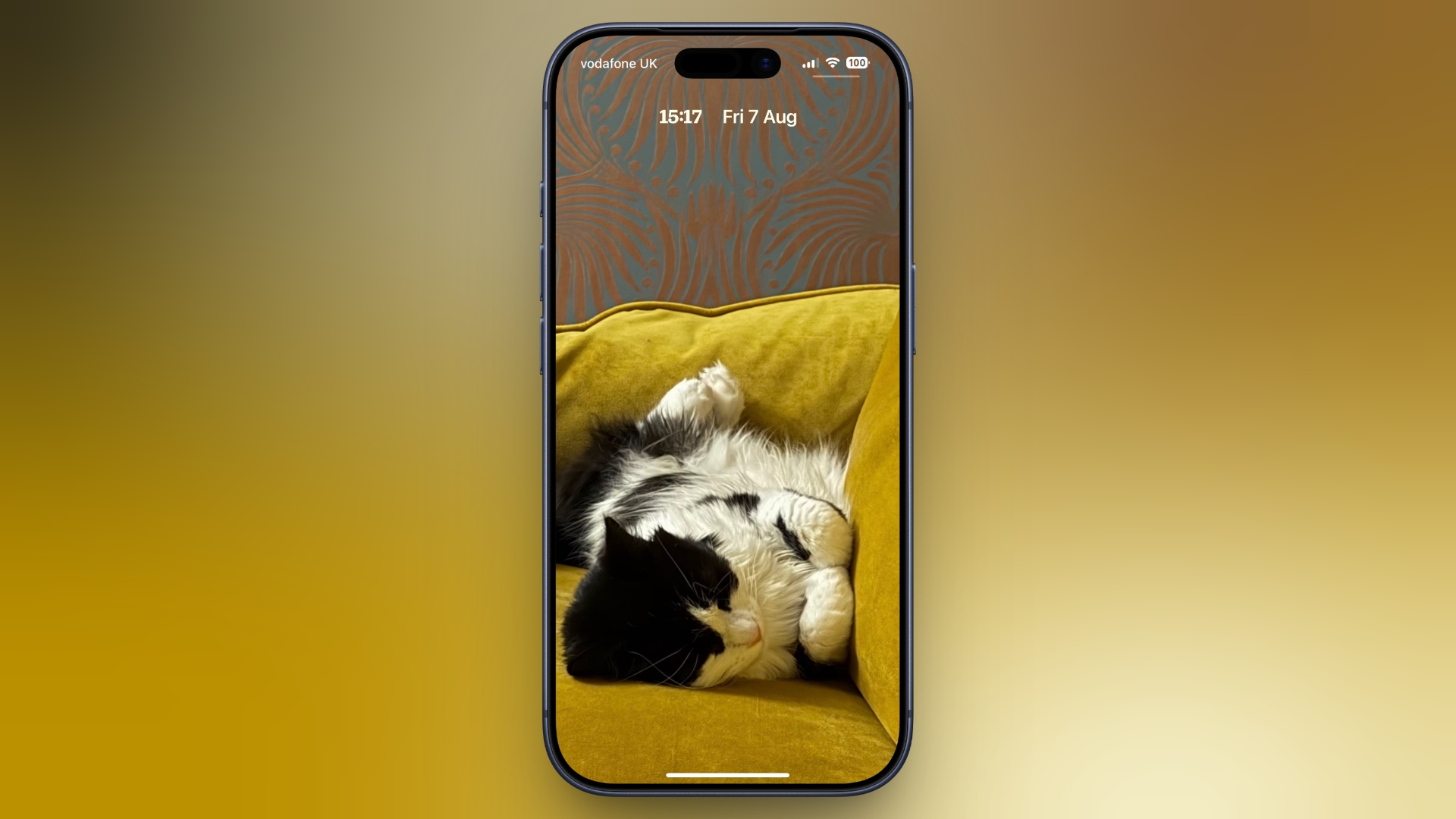
In iOS 26, Apple let you stretch the Lock Screen clock down your iPhone's display until it dwarfed everything else. In iOS 27, Apple has a new clock option that does the opposite, with the introduction of a compact mode that shrinks the time to roughly the size of the date and tucks it into the row at the top of the screen.
cat-couch-lock-screen-clock-compact-mode.jpeg

The result is a Lock Screen that genuinely shows off your wallpaper, while still displaying the time and date. If you picked a photo that looks better in its complete framing, this is the first time iOS gives you the opportunity to see more of it unobstructed.

How to Switch to the Compact Clock

The following steps show you how it's done.
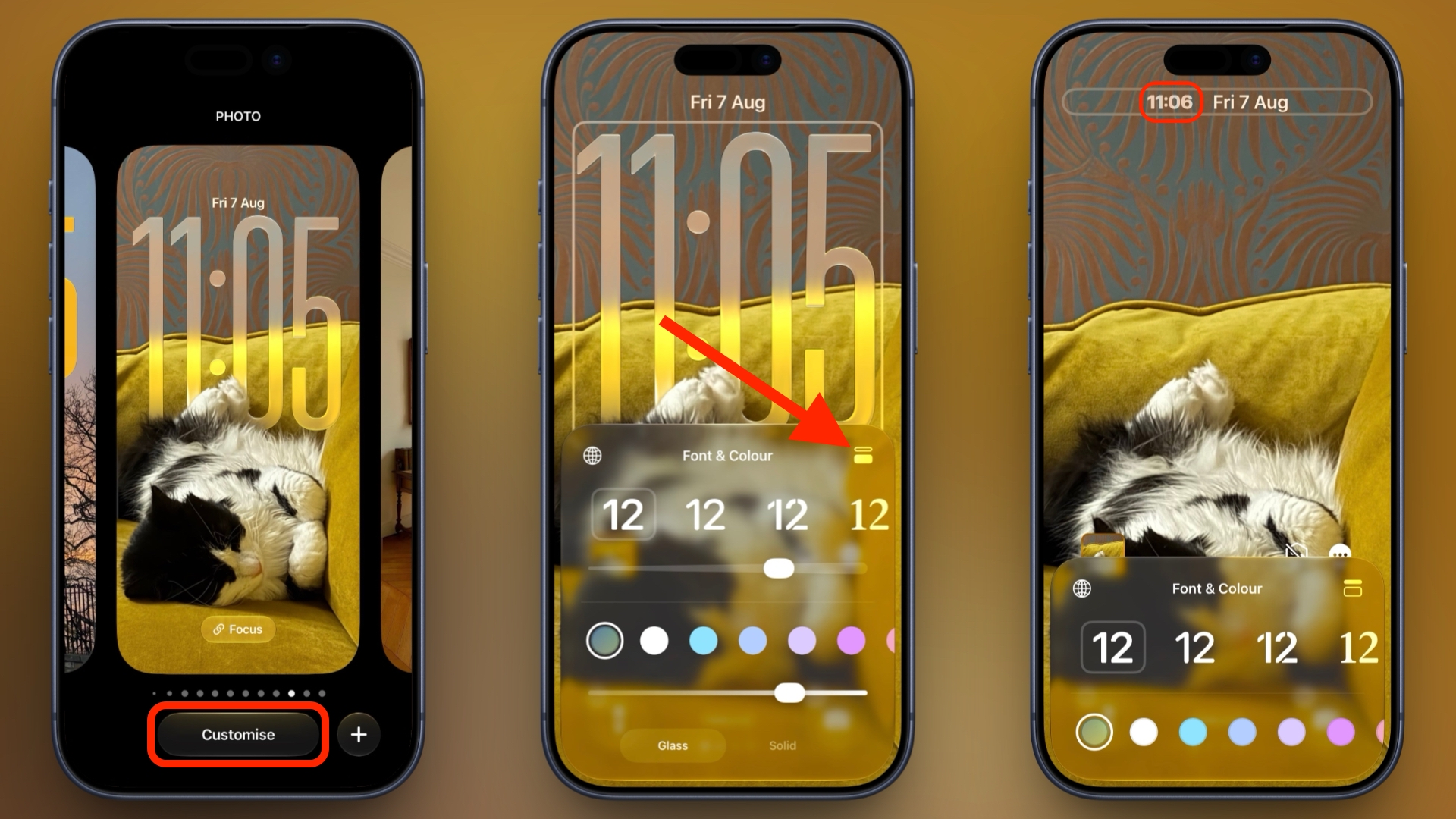
  1. Touch and hold the Lock Screen, then tap Customize.
  2. Tap inside the currently set clock frame to open the Font & Color panel.
  3. Tap the new icon made of two horizontal bars in the top-right corner of the panel to set the clock to compact mode.
  4. If you're happy with the new look, tap anywhere else on the wallpaper, then tap Done in the top-right corner of the screen.
set-compact-clock-lock-screen-ios.jpeg


You'll see that the clock shrinks immediately and moves up beside the date, so you can judge the effect against your wallpaper before saving. To go back, simply tap the same icon in the Font & Color panel again. The clock will return to its previous position and size.

Customizations

The new compact clock keeps your existing clock customizations like font, weight, and color, and these can still be adjusted, but you do lose access to the Liquid Glass slider in compact mode.

Bear in mind that the option applies to individual Lock Screens rather than being a global setting, so you can have a compact clock on one wallpaper and a full-size one on another – for a Focus mode, for example. iOS 27 is currently in public beta with general availability expected in September.

Article Link: iOS 27's New Compact Clock Gives Your Wallpaper Room to Breathe
 
Last edited:
I like the look. It gives a cheap iPhone like the iPhone 11 look different than any other iPhone before it ( and stretching the time as well on iOS 26 which came as old as the 11).

Just like how I have said in this forum that the iPhone XR is much better than the more expensive iPhone X, the iPhone 11 is even more better in this regard in comparison to the XS regarding changes like this.
 
  • Like
Reactions: boswald
that's nice to see...I have the clock large to more easily see on a glance and the top, smaller line has the Day/Date and either Sunrise or Sunset time. I am guessing you can only put 2 options on that top/smaller line
 
I wish to go back to the iOS 15 lock screen but with the flashlight and camera icons switchable to something else.
 
They should make the battery bigger and probably move it below the clock while you charge so the user can quickly discern battery percentage (not just during the few seconds when you plug in; after all, you plugged in because you already know what percent the battery is at, but when you tap-to-wake from 14-28 inches away to check on it; now it's as important as the time).
 
Last edited:
Now, if we could only get the clock with seconds like I've wanted for the past twenty years...

Yeah seconds can be pretty important, this should def be an option, good call.


Good to see this. Always good to have maximum customization options possible so that everyone can set it to their preferred style.

Yea Apple is def getting better with this…remember how restrictive iOS used to be?? Even back then it was still incredible tho…way better than anything else so now with more customization it’s just…even that much better.


This is the internet. Everything moves to make space for cat pics.

View attachment 2650774

I see why ppl love dogs so much because just breathing they have that smile look and just dopey and happy but cats? Cats are so damn badass, they just look so regal and commanding…too bad they’re so afraid of even their own shadow lol

Imagine if they were bigger stronger and tougher they’d be way more popular (especially amongst ppl who prefer pitbulls etc)

But when they’re both really young I don’t see how anyone can say one is cuter than the other…even bears, basically mammals are the best! lol

I wish to go back to the iOS 15 lock screen but with the flashlight and camera icons switchable to something else.

Was that the iOS that had live wallpapers? I think they stopped allowing that…such a shame : (
 
  • Like
Reactions: DEMinSoCAL
I like this customization option (not all customizations are good, ask Mountain View).

For me ... Tiny clock when I have watch on hand (Work / Personal profile) and big clock for Sleep profile.
 
Register on MacRumors! This sidebar will go away, and you'll see fewer ads.