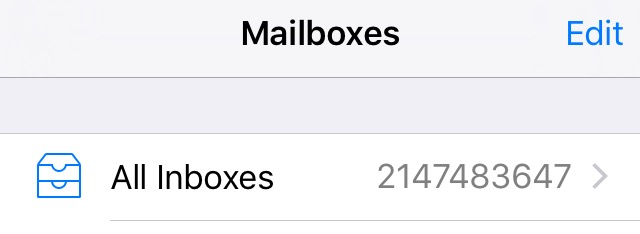
fania123 macrumors regular Original poster Sep 16, 2015 #1 Just put the IOS 9 on my phone and it now shows that I have 14,000 emails and I can't seem to remove it. I used to be able to remove it by marking them as all read now it doesn't seem to want to let me.
Just put the IOS 9 on my phone and it now shows that I have 14,000 emails and I can't seem to remove it. I used to be able to remove it by marking them as all read now it doesn't seem to want to let me.
fania123 macrumors regular Original poster Sep 16, 2015 #3 🙁 khaosxbez said: start reading....... Click to expand...
fania123 macrumors regular Original poster Sep 16, 2015 #6 😱 Hexiii said: You poor thing... In other news, iOS 9 is not buggy at all. Click to expand... matthewv1227 said: Mail > All Inboxes> Edit> Mark all..... Click to expand... Doesn't work. Last edited by a moderator: Sep 16, 2015
😱 Hexiii said: You poor thing... In other news, iOS 9 is not buggy at all. Click to expand... matthewv1227 said: Mail > All Inboxes> Edit> Mark all..... Click to expand... Doesn't work.
M matthewv1227 macrumors 6502 Sep 16, 2015 #7 fania123 said: Doesn't work. Click to expand... What happens when you try?
fania123 macrumors regular Original poster Sep 16, 2015 #8 matthewv1227 said: What happens when you try? Click to expand... Nothing, messages still remain.
M matthewv1227 macrumors 6502 Sep 16, 2015 #10 fania123 said: Nothing, messages still remain. Click to expand... Even after hitting mark all as read?
fania123 said: Nothing, messages still remain. Click to expand... Even after hitting mark all as read?
fania123 macrumors regular Original poster Sep 16, 2015 #11 matthewv1227 said: Even after hitting mark all as read? Click to expand... yep
stridemat Moderator Staff member Sep 16, 2015 #12 Could you mark as all read on the web interface of your email provider?