Become a MacRumors Supporter for $50/year with no ads, ability to filter front page stories, and private forums.

TorontoSS

macrumors 65816
Original poster
Nov 9, 2009
1,163
454
So I’m clearly going down a rabbit hole (it’s unhealthy i know). I have the option to get an M4 iPad Pro 13 inch (1tb, cellular) for £1200 (for non UK people, equivalent model was 2200 when it released) or an M4 iPad Pro 13 inch (1tb, cellular with Nanotexture) for £1295.

Both are an excellent deal. I also know, I can’t really go wrong with both. I went to the Apple Store and I did in fact notice a difference between the screens in terms of colours, the deep blacks etc. But not a MASSIVE difference. But a difference. I checked between the iPad Air too, but i thought colours were better on the Nanotexture vs the air but definitely better on the non nano oled vs the air.

My question is really around, how much are you really sacrificing for the Nanotexture for movies/netflix etc?

I.e. would a nano texture iPad be worse an a MacBook Air for example or MacBook Pro for that matter (because i think the OLED screen is better than the MBP’s screen) for media consumption?

I should note I’m not an artist or into photography etc. I’m just a regular person who uses her iPad to take it to work in the morning. I read books, and news articles on the my way to work and i watch Apple TV / Netflix on the way back. I watch some light tv at night before bed and use my iPad for iPad-y things like browsing, and emails etc. But the deals available are pretty good. I have noticed when I was at the Apple Store, that for reading, the Nanotexture was better (in dark mode). For articles news etc. it was grainy.
 
Do you like looking at yourself when watching a movie? there is your answer.

That also depends on lighting. In a dark room, there should be no reflections.

Then again, the difference between glossy and matte in dark environments is probably mitigated as well so they would probably look almost the same.

I haven't opened my M4 iPP package yet but I've always preferred matte to glossy. I expect I'll be quite happy with the nano-texture glass (provided the OLED doesn't give me migraines).
 
OP,
Given your stated usage, I highly recommend the Nano texture glass. It will make your usage so much more enjoyable when you don’t have to deal with reflections on the screen impeding your view and enjoyment.

I like the nano so much, I have 3 nano iPads, and a nano iMac.

That's quite an endorsement! Can I ask one thing - have you had any durability issues with the nano ipads? if this were a macbook (or iMac) I would not have hesitated as much because the screens aren't as exposed. But ipads can get some liquid, or more scratches on them.

My husband has a nano iMac and he LOVES the screen but he doesn't watch movies or anything on it. Mainly just work.
 
That's quite an endorsement! Can I ask one thing - have you had any durability issues with the nano ipads? if this were a macbook (or iMac) I would not have hesitated as much because the screens aren't as exposed. But ipads can get some liquid, or more scratches on them.

My husband has a nano iMac and he LOVES the screen but he doesn't watch movies or anything on it. Mainly just work.
I haven't had any durability problems with the iPads. However I am very careful with them, as I am all my Apple toys. I do not eat or drink near my Apple toys. I do not transport (at home or mobile) my iPads in the Magic Keyboard. And when transporting my iPad, I use an MBP leather wool lined sleeve which resides inside a well padded pouch of my Waterfield Messenger Bag. I also make a point to wash my hands before touching my iPads, Magic Keyboards, MBA etc. https://www.sfbags.com/collections/...s/products/executive-leather-laptop-messenger.

As to durability, the Nano really isn't more fragile than the standard glass. The main difference is the machined etched glass with the Nano which, for some people, makes it a little harder to clean. I do not directly touch the glass with my fingers unless I have to. And if that happens, I remove the fingerprint (if there is one) with the Apple Polishing cloth. The mistake most people make is letting the oils from the fingers build up over time and then they complain that cleaning the Nano is harder to keep clean. If I don't have the Magic Keyboard with me for some reason, I use a stylus to touch the screen. The stylus provides good, responsive feedback without leaving any smudges or marks on the screen.

I did get AppleCare+ for my iPads and iMac, because of the Nano screens. While I can afford to repair or replace one of the devices should a problem or accident happen, the cost with AC+ is much lower. Granted, if there aren't any problems or accidents with the devices, I will have spent money that wasn't needed. At the same time, there is no way for me to know what may happen day to day, whether a direct fault of my own or an unforeseen hardware failure or accident.

In my opinion, if you are willing to exercise due diligence in how you use and transport the Nano device, it will be money well spent as you will enjoy using the Nano screen immensely. The screen can get scratched just like the screen on the regular Apple Watch. Both have the same hardness level.

If you wish to touch the Nano screen directly, clean it every day and you won't have the same problem so many others do because they were lazy and let the oils build up over time. I don't think you should fear getting the Nano.
 
  • Like
Reactions: orbital~debris
That also depends on lighting. In a dark room, there should be no reflections.

Then again, the difference between glossy and matte in dark environments is probably mitigated as well so they would probably look almost the same.

I haven't opened my M4 iPP package yet but I've always preferred matte to glossy. I expect I'll be quite happy with the nano-texture glass (provided the OLED doesn't give me migraines).
Rui your new M4 iPP may give you headaches straight out the box on start up, it did with me anyway. Don't want to be negative but PWM on the tandem oled display is bad, worse than the iPhone imo, i can just about tolerate it at 50% brightness. It is absolutely stunning though, best display on the market right now.

OP you got 2 epic deals to choose from, you cant go wrong either way. You should also get the Magic keyboard to really get the best out of it (£329 on Amazon right now) so in this regard the cheaper Non nano texture model would alleviate the cost a bit.
 
Last edited:
Rui your new M4 iPP may give you headaches straight out the box on start up, it did with me anyway. Don't want to be negative but PWM on the tandem oled display is bad, worse than the iPhone imo, i can just about tolerate it at 50% brightness. It is absolutely stunning though, best display on the market right now.

There’s 90 day Costco return policy anyway so I have plenty of time to return if I can’t tolerate it.
 
  • Like
Reactions: snipr125
Nano texture is an upgrade for most situations and for the small price difference it's clearly the better device. The only major downside of this version isn't actually in the visuals. It does scratch easily. But when you spend this amount of money on an iPad you are likely going to have a cover or a padded backpack space for it.
 
Thanks all! Has been very useful! I sort of solved my non issue! I convinced my husband to upgrade his 11 inch iPad to the 13 inch nano texture one as he uses it for reading. He LOVES nano texture and seems like a too good deal to pass up. He’s also 50 times more careful than I am. While I take excellent care of my apple products, I use my iPad much more (I take it out everyday, use a Magic Keyboard and cook with it around). I’ll take the standard display one which is generally more durable.
 
Thanks all! Has been very useful! I sort of solved my non issue! I convinced my husband to upgrade his 11 inch iPad to the 13 inch nano texture one as he uses it for reading. He LOVES nano texture and seems like a too good deal to pass up. He’s also 50 times more careful than I am. While I take excellent care of my apple products, I use my iPad much more (I take it out everyday, use a Magic Keyboard and cook with it around). I’ll take the standard display one which is generally more durable.
That is an excellent plan. When you aren’t cooking, you might try commandeering the nano lol. I really enjoy the 13” even though it isn’t as portable as the 11”.
 
My suggestion is to wait with your purchase until you have tried the nano display. Especially on the go in varying lighting conditions the nano version is much easier on your eyes without the reflections and you might find that once you tried it out you don't want to go back to the standard display.

The magic keyboard does protect the screen when closed and fingernails or an Apple Pencil of course don't scratch it. I wouldn't say the standard display is generally more durable, if you drop the iPad it's just as likely to crack as the nano. All I do is make sure I don't throw it in naked into a bag with my keys and after over a year there isn't a single scratch on my nano iPad Pro M4.
 
  • Like
Reactions: orbital~debris
My suggestion is to wait with your purchase until you have tried the nano display. Especially on the go in varying lighting conditions the nano version is much easier on your eyes without the reflections and you might find that once you tried it out you don't want to go back to the standard display.

The magic keyboard does protect the screen when closed and fingernails or an Apple Pencil of course don't scratch it. I wouldn't say the standard display is generally more durable, if you drop the iPad it's just as likely to crack as the nano. All I do is make sure I don't throw it in naked into a bag with my keys and after over a year there isn't a single scratch on my nano iPad Pro M4.
You’re right - but it’s not about the fragility of the glass (like I’m not afraid it will crack), it’s more about the lack of hardness in it compared to the standard screen. The standard one scratches less. But you’re right, having a cover on it, should be fine. I was earlier planning on having a sleeve as well.
 
  • Like
Reactions: orbital~debris
You’re right - but it’s not about the fragility of the glass (like I’m not afraid it will crack), it’s more about the lack of hardness in it compared to the standard screen. The standard one scratches less. But you’re right, having a cover on it, should be fine. I was earlier planning on having a sleeve as well.
The standard glass has a MOHS rating of 6 while the Nano has a rating of 3. You are correct. The Nano will scratch as easy as the screen on the regular aluminum Apple Watch. If you use a sleeve without a case for the iPad, make sure the sleeve lining is high quality so as to deter potential scratching.

When I was at the Apple Store buying my 13” Nano, i did say I really like the screen but, was concerned about possible scratches when carrying outside the house even though I am buying AC+ and that didn’t cover scratches. Both of the Apple employees present said in a direct manner that should I ‘accidentally drop’ the iPad and damage the screen, AC+ would cover that damage. I was rather surprised both employees were in agreement with each other in telling me to do such a thing.

Edited to add: Consider the cellular model as well. It will work so much better than trying to hotspot all the time.
 
Last edited:
The standard glass has a MOHS rating of 6 while the Nano has a rating a 3. You are correct. The Nano will scratch as easy as the screen on the regular aluminum Apple Watch. If you use a sleeve without a case for the iPad, make sure the sleeve lining is high quality so as to deter potential scratching.

When I was at the Apple Store buying my 13” Nano, i did say I really like the screen but, was concerned about possible scratches when carrying outside the house even though I am buying AC+ and that didn’t cover scratches. Both of the Apple employees present said in a direct manner that should I ‘accidentally drop’ the iPad and damage the screen, AC+ would cover that damage. I was rather surprised both employees were in agreement with each other in telling me to do such a thing.

Edited to add: Consider the cellular model as well. It will work so much better than trying to hotspot all the time.
I'm surprised apple themselves would have suggested that! But yes - what i meant was, ipad with cover (smart folio) AND in a sleeve. that would be totally fine then. I did in fact get the cellular model actually when I never ever get because that was the one on sale. BUT i have noticed that you don't get "prepaid" esims anymore. I remember in the past you could get that. I don't want to get a plan for very very occasional use. BUT the option is there.
 
  • Like
Reactions: orbital~debris
I'm surprised apple themselves would have suggested that! But yes - what i meant was, ipad with cover (smart folio) AND in a sleeve. that would be totally fine then. I did in fact get the cellular model actually when I never ever get because that was the one on sale. BUT i have noticed that you don't get "prepaid" esims anymore. I remember in the past you could get that. I don't want to get a plan for very very occasional use. BUT the option is there.
T-Mobile offers a plan you can only get through the iPad (under Settings > Cellular > new plan > pick T-Mobile) that is great for occasional use, should you ever need to (5GB good for 150 days for $10).
 
  • Like
Reactions: orbital~debris
That’s not bad at all. In the UK though will be different. May be it will be able to offer me something similar though!

Interesting discussion: particularly the different hardness ratings of the regular display vs. the nano-texture upgrade – I had no idea there was a difference!

I bought an M4 without nano glass, but did get the cellular in case it was useful at some point. I've not yet added a data plan, so if you have any updates on good UK plans I'd be interested to read 🙂
 
  • Like
Reactions: Rade0
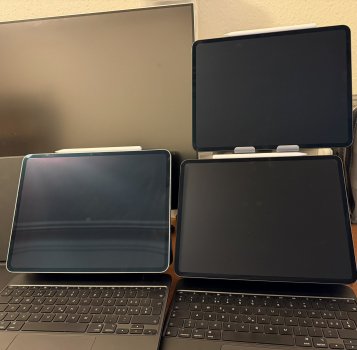
There are 2 potential issues with the nano: screen quality vs standard glass and fragility.

The first issue is BS:
In a dark room the look identical.
In a bright room you see the reflection on the standard glass unless you tilt it, but if you tilt the nano it become darker too.
Here is a picture to show it (you can see 2 nanos and a standard glass, on of the nano is darker because of the tilt, point is, people don't tilt the nano because it has no reflections so they say the darks are not as dark as the spread the light, but it they titled the same way they would see that the are not comparing the same thing) 2026-01-23 17.30.13.jpg
The second issue is real and there have been several tests:
the nano scratches more easily (which has nothing to do with dropping the iPad, it scratches with other ojects rubbing against the screen, not fingers or pencils)
and liquids should be avoided. So it takes some extra care.
 
  • Like
Reactions: Rade0
When I was at the Apple Store buying my 13” Nano, i did say I really like the screen but, was concerned about possible scratches when carrying outside the house even though I am buying AC+ and that didn’t cover scratches. Both of the Apple employees present said in a direct manner that should I ‘accidentally drop’ the iPad and damage the screen, AC+ would cover that damage. I was rather surprised both employees were in agreement with each other in telling me to do such a thing.
Yeah Apple Care+ doesn't cover scratches, so people online recommend you purposely break the iPad to have it replaced for around 10% of the price. Technically hat's called insurance fraud. But there is no way to prove it. I personally don't judge, but I wouldn't be capable of doing it. Not just because of ethics (I am not always an example, I download movies via torrents and use adblockers) but I woudn't be capable of breaking/dropping a working device. But many people, including some Apple employees see no issues...
 
  • Like
Reactions: Apple_Robert
Yeah Apple Care+ doesn't cover scratches, so people online recommend you purposely break the iPad to have it replaced for around 10% of the price. Technically hat's called insurance fraud. But there is no way to prove it. I personally don't judge, but I wouldn't be capable of doing it. Not just because of ethics (I am not always an example, I download movies via torrents and use adblockers) but I woudn't be capable of breaking/dropping a working device. But many people, including some Apple employees see no issues...

Using ad blockers is ethically Positive in my opinion.
 
Not needed anyway, have only used the cloth that comes with it on mine, and it's 10 times easier to clean than my Mrs M1.
I don't find it any easier, and I also use the Apple cloth, but it's totally possible to use only that. When I say extra care I mean careful to avoid splashes and to avoid objets that could scratch it
 
I had a very hard time figuring out whether to order nano texture, then I saw it in person at Best Buy of all places and was immediately sure it was not for me. You need to put your own set of eyeballs on it before you decide, because unless your use case is "I need less glare & work by a bright window or outside" it isn't cut & dry that nano texture is better.

I prefer matte displays any other time, but I did not like Apple's nano texture at all.
 
Register on MacRumors! This sidebar will go away, and you'll see fewer ads.