splifingate
Contributor
I will be forced to iOS 26+...
Ultimately: yes.
Unfortunately: yes.
By that time, it is my sincerest hope that most of the wrinkles will be ironed-out.

I will be forced to iOS 26+...


Thanks man, i can only update to ios18 through MacBook Pro , there only option to jump to iOS 26 on the software update setting on the 13 mini , I guess I will do it through MacBook Pro asap before no more option
bad news I am just found out , its only can update to iOS 26 even I plug in to MacBook Pro, no more iOS 18 choiceThe 13 mini runs fine on 18. I suggest updating now while you still can before 26 becomes your only upgrade option.
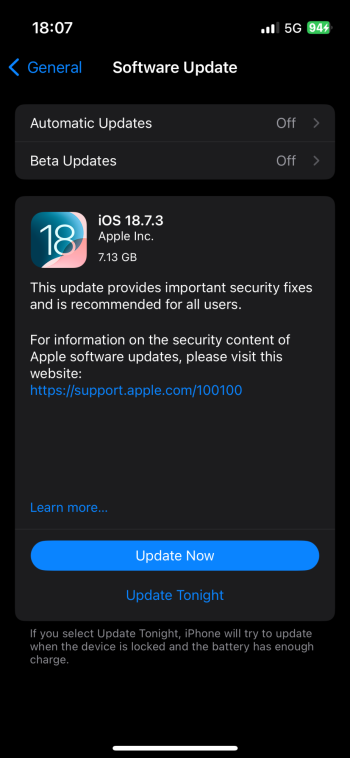
The clock is ticking on iOS 18 firmware signing. Apple recently rolled out 18.7.3 but on my phones, it was only showing 26.2 until I switched to iOS 18 Public Beta.

bad news I am just found out , its only can update to iOS 26 even I plug in to MacBook Pro, no more iOS 18 choice

I have two iPhone 13 minis that I cycle between for my backup iPhone. One has iOS18 and the other iOS26.3 installed. From my use case, I haven't had issues using my 13 mini with iOS 26 installed on it. Personally, I like the Liquid Glass that iOS 26 brings. For my other mini, I will keep it on iOS 18 but actually prefer iOS 26 since my mini is my backup iPhone, I don't see a problem running the newer iOS on it. Just my take on things.
I don't worry about battery drain as I have MagSafe battery packs to use if I need for my 13 minis. For my use case, having iOS 26 is not an issue, especially for a backup iPhone.just on wifi and limited use? I'll bet the iOS 26 iPhone 13 mini drains considerably quick..
I sign up but I can only see iOS 26 beta , didn’t show there are iOS 18 beta .would you give me more details? Thanks a lotSign up for the beta program. Once you've done that, you'll get the option to use iOS 18 beta via OTA update.
I sign up but I can only see iOS 26 beta , didn’t show there are iOS 18 beta .would you give me more details? Thanks a lot
thanks man ,if i update to ios 18 public beta , can i update to IOS 18 RC after ?When I signed up for the beta, these options show up in Settings - General - Software Update - Beta Updates
View attachment 2589019
thanks man ,if i update to ios 18 public beta , can i update to IOS 18 RC after ?
is the IOS 18 public beta version stable man ? actually any difference between with the RC version since i never try any public version before ,thanks for replyThere's no iOS RC for 18 on iPhones anymore. Anyway, the beta was released the same time 18.7.3 stable on iPads so that likely is the same as stable.
is the IOS 18 public beta version stable man ? actually any difference between with the RC version since i never try any public version before ,thanks for reply
just on wifi and limited use? I'll bet the iOS 26 iPhone 13 mini drains considerably quick..
is it a beta version? thanks for replyIt's basically just a security update. For iPhones, iOS 26 is the main release now.
Well, that's basically what Lightning chargers are for 😉
Yeah but when it’s exceptionally bad being tethered to a charger isn’t the best. It is a mobile phone not a desktop.