Become a MacRumors Supporter for $50/year with no ads, ability to filter front page stories, and private forums.

royinla14

macrumors 6502a
Original poster
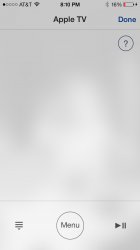
Can someone take a pic of the screen on the new Remote app and let me know if you see the same kind of light bleeding?
 

Attachments

  • image.jpg
    image.jpg
    47.5 KB · Views: 115
the app is semi translucent. its your wallpaper showing through slightly, like the second poster said. look at the screen in the app, then close it. you will see where its your wallpaper showing.
 
Agree with dictoresno. Translucency causes colours to appear like this. You can notice a similar effect while in a call, for example.
 
That also looks more like a screenshot than an actual picture of the screen.

Because if it's got light bleeding, it's impossible to tell in a screenshot.
 
That also looks more like a screenshot than an actual picture of the screen.

Because if it's got light bleeding, it's impossible to tell in a screenshot.

im sure they are talking about the blurred image in the middle of the screen, which is the wallpaper showing through. i checked the app on my phone too and it does the same thing. im surprised the OP didnt realize their own wallpaper image matched the outline of the blurred image. its the first thing i realized when i opened the updated app for the first time. OP, post a screen shot of your home screen. it looks like its a pic of a persons face and shoulders.
 
This is not light bleeding which would be a hardware issue. Taking a screenshot on your phone won't capture faults like light bleeding or dead pixels because they aren't software issues.

What you're seeing is probably your wallpaper through the translucent menu.
 
You get the same effect when you exit the camera app. Look at the minimised image and it's a translucent image of your last picture. Nothing wrong with your screen.
 
Register on MacRumors! This sidebar will go away, and you'll see fewer ads.