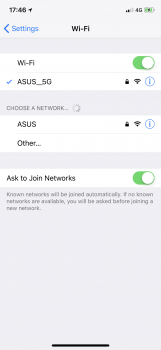
jamin00 macrumors 6502a Original poster Nov 3, 2017 #1 In the wifi settings it has my wifi name shown and has the tick next to it suggesting its connected yet it says 4G up the top and not the wifi icon?? Attachments F321CA93-0CD3-4BB8-A92A-C4B8A114CA53.png 309.8 KB · Views: 1,861
In the wifi settings it has my wifi name shown and has the tick next to it suggesting its connected yet it says 4G up the top and not the wifi icon??
J Jimpilot Cancelled Nov 3, 2017 #2 Are you connected to a Wi-Fi that requires additional login? Like a lot of free Wi-Fi that require you accept conditions etc before connecting you
Are you connected to a Wi-Fi that requires additional login? Like a lot of free Wi-Fi that require you accept conditions etc before connecting you
jamin00 macrumors 6502a Original poster Nov 3, 2017 #6 Done the router etc but reset the iPhone and all good now 🙂
jamin00 macrumors 6502a Original poster Nov 3, 2017 #7 Same thing again? But this time it appears I have no internet [doublepost=1509742443][/doublepost]Resolved, an issue with my isp
Same thing again? But this time it appears I have no internet [doublepost=1509742443][/doublepost]Resolved, an issue with my isp
S skunkey macrumors newbie Apr 3, 2018 #8 I have just had this problem at work. Solution was to reset the network settings which seemed to work.
I have just had this problem at work. Solution was to reset the network settings which seemed to work.