F foxdie097 macrumors newbie Original poster Jun 18, 2011 #1 My iphoto comes up every time I turn on my computer or log in and I don't know how to tern it off. 😕
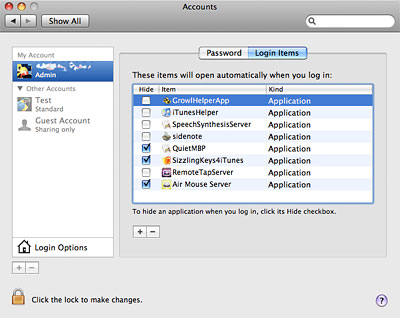
Mrguidogenio macrumors regular Jun 18, 2011 #2 Get to your account panel and click "Login Items" like this: Then highlight iPhoto and hit the minus button. This will remove it from your login items so it doesn't lunch automatically when you turn on the Mac.
Get to your account panel and click "Login Items" like this: Then highlight iPhoto and hit the minus button. This will remove it from your login items so it doesn't lunch automatically when you turn on the Mac.