Become a MacRumors Supporter for $50/year with no ads, ability to filter front page stories, and private forums.

Hughm

macrumors member
Original poster
I'm new to Mac, so bear with me. I'm running 10.5.8 on a G4.

In Finder, my iPhoto library appears as a folder in the Pictures folder, but there are no sub-folders below that (like Events or a "modified" folder) or any indication in Finder that I have any images at all.

This is unlike all other media folders (documents, music, movies, etc.) where I am, al la Windows, quite able to see at a glance what I've got.

I assume, for now, that I've not set some preference; but I've tried everything I can think of. Help!
 
http://theappleblog.com/2007/11/06/how-to-access-your-iphoto-08-library-from-your-browser/

iphotolibrary-02.png
 
You can option click and select 'show package contents', but it is not organized for browsing easily via the finder. iPhoto is designed so that you use the iPhoto program as the 'finder', and use this program to see "at a glance what you've got". (kinda like iTunes is the finder for media..)
 
You can option click and select 'show package contents', but it is not organized for browsing easily via the finder. iPhoto is designed so that you use the iPhoto program as the 'finder', and use this program to see "at a glance what you've got". (kinda like iTunes is the finder for media..)

You mean right click or CONTROL click, OPTION click does nothing.
 
Since no one else has said this, allow me:

Don't mess around inside the iPhoto Library directory. Browse all you like if you want to understand how it works, but don't move anything or delete anything because it will screw up iPhoto. My friend, who is not very computer literate, monkeyed around in her iPhoto Library folder and ended up losing a lot of important photos.
 
Thanks so much for the advice.

The "show package contents" option seems to work, though I can see that there are a lot of items in the list that you would not want to monkey around with!

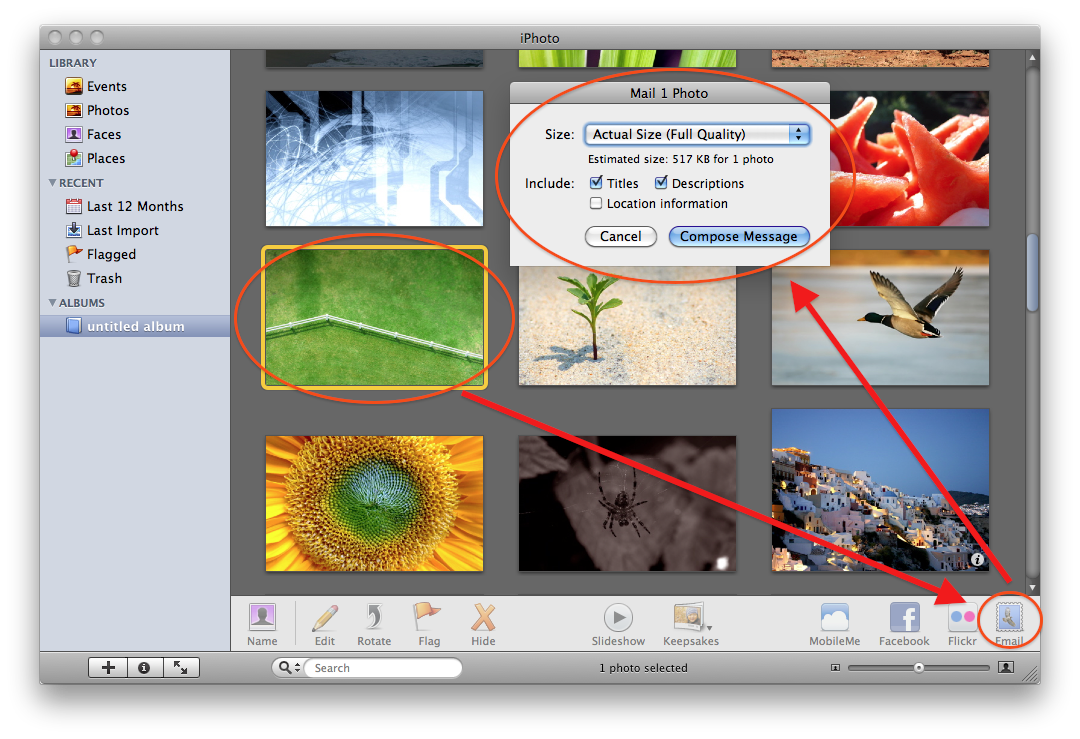
It seems a very clumsy way to do things, though. When I want to attach a photo to an email, for example, it is surprising to have to take that extra step to see a list of files. Not very Apple-like, if you ask me.
 
Thanks so much for the advice.

The "show package contents" option seems to work, though I can see that there are a lot of items in the list that you would not want to monkey around with!

It seems a very clumsy way to do things, though. When I want to attach a photo to an email, for example, it is surprising to have to take that extra step to see a list of files. Not very Apple-like, if you ask me.

4563618352_e2a5eb2550_o.png


Or drag and drop via the Desktop or directly into the browser.
 
Register on MacRumors! This sidebar will go away, and you'll see fewer ads.