Become a MacRumors Supporter for $50/year with no ads, ability to filter front page stories, and private forums.

JW Pepper

macrumors regular
Original poster
One of the main reasons I bought the iPhone 6 so that I would be able to view my photo's better. At no point does it say anywhere that the iPhone 6 cannot sync your photo library only iCloud photo's will appear. Who put's their photo's on iCloud? Is there any way around this hideous problem. Does anyone know if the iPhone 5 also has this problem?

 
You're trying to sync photos from your computer? You can absolutely still do that....

In earlier builds of ios 8 (before 8.1.x) they got rid of the camera roll but re implemented it very soon after. Perhaps that is what's confusing you?
 
Last edited:
What?

I sync my photos from iPhoto to my iPhone via iTunes as it's always been. iPhone 6, iTunes 12, iPhoto.

You're not making any sense.
 
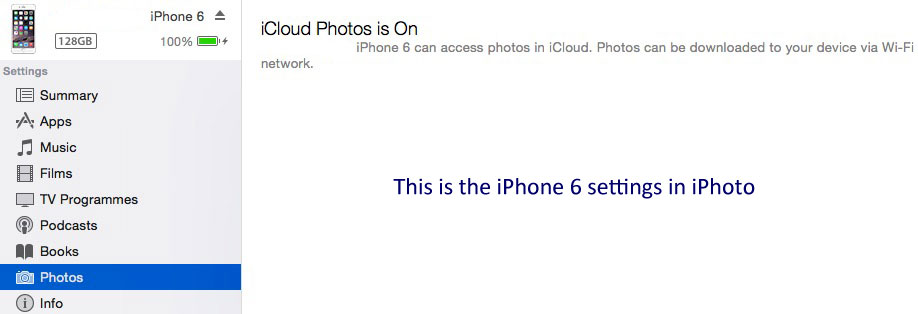
When you fire up iTunes 12.01.126 and you go to settings/Photos there is a statement that the Phone will sync with iCloud. There is no option to sync with iPhoto.

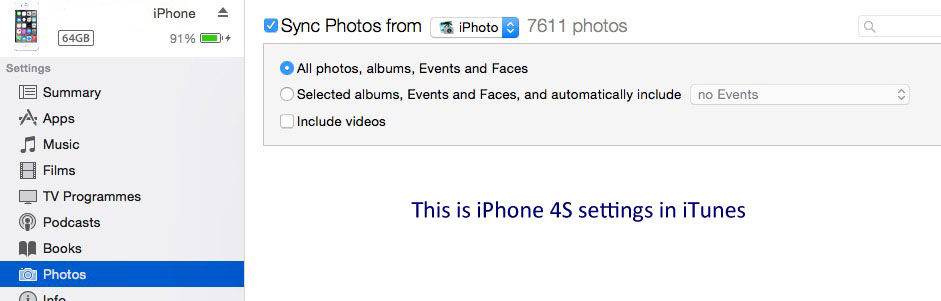
With the 4S when you go to settings you have a check box which says Sync Photo's from (dropdown box) iPhoto and then you can select all photo or Select Albums and have a check box to include videos. All this is missing from iPhoto.


Here is a screen shot of the iPhone 6 settings

ip6.jpg


And here is the original iPhone 4S settings

ip4s.jpg


You can clearly see that there is no option to sync photos from iTunes. First you have to upload everything to iCloud and pay your storage charges, then you have to download them all again to you shiny new iPhone6.

Madness.

----------

I hope I make sense now!
 
I suspect you have turned iCloud Photo Library on in your iPhone settings. Turn that off (not Photo Stream, they are different) and the option to sync via iTunes will reappear.
 
I suspect you have turned iCloud Photo Library on in your iPhone settings. Turn that off (not Photo Stream, they are different) and the option to sync via iTunes will reappear.

This is likely what is happening. If you have iCloud sync on you can't also have iTunes sync on (unless you temporarily turn iCloud sync off).
 
Ah that might be it. I didn't turn anything thing on it must be the new default. I tried searching for help but nothing came up.

Thanks.
 
When you fire up iTunes 12.01.126 and you go to settings/Photos there is a statement that the Phone will sync with iCloud. There is no option to sync with iPhoto.

With the 4S when you go to settings you have a check box which says Sync Photo's from (dropdown box) iPhoto and then you can select all photo or Select Albums and have a check box to include videos. All this is missing from iPhoto.


Here is a screen shot of the iPhone 6 settings

Image

And here is the original iPhone 4S settings

Image


You can clearly see that there is no option to sync photos from iTunes. First you have to upload everything to iCloud and pay your storage charges, then you have to download them all again to you shiny new iPhone6.

Madness.

----------

I hope I make sense now!

Doing it wrong.
 

Attachments

  • Screen Shot 2015-01-27 at 10.09.02 pm.png
    Screen Shot 2015-01-27 at 10.09.02 pm.png
    51.7 KB · Views: 102
Clearly in the screenshot for the iPhone 6 iTunes says iCloud photos is on. Turn it off and sync as normal. I suspect Apple are not the idiots, as usual it's operator error.
 
Register on MacRumors! This sidebar will go away, and you'll see fewer ads.