


Got a tip for us?
Let us know
Become a MacRumors Supporter for $50/year with no ads, ability to filter front page stories, and private forums.
iPod touch iPod won't sync after iTunes 8.0.1 update
- Thread starter SnowLeopard2008
- Start date
- Sort by reaction score
You are using an out of date browser. It may not display this or other websites correctly.
You should upgrade or use an alternative browser.
You should upgrade or use an alternative browser.
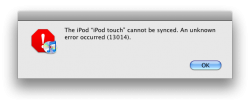
This problem is being discussed in the dedicated thread. Try unplugging and then plugging it back in. Some had to do it a few times.
sorry, i just found that thread. i was panicing so yea... anyway a reboot also helps. i rebooted my macbook and reconnected. worked liek a charm

Can someone give me a link to the thread in question? Thanks.
Oh, and by the way, it still syncs, it just gives you an error message when it's done.
Oh, and by the way, it still syncs, it just gives you an error message when it's done.
Here is the dedicated thread link:
https://forums.macrumors.com/threads/573933/
I grabbed it from macrumors home page.
https://forums.macrumors.com/threads/573933/
I grabbed it from macrumors home page.
Well just tried to sync with the new itunes 8.0.1 and nothing effing work still get the same G*d*amn message. Bout to thow my whole effing computer out the mother effin door. Eff apple they can suck on my nutz. O sorry im having a bad day i just found out my car was stolen. But still apple u ****ed my itunes up.
Just reboot your computer. That solves the problem for 99% of the people who encountered this problem thus far.
Well just tried to sync with the new itunes 8.0.1 and nothing effing work still get the same G*d*amn message. Bout to thow my whole effing computer out the mother effin door. Eff apple they can suck on my nutz. O sorry im having a bad day i just found out my car was stolen. But still apple u ****ed my itunes up.
How do u reboot a computer? If u mean restart then i did that a thousand times. IF u mean turn it off i did that a thousand times. But if rebooting is a completely different process then let me know.

How do u reboot a computer? If u mean restart then i did that a thousand times. IF u mean turn it off i did that a thousand times. But if rebooting is a completely different process then let me know.
You must be a REAL noob to computers if you've never heard of rebooting. Yes, it's a restart. A warm boot is a restart and a cold boot is starting up the computer from a shut down state.
You must be a REAL noob to computers if you've never heard of rebooting. Yes, it's a restart. A warm boot is a restart and a cold boot is starting up the computer from a shut down state.
So which one should i do? The warm or cold boot? BTW i uninstall itunes .
So which one should i do? The warm or cold boot? BTW i uninstall itunes .
There's really no difference. A reboot just saves you from having to shut the computer down especially if you are doing software installs and want to get right back to the desktop. When you reboot the computer it shuts down processes that are using up needed memory and kinda refreshes the computer. This is why a reboot is necessary as a problem solver when you are having issues.
I don't know what method you used to remove iTunes but it might be better for you to use App Zapper or App Delete to get rid of all of the iTunes preferences. After that then you can reinstall iTunes from Apple's website.
Here's a link to App Zapper. If you've already emptied the Trash then you will need to reinstall iTunes and then remove it again with App Zapper.
http://www.versiontracker.com/dyn/moreinfo/macosx/28764
There's really no difference. A reboot just saves you from having to shut the computer down especially if you are doing software installs and want to get right back to the desktop. When you reboot the computer it shuts down processes that are using up needed memory and kinda refreshes the computer. This is why a reboot is necessary as a problem solver when you are having issues.
I don't know what method you used to remove iTunes but it might be better for you to use App Zapper or App Delete to get rid of all of the iTunes preferences. After that then you can reinstall iTunes from Apple's website.
Here's a link to App Zapper. If you've already emptied the Trash then you will need to reinstall iTunes and then remove it again with App Zapper.
http://www.versiontracker.com/dyn/moreinfo/macosx/28764
will I lose anything from my library?
i have a problem once i downloaded the new itunes it asked me to updat my ipod video, when i did it erased all my music effin bad but ok fine. now the ipod won't come up in itunes not only that but itunes freezes every time i connect my ipod. once i disconnect the ipod itunes is fine i have rebooted, re-installed ipod drivers i even removed the new itunes and installed an older version same thing what do i do thank you.
Register on MacRumors! This sidebar will go away, and you'll see fewer ads.