Become a MacRumors Supporter for $50/year with no ads, ability to filter front page stories, and private forums.
The two "problems" that you've pointed out are so weirdly specific that it makes me think you're a Windows user trying to troll us.

I for one prefer the behavior in which the X closes individual windows, not the entire application. That makes logical sense to me. iPhones and Android devices work the same way, when you swipe away an app, it doesn't close the app just the individual instance.

As for ejecting hard drives, this is a data safety feature. You should never unplug a drive without ejecting it first, including on Windows.

Idk man if these are your two biggest complaints about macOS, feels like you mostly like it.
 
I use an app called "Ejectify" to solve the "disk not ejected properly" annoyance. I've configured it to auto-eject disks when I lock the screen, and it re-mounts them automatically when the screen wakes back up. It makes for one less thing I have to worry about.
 
The two "problems" that you've pointed out are so weirdly specific that it makes me think you're a Windows user trying to troll us.
Ouch. I would bet here are plenty of "us" that use both Mac and Windows.
Even so, I think it is good to being open to other camps, where their perspective may reveal limitations / weaknesses that have been allowed for so long.
Happy computing, all!
 
Clicking on the X does close the window. The app itself does not quit. It's no different from Windows apps minimizing to the system tray instead of closing when clicking on the X in the top right corner. If you're just unplugging the drive without ejecting it first, that's a bad practice on ANY OS, including Windows, which is why there is the "Safely Remove Hardware and Eject Media" option in the system tray on Windows systems.

Pressing the red X sends the application into it background state. It will free up memory from its foreground processes while retaining its core processes. Depending on the app it will idle or nap, the latter being a more efficient version of the former. Energy usage is virtually zero. The app is ready to reopen quickly and efficiently (its still resides in RAM) or be terminated by the user or the OS to reclaim resources. It's generally better to let the OS handle it, since it knows what it needs better than the user does.

Maps is an easy application to see the full life cycle. If you watch it in activity monitor you can see it use 300-400 mb of RAM, when you close it (not quit), you'll see it drop to 50-100 mb of RAM, and if you wait you'll see it enter its 'App Nap' state and maintain 0.0 % CPU.

It doesnt matter too much in the end however Apple is fairly particular with battery life so they will try to keep things in RAM as long as possible.
 
  • Like
Reactions: judgeFire
Yes, first thing to do is to get rid of the current CEO and replace it with one that has a technical background.
 
  • Haha
Reactions: progx
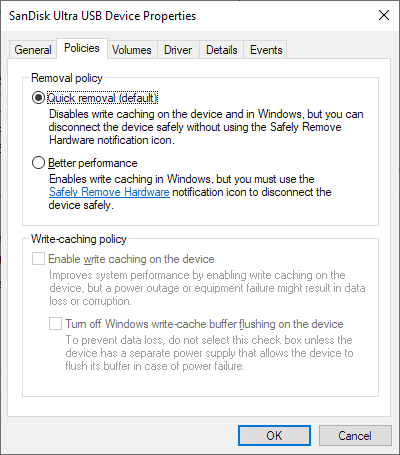
Actually Windows has two options: quick removal or better performance. If you chose better performance, then you have to manually eject.

Windows choses easy as default. Apple choses performance. Kind of like easy or good. I think you see similar decisions from both companies across many of their choices.


Yeah, but here’s the thing — Windows gives you a choice: Quick Removal (which is default) or Better Performance, which requires manual ejection. That’s fine. The point is, Windows defaults to easy, Apple defaults to strict performance. It’s like choosing between convenient or theoretical gains.

And what exactly is “better performance” here anyway? If you’re copying a hundred gigs of photos, are you really saving more than a second? Most people are using USBs to transfer pictures or documents — not stream high-performance databases.

This isn’t about Windows being better — it’s about macOS missing practical touches. Like Notepad++ on Windows — a brilliant, free app that actually improves the OS. I scoured the Mac ecosystem and couldn’t find anything that really fills that space. That’s what I meant when I said: make Mac less terrible. It’s not hate — it’s just pointing out where it could grow up a little.
I do not want to talk about Windows over here. Windows do not exists in the MAC Universe. It is a las time I'm going to use the word "Windows" over here.
I thought you guys/girls probably have a your "own" tools or preferred free apps that could improve MAC world. Especially for those that just arrived here... You know what I mean. Thank you!
 
I'm not sure if anyone is interested but

I saw people on a Mac forum recommending a free app called MC Explorer, and honestly it made my life way easier.
What Mac forum was that ? ; who produced the app ?.
 
Register on MacRumors! This sidebar will go away, and you'll see fewer ads.