Become a MacRumors Supporter for $50/year with no ads, ability to filter front page stories, and private forums.
Powerbook max memory?

I have 1.25GHz AlBook. I got the Superdrive version that shipped with 512MB memory. I get the beachball all the time. I would like to go to 1gb. I think the 2 slots are already used (@x256mb). So, I will need to buy a 1gb card. Is this right? Will I also be able to use one of the 256 cards in the other slot(can the computer run 1.25GHZ of RAM)?
 
mrzeve said:
Never been on a forum and gotten so many replies. Thought this was a dream or something.

Anyone have any idea how much the Apple Genius Bar would charge be for a ram installation, that could play a factor in how much memory I purchase.

Don't know how Apple does things with its retail stores in the US, but in the UK its 99% resellers and we wouldn't make a charge provided bought the RAM from us. If you came into the shop with memory you got from crucial I would charge £25.
 
I plan on buying Tiger when it is released.

Do you guys think 512mb ram on a Mini is going to be sufficient?
 
mrzeve said:
I plan on buying Tiger when it is released.

Do you guys think 512mb ram on a Mini is going to be sufficient?
Yeah you'll be fine. 🙂 For anything ultra-intensive you may want more, but for anything else you'll be fine with 512.
 
jjd said:
I have 1.25GHz AlBook. I got the Superdrive version that shipped with 512MB memory. I get the beachball all the time. I would like to go to 1gb. I think the 2 slots are already used (@x256mb). So, I will need to buy a 1gb card. Is this right? Will I also be able to use one of the 256 cards in the other slot(can the computer run 1.25GHZ of RAM)?
Yes (buy a 1gb module) and Yes (it can run a 1gb+ 256mb). 🙂
 
I know it's been said a lot; 'Get 512mb, if you can 1gb', but no one's really said if 512mb of RAM is really enough. Will my Mac Mini with 512mb thats in the post be ok?
 
JoeUK said:
I know it's been said a lot; 'Get 512mb, if you can 1gb', but no one's really said if 512mb of RAM is really enough. Will my Mac Mini with 512mb thats in the post be ok?


Yes. It will work - thats what the Apple store uses in their mac minis. They are really, REALLY fast.
 
shake said:
I think the mini is underpowered. sure, yeah, the price is right blah blah blah. i'm not buying one.

I also think Apple kind of dropped the ball on this one. They tried to do two things at once, and failed on both (up to a point):

- make a computer even smaller than the so-called "small form factor" on the PC side (they were sucessful, and the result is also very nice)

- make the lowest-cost Mac ever (they were successful, but are still a bit more expensive than PCs, if you only look at the price tag and the included gear).

Why try to make a low-cost, smallest-ever computer? We all know that small parts cost MORE than regular parts. And yet, Apple used a laptop HD and a laptop slot-loading drive. At least they didn't use SODIMM (but they still made the mistake of only having one slot, making it more expensive to upgrade the Mac mini than any other of their current desktop offerings).

You want to make a low-cost computer, you stick with "old", regular parts:
- 3.5" HD, ATA133 (don't even use serial ATA)
- tray-loading combodrive (use the same as the eMac)
- multiple memory slots (so upgrading doesn't costs much, and allows you to upgrade in small steps)

Yes, the Mac mini is beautiful. And small. But it's too small for its own good (and for its own price). Imagine if it had been a tad bigger, used a regular 3.5" drive (7200 RPM), and had two memory slot (ships with 256MB, most users would simply add another 256MB).

In short:
- Laptop drives are more expensive AND slower. Big mistake as far as I'm concerned.
- One memory slot means you have to remove the current memory to upgrade. In most cases, replacing is more expensive than adding.
- Slot-loading is nice, but even top-of-the-line DVD players still have trays. There's nothing "wrong" with tray-loading drives. Keep costs down, use regular parts, don't be too fancy.
- This is 2005. The Radeon 9200/32MB is pathetic for today's market. The low-end needs to be 64MB, the mid-range 128MB and the high-end 256MB.

Yes, some of my points could be pointless. Apple now has slot-loading on all computers (meaning they order more drives, costing less in the end). Maybe they can buy laptop drives for a lot cheaper. But PowerMacs and iMacs (and eMacs) all still have 3.5" drives. And those drives are 7200 RPM, not 5400 (or worst, 4200).

Would the Mac mini cost more with 64MB VRAM instead of 32MB? Yes. Would it cost a lot more? Not really. In fact, try to go out and purchase a 32MB videocard for a PC. You can't (unless you got for a non-ATI, non-nVidia card). You'll probably even have a hard time finding 64MB cards. I've even seen budget cards with 256MB...

Yes, Steve said "BYODKM" and specified USB keyboard/mouse. But had Apple looked a bit at the current market, they would've put PS/2 ports on the Mac mini. Most mices are USB, but 90%+ of keyboards are still PS/2 only. Apple should've shipped the Mac mini with a PS/2-to-USB adapter, like they did for the DVI/VGA port. Even in the hopeful case that you already have a USB keyboard and mouse, you're out of luck if you want to connect anything else (scanner, printer, etc). The Mac mini needed at least 3 USB ports, 4 would've been enough for most users (keyboard, mouse, printer, scanner/other).

Will the Mac mini be a monumental flop? Absolutely not. Is it overpriced? Maybe a bit, but it's not "Macs are too expensive" anymore.

Could it have been cheaper AND more powerful/upgradable? Absolutely. I'm surprised every time Apple makes weird decisions like this. After all, isn't it "Perfection: the difference between ordinary and extraordinary is that little extra"? Putting slower, more expensive parts isn't what I call "extraordinary" in my book. Make the design fit the parts, not the other way around (see iMac G5, PowerMac).

Imagine a bigger Mac mini with a GeForce FX5200 Ultra/64MB, two memory slots (256MB or 512MB default, but the point being you can upgrade for cheap later on - even put the memory slots user-accessible, underneat for exemple), a 3.5" 7200 RPM HD (giving default sizes of 80/120GB instead of 40/80GB), four USB 2.0 ports in the back. PS/2-to-USB adapter included in the box. Same price.

Wouldn't that be much better? After all, switchers are used to computer towers that are so big (and so noisy), even if the Mac mini had been 25-50% bigger, it would still have been incredibly impressive and a lot smaller than the current SFF boxes on the PC side.

To be fair, on all those five points (GPU/VRAM, Memory Slots, HD, USB ports and PS/2 connectivity), only 3 are out of our hands (GPU/VRAM, memory slots, HD). You can fix the lack of USB ports by using an external hub (I got one with 7 ports) and buy the PS/2 adapter yourself if needed (after all Apple never said anything about PS/2 ports. But you know as well as me that most switchers will have PS/2 keyboards).

Oh well. Can't wait to see what Apple will do next. 😱

Waiting for Tiger, Mac mini rev.2 and iMac G5 rev.2

Either 64MB VRAM in the Mac mini or a better GPU/128MB in the iMac G5 would be enough of an update IMO.

...

Stupid PC... this Athlon sure is noisy... 😡

 
mrzeve with said:
maya's replys

Adium X <--- Not a Memory Hog.
iTunes <--- Not a Memory Hog, can be if you are ripping/encoding or burning a CD.
Safari <--- Not a Memory Hog, can be depending if you are on a flash/java site

The following are open rarely, from time to time
iCal (open every night to wake me up in the morning, then shut off)
OSXVNC <--- Big Time Memory Hog.
iPhoto <--- Big Time Memory Hog, with larger images and manipulation.
Konfabulator <--- Big Time Memory Hog, do not even use it.

Upgrade the RAM
🙂


BOLD text is my reply. 😉 🙂
 
clayjohanson said:
Is that a single stick for a Mac mini? Because if you can get a 1 GB stick for a Mac mini for $86, that's an insanely good deal... my 1 GB stick cost about $175.

Yes its a single stick that was supposedly stripped from a Compaq desktop.

I was wondering what the 64x4 meant and what not.
 
mrzeve said:
Yes its a single stick that was supposedly stripped from a Compaq desktop.

I was wondering what the 64x4 meant and what not.
That doesn't sound right to me... I don't remember anything about "64x4" when I bought my RAM upgrade for the Mac mini.

My advice: Make sure you can return the RAM if it's not the right thing... or ask the seller what exactly they have.
 
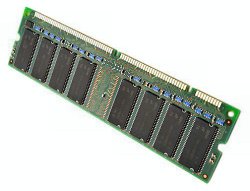
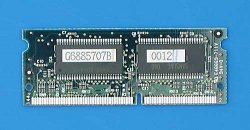
Careful with the RAM. Most desktops use DIMM memory and laptops (Mac minis) use SO-DIMM memory.
Attached are pictures showing the difference.
SO-DIMMs are smaller and more $
 

Attachments

  • DIMM.jpg
    DIMM.jpg
    35.6 KB · Views: 82
  • so-dimm.jpg
    so-dimm.jpg
    21.9 KB · Views: 66
I convinced a friend to switch, and she recently got an emac. It has 512 MB ram, but it's pretty slow. She thinks it's a slow computer, and is not particularly happy with it. When I've used it, it seemed to be slower than my 1.4 ghz powermac (upgraded from 400 mhz). My processor is slightly faster (hers is 1.25 ghz) and her bus is faster (mine is an old 100 mhz, hers is 167 mhz). I would've expected her emac to be about as fast as my powermac (I have 1 GB ram). But it takes longer to open applications and load web pages (loading pages is ridiculously slow on hers, considering she has a very fast cable internet connection). I doubt the difference in ram is causing the speed difference, but I'm not positive. I would think her faster bus would make up for her slower processor. If anyone knows any issues that slow emacs down, or any tricks to speed it up (besides overclocking), I'd love to hear about it.
 
They should've done the iBook trick and had 128MB of RAM soldered onto the motherboard. That way it would've been 384MB RAM minimum and 640 with an upgrade.

(The Mac mini does NOT use laptop RAM)
 
mrzeve said:
Hello all,

I just switched and I have to say, Im absolutely hating it.

I bought the mac mini (80gb hd stock version/1.42ghz/256mb ram/no bluetooth or wireless installed) and I have to say Ive never experienced something so slow since my 300mhz home built windows machine with 32mb of ram.

Anytime I try doing a small task I get the spinning multicolor disc cursos.

Anyway, Its been like this since day one. I have only the following applications open round clock (I close them and reopen them sometimes when the computers really hauling butt)

Adium X
iTunes
Safari

The following are open rarely, from time to time
iCal (open every night to wake me up in the morning, then shut off)
OSXVNC
iPhoto
Konfabulator

Thats it really. Nothing more.

I opened utility monitor (I think thats what it was called) when I was having the trouble and viewed the ram and the 256 wasnt even fully used.

I understand this is a laptop hardrive inside the mini, but comeon people I have a windows laptop on my lap right now, and its NOT even comparable. It feels like Im using the fastest computer on earth right now. My mini is OFF because I can not bare with it right now.

I ran the disk test that came with the mini, and everything turned up fine.

I repaired permissions before and after every software update.

Im really tearing my hair out guys. Please, reassure me that Im nuts.

.......anyone wana buy a mini 🙄
All you need is more RAM. The OS alone is sucking over half your RAM which is why it's so slow. bump it to 512 or 768 and you'll be fine.
 
Yvan256 said:
Yes, the Mac mini is beautiful. And small. But it's too small for its own good (and for its own price). Imagine if it had been a tad bigger, used a regular 3.5" drive (7200 RPM), and had two memory slot (ships with 256MB, most users would simply add another 256MB).

While they're at it they might as well take the the laptop drives out of their laptops and put full size drives in. It would save the a few $ and would only increase the weight and size by, say, 25%.

What is the mac mini? a computer that is being marketed at the ipod crowd. a computer that is not supposed to interfere with your life. How do you do that ? you make as small and as slick looking as you can. My ONLY problem with the mini is that it only has 256 mb of ram. it's so cheap to put in 512 and when a user has iphoto and safari open at the smae time and their comp starts crawling, they are gonna get frustrated with it.
 
mrzeve said:
Yes its a single stick that was supposedly stripped from a Compaq desktop.

I was wondering what the 64x4 meant and what not.

That doesn't sound like a gig stick. 64x4=256; 256/8=32MB. At least that's the formula according to Crucial.

As for me, I got a gig stick for my iBook from Fry's Outpost.com (unlikely source, as I normally avoid Fry's like the Plague.) I got it for $160, and that's for a laptop SO-DIMM. It works like a charm, haven't had a single problem with it. They might have similar or better pricing for RAM that'll fit the Mac mini, so check it out.
 
I remember someone benchmarking the mini (I think it might have been barefeats.com) who suggested if money's tight it's better to get the slower machine with 1GB of RAM than the faster machine with less memory.
 
Register on MacRumors! This sidebar will go away, and you'll see fewer ads.