
Become a MacRumors Supporter for $50/year with no ads, ability to filter front page stories, and private forums.

Laughingman13

macrumors member
Original poster
So basically I put a fan near my macbook pro and set the airpower to Low to give my macbook pro some cool air.

Are there any Cons to doing this?

Would this accumulate more dust?
Seeing as there aren't really any open holes in the macbook pro I am pretty sure it is resistant to dust?
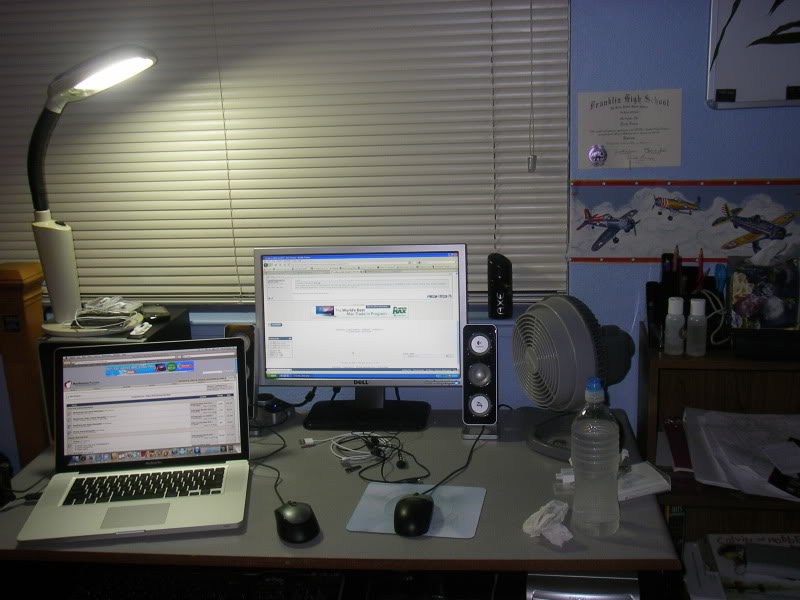
setup.jpg
 
Just make sure you're not blowing the fan into the rear vents, and you should be okay. What you're doing is no different than a laptop cooling pad, though probably less effective depending on how strong and/or placement of the fan.
 
Just make sure you're not blowing the fan into the rear vents, and you should be okay. What you're doing is no different than a laptop cooling pad, though probably less effective depending on how strong and/or placement of the fan.

Where are the vents in the macbook pro?
 
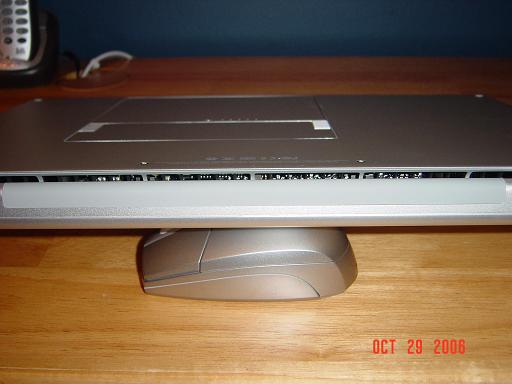
The vent running along the entire backside of the MBP above the keyboard, with the screen facing you if opened.

Older MBP below, but same location.
vents.JPG
 
The vent running along the entire backside of the MBP above the keyboard, with the screen facing you if opened.

Older MBP below, but same location.
vents.JPG

nevermind didn't understand what u meant.

Now I do sorry about that.

the vent is barely noticeable lol.
 
The fans inside the MacBook Pro blow the heat inside your MBP out, while sucking the cooler surrounding air in. The fan you are using is not blowing "cool" air onto the MBP, it's blowing the same temperature air across the case as the air that is already in contact with the case. Air from the fan feels "cool" to you because the increased air circulation is increasing your evaporative cooling. However, your MBP isn't moist and doesn't sweat, so it won't cool evaporatively, and thus the fan is not going to cool the MBP nearly as effectively as it cools you. If the fan was right next to the MBP, then the greater volume of cooler (than inside the MBP) air coming in contact with the case would slightly cool your MBP. As it is, from a couple feet away, I'll guess that the results will be negligible.
 
The fans inside the MacBook Pro blow the heat inside your MBP out, while sucking the cooler surrounding air in. The fan you are using is not blowing "cool" air onto the MBP, it's blowing the same temperature air across the case as the air that is already in contact with the case. Air from the fan feels "cool" to you because the increased air circulation is increasing your evaporative cooling. However, your MBP isn't moist and doesn't sweat, so it won't cool evaporatively, and thus the fan is not going to cool the MBP nearly as effectively as it cools you. If the fan was right next to the MBP, then the greater volume of cooler (than inside the MBP) air coming in contact with the case would slightly cool your MBP. As it is, from a couple feet away, I'll guess that the results will be negligible.

OK cool but what I was wondering is that should I really keep the fan on because it can cool my small work area. THat it turn will put less stress of my mac?
 
You don't need a fan. Apple actually built one if for you.🙄 Trust me, the computer can keeps its self cool. Just use it with in the aceptable operating temps (95F is the max) and let the computer worry about its self.
 
You don't need a fan. Apple actually built one if for you.🙄 Trust me, the computer can keeps its self cool. Just use it with in the aceptable operating temps (95F is the max) and let the computer worry about its self.
Actually the maximum operating temperature is 105ºC.
 
Actually the maximum operating temperature is 105ºC.

Yes, but thats for the CPU. If the computer itself is that hot, hell will burn over. If you have the actual computer with in the temps of 50-95, then the computer will cool its self fine.
http://www.apple.com/macbookpro/specs.html


Line voltage: 100V to 240V AC
Frequency: 50Hz to 60Hz
Operating temperature: 50° to 95° F
(10° to 35° C)
Storage temperature: -13° to 113° F
(-24° to 45° C)
Relative humidity: 0% to 90% noncondensing
Maximum operating altitude: 10,000 feet
Maximum storage altitude: 15,000 feet
Maximum shipping altitude: 35,000 feet
 
Yes, but thats for the CPU. If the computer itself is that hot, hell will burn over. If you have the actual computer with in the temps of 50-95, then the computer will cool its self fine.
http://www.apple.com/macbookpro/specs.html


Line voltage: 100V to 240V AC
Frequency: 50Hz to 60Hz
Operating temperature: 50° to 95° F
(10° to 35° C)
Storage temperature: -13° to 113° F
(-24° to 45° C)
Relative humidity: 0% to 90% noncondensing
Maximum operating altitude: 10,000 feet
Maximum storage altitude: 15,000 feet
Maximum shipping altitude: 35,000 feet
I'm sorry, yes, you're correct. I misunderstood your post.
 
When I see specs like this it makes me realize that I need to move as here in AZ it actually gets hotter than the storage temperature for an UNUSED computer....and waaay hotter than the acceptable operating temperature. It's sad that I technically shouldn't use my computer out on the patio on a spring day, let along a summer day where I live. That of course is not Apple's or any other manufacturers fault, it's mine for living in this hell hole. Heck, in the middle of summer it will be 102 degrees at 3am in the morning. 😀😀

Yes, but thats for the CPU. If the computer itself is that hot, hell will burn over. If you have the actual computer with in the temps of 50-95, then the computer will cool its self fine.
http://www.apple.com/macbookpro/specs.html


Line voltage: 100V to 240V AC
Frequency: 50Hz to 60Hz
Operating temperature: 50° to 95° F
(10° to 35° C)
Storage temperature: -13° to 113° F
(-24° to 45° C)
Relative humidity: 0% to 90% noncondensing
Maximum operating altitude: 10,000 feet
Maximum storage altitude: 15,000 feet
Maximum shipping altitude: 35,000 feet
 
Register on MacRumors! This sidebar will go away, and you'll see fewer ads.