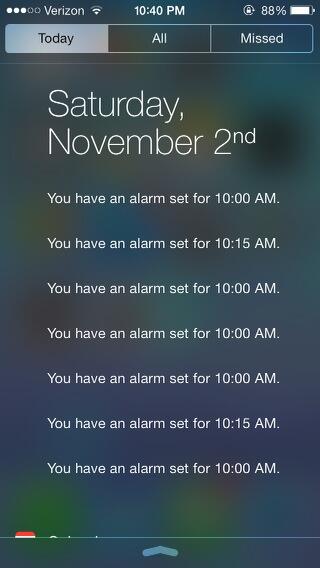
K kidwithdimples macrumors 6502a Original poster Nov 2, 2013 #1 As you can see, my alarms are turned off and yet I see this. It does not go away.
springsup macrumors 65816 Nov 2, 2013 #2 kidwithdimples said: As you can see, my alarms are turned off and yet I see this. It does not go away. Click to expand... Oh is that still happening? I had that on my iPad a while back during the betas. Unfortunately, I don't know of any way to clear it up. Sorry.
kidwithdimples said: As you can see, my alarms are turned off and yet I see this. It does not go away. Click to expand... Oh is that still happening? I had that on my iPad a while back during the betas. Unfortunately, I don't know of any way to clear it up. Sorry.
Z Zerilos macrumors 6502a Nov 2, 2013 #3 kidwithdimples said: As you can see, my alarms are turned off and yet I see this. It does not go away. Image Click to expand... If your alarms are turned off, then I assume it's a bug.
kidwithdimples said: As you can see, my alarms are turned off and yet I see this. It does not go away. Image Click to expand... If your alarms are turned off, then I assume it's a bug.
Fantasigraphic macrumors 65816 Nov 3, 2013 #4 Power off then turn back on and see if that clears it up
A Apple blogger macrumors 6502a Nov 4, 2013 #5 Go in settings and switch off the today summary .. And check .. Then go back and switch on the today summary
Go in settings and switch off the today summary .. And check .. Then go back and switch on the today summary
GreyOS macrumors 68040 Nov 4, 2013 #6 Yes I have had this very occasionally. Maybe 3 times, once in beta and twice in public releases. I even deleted the alarms listed and they still appeared in the notification centre. Not sure at what point they were cleared out though.
Yes I have had this very occasionally. Maybe 3 times, once in beta and twice in public releases. I even deleted the alarms listed and they still appeared in the notification centre. Not sure at what point they were cleared out though.