
Got a tip for us?
Let us know
Become a MacRumors Supporter for $50/year with no ads, ability to filter front page stories, and private forums.
Is this normal memory pressure for an M5 Pro chip?!
- Thread starter xee_
- Start date
- Sort by reaction score
You are using an out of date browser. It may not display this or other websites correctly.
You should upgrade or use an alternative browser.
You should upgrade or use an alternative browser.

Apple_Robert
Contributor
You don't have a hardware problem with the M5. It appears you have several apps that haven't been properly coded / optimized and are chewing up needless RAM.


smithrh
macrumors 68030
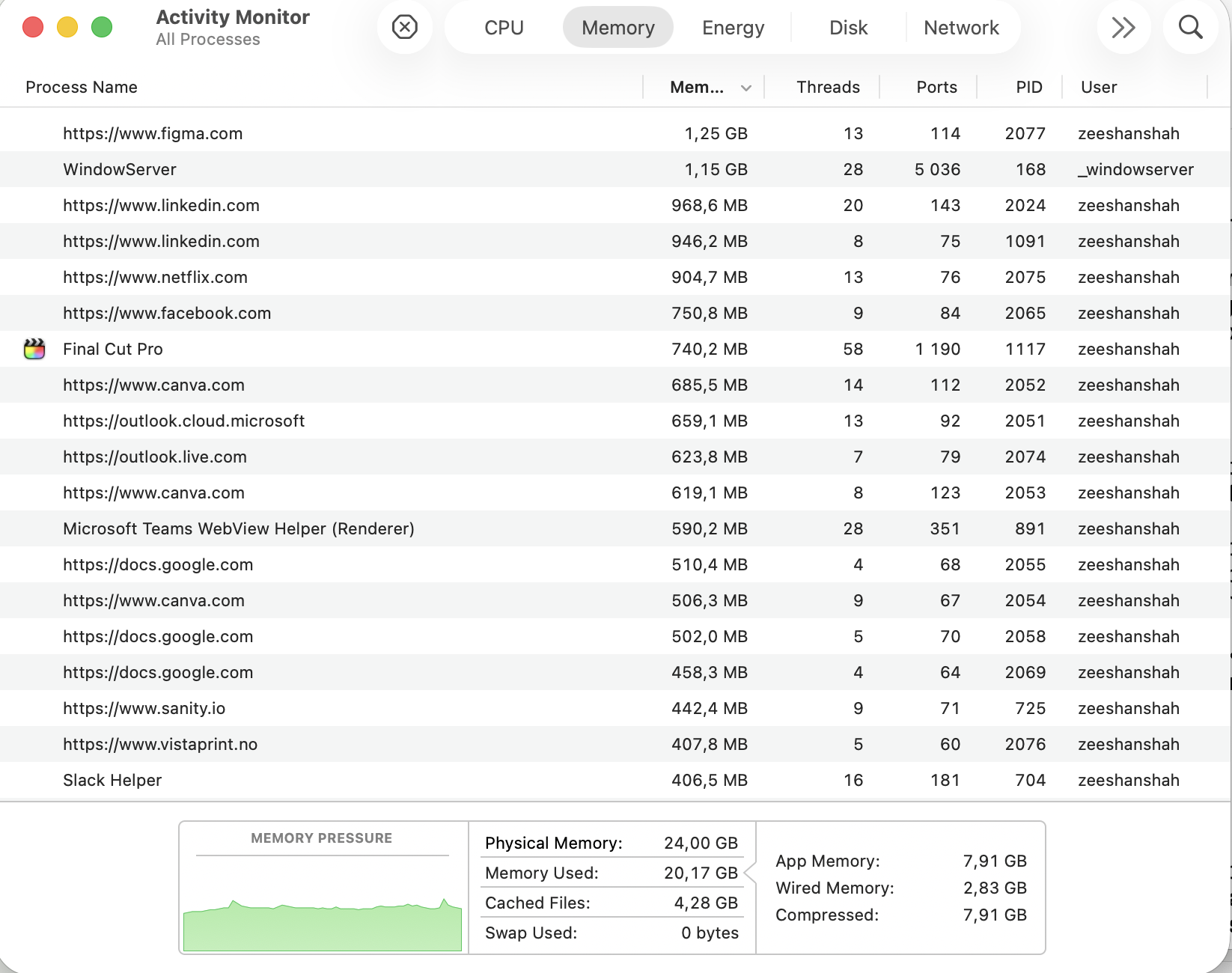
The *webpages* you are visiting are killing it. Almost 3Gb for LinkedIn.
Close some browser windows.
In fact, you have so much compressed RAM I'd suggest a reboot. Even a `sudo purge` isn't going to help you.
Edited to add: I *underestimated* the LinkedIn RAM usage, it's over 4Gb...
Close some browser windows.
In fact, you have so much compressed RAM I'd suggest a reboot. Even a `sudo purge` isn't going to help you.
Edited to add: I *underestimated* the LinkedIn RAM usage, it's over 4Gb...
smithrh
macrumors 68030
Anything - car, bed, bottle, plate, aircraft, shoes - has limits and performance will suffer if taken beyond those limits. Take a hammer to a plate and pretty soon, it's not a plate.
A Mac isn't a magical device that does whatever the user throws at it.
Sure, spend a lot of money on more ram, it will help for a while, but you'll likely wind up in the same place.
A Mac isn't a magical device that does whatever the user throws at it.
Sure, spend a lot of money on more ram, it will help for a while, but you'll likely wind up in the same place.
Apple is good at using memory the more you have the more it will use for cached files for quick and instant response.

Bigwaff
Contributor
You not seeing the entire picture. Your screenshot only shows your processes in Activity Monitor. Select menu View > All Processes to see everything consuming RAM.MacBook Pro with an M5-chip and 24GB of RAM. Look at the memory pressure and swap.
A bit disappointed that this is how it performs! Any thoughts? Should I upgrade to 48GB?
wilberforce
macrumors 68040
If that is your normal operating scenario, then yes you should upgrade (assuming you can easily return what you bought).
If, on the other hand, you just tend to leave apps and tabs open, then I suspect that you will still land in the yellow zone even with 48gb, it will just take a little longer.
MacOS is very good at memory management, though, so you may not actually realize a big speed improvement.
If, on the other hand, you just tend to leave apps and tabs open, then I suspect that you will still land in the yellow zone even with 48gb, it will just take a little longer.
MacOS is very good at memory management, though, so you may not actually realize a big speed improvement.
Last edited:
What ACTUAL "bad performances" are you seeing? Slowdowns, lags, stutters, beachballs?A bit disappointed that this is how it performs! Any thoughts?
Or are you just concerned about the yellow color?

donawalt
Contributor
@xee_ this is my .02 - this is NOT really an issue at all unless you are experiencing real problems.
Looking at this Activity Monitor screenshot, I do not see anything that immediately concerns me. While memory pressure is showing some yellow, it seems only mildly elevated rather than heavily stressed. Yellow does not necessarily mean the machine is struggling; rather, it indicates that macOS is actively managing memory resources. Red memory pressure would be far more concerning.
One thing many users misunderstand is that modern operating systems, especially Apple Silicon Macs, intentionally try to use as much available RAM as possible. Unused RAM provides no benefit, so macOS aggressively uses memory for application data, file caching, browser content, and recently accessed information. The fact that this 24 GB system is showing nearly 21 GB of memory in use is not, by itself, evidence of a problem.
The large memory numbers associated with browser tabs also do not surprise me. Modern websites have increasingly become full applications rather than simple web pages. LinkedIn, Figma, Canva, Outlook, Google Docs, Netflix, and similar sites all run substantial amounts of JavaScript, maintain large data structures in memory, cache images and media, and preserve session state. Figma and Canva, in particular, are essentially graphics applications running inside a browser. It is therefore not unusual to see individual browser processes consuming 1–3 GB of memory.
Browsers also intentionally retain memory while it is available. Their philosophy is that free memory is wasted memory. Keeping data in RAM allows tabs to switch instantly, preserves scrolling positions, prevents page reloads, and improves overall responsiveness. If another application suddenly requires additional memory, macOS can request that browsers release some of those resources, compress inactive memory, or move less active pages to swap storage.
The nearly 11 GB of compressed memory may look alarming, but compression is actually one of the strengths of modern macOS memory management. Rather than immediately writing inactive memory pages to disk, the operating system compresses them in RAM, which is significantly faster than swapping. Apple Silicon systems handle compressed memory extremely efficiently, and seeing several gigabytes of compressed memory during heavy multitasking is not unusual.
Similarly, the approximately 3 GB of swap usage should not automatically be viewed as a problem. Many people still think that any amount of swap indicates insufficient RAM, but that is no longer necessarily true. The SSDs in modern Apple Silicon Macs are extremely fast, and macOS often uses swap proactively to optimize overall responsiveness. A few gigabytes of swap during a heavy workload involving numerous browser tabs, web applications, Teams, Claude, Outlook, and a virtual machine is entirely within the range of normal operation.
The virtual machine itself is using over 2 GB of memory, and there appear to be multiple active browser applications and web-based productivity tools running simultaneously. Given that workload, a 24 GB machine being largely utilized is exactly what I would expect to see.
Ultimately, the real question is not how much RAM is being used, but whether you are experiencing actual performance problems. If the system feels responsive, applications open quickly, tabs do not constantly reload, and there are no frequent beachballs or delays, then the machine is functioning exactly as Apple intended. From this screenshot alone, I would conclude that the system is behaving normally and that much of what we are seeing is simply modern browsers and macOS making aggressive use of available memory to maximize performance. Don't upgrade based just this snapshot unless you are having some of the problems I just mentioned at the beginning of this paragraph!
Looking at this Activity Monitor screenshot, I do not see anything that immediately concerns me. While memory pressure is showing some yellow, it seems only mildly elevated rather than heavily stressed. Yellow does not necessarily mean the machine is struggling; rather, it indicates that macOS is actively managing memory resources. Red memory pressure would be far more concerning.
One thing many users misunderstand is that modern operating systems, especially Apple Silicon Macs, intentionally try to use as much available RAM as possible. Unused RAM provides no benefit, so macOS aggressively uses memory for application data, file caching, browser content, and recently accessed information. The fact that this 24 GB system is showing nearly 21 GB of memory in use is not, by itself, evidence of a problem.
The large memory numbers associated with browser tabs also do not surprise me. Modern websites have increasingly become full applications rather than simple web pages. LinkedIn, Figma, Canva, Outlook, Google Docs, Netflix, and similar sites all run substantial amounts of JavaScript, maintain large data structures in memory, cache images and media, and preserve session state. Figma and Canva, in particular, are essentially graphics applications running inside a browser. It is therefore not unusual to see individual browser processes consuming 1–3 GB of memory.
Browsers also intentionally retain memory while it is available. Their philosophy is that free memory is wasted memory. Keeping data in RAM allows tabs to switch instantly, preserves scrolling positions, prevents page reloads, and improves overall responsiveness. If another application suddenly requires additional memory, macOS can request that browsers release some of those resources, compress inactive memory, or move less active pages to swap storage.
The nearly 11 GB of compressed memory may look alarming, but compression is actually one of the strengths of modern macOS memory management. Rather than immediately writing inactive memory pages to disk, the operating system compresses them in RAM, which is significantly faster than swapping. Apple Silicon systems handle compressed memory extremely efficiently, and seeing several gigabytes of compressed memory during heavy multitasking is not unusual.
Similarly, the approximately 3 GB of swap usage should not automatically be viewed as a problem. Many people still think that any amount of swap indicates insufficient RAM, but that is no longer necessarily true. The SSDs in modern Apple Silicon Macs are extremely fast, and macOS often uses swap proactively to optimize overall responsiveness. A few gigabytes of swap during a heavy workload involving numerous browser tabs, web applications, Teams, Claude, Outlook, and a virtual machine is entirely within the range of normal operation.
The virtual machine itself is using over 2 GB of memory, and there appear to be multiple active browser applications and web-based productivity tools running simultaneously. Given that workload, a 24 GB machine being largely utilized is exactly what I would expect to see.
Ultimately, the real question is not how much RAM is being used, but whether you are experiencing actual performance problems. If the system feels responsive, applications open quickly, tabs do not constantly reload, and there are no frequent beachballs or delays, then the machine is functioning exactly as Apple intended. From this screenshot alone, I would conclude that the system is behaving normally and that much of what we are seeing is simply modern browsers and macOS making aggressive use of available memory to maximize performance. Don't upgrade based just this snapshot unless you are having some of the problems I just mentioned at the beginning of this paragraph!
Sheepish-Lord
macrumors 68040
How did you get the websites to show up separately like that? Anyway, the fact LinkedIn is using almost 3GB is wild to me and then you have another instance of it as well. Not to blame you or the machine but seems like there's probably a better way than to spend $$$ more for extra memory.
teh_hunterer
macrumors 68000
Your RAM usage is high for what just seems like web browsing but that is unfortunately the modern web. These websites are really applications running in another OS (the browser) and not very efficiently. If you need to keep all those websites open in Safari and you don't want compressed memory/swapping, you'll need more RAM (which of course implies a complete system replacement these days).
LinkedIn in particular has become a shark website -- consuming all the resources in its path and sucking up all available data it can:
Note that your RAM usage has nothing to do with your M5 (Pro, etc) chip. It's just the combination of the browser and the websites. I've heard LinkedIn is less problematic in Firefox but haven't tested. I've just taken to opening it in a dedicated profile and logging out and closing every time I use it. Annoying yes but it's clearly out of control.
Next thing I would do is enable View->All Processes as mentioned elsewhere if you haven't and also View->Columns->Real Mem and VM Compressed. I can't tell what the Memory Usage column is actually measuring. Then you can see better see what applications are driving usage and whether you think that is justified or you want to try alternate configurations.
Also decide if keeping all those websites open at the same time is really necessary. And vice-versa if opening and closing websites as needed makes for a better experience than just keeping them open with high memory usage. If your Mac is not beachballing or otherwise sluggish, buying a new system just to get a lot of RAM just to keep these websites open may be hard to justify.
P.S.I am assuming you need the VM running at all times too.
LinkedIn in particular has become a shark website -- consuming all the resources in its path and sucking up all available data it can:
Note that your RAM usage has nothing to do with your M5 (Pro, etc) chip. It's just the combination of the browser and the websites. I've heard LinkedIn is less problematic in Firefox but haven't tested. I've just taken to opening it in a dedicated profile and logging out and closing every time I use it. Annoying yes but it's clearly out of control.
Next thing I would do is enable View->All Processes as mentioned elsewhere if you haven't and also View->Columns->Real Mem and VM Compressed. I can't tell what the Memory Usage column is actually measuring. Then you can see better see what applications are driving usage and whether you think that is justified or you want to try alternate configurations.
Also decide if keeping all those websites open at the same time is really necessary. And vice-versa if opening and closing websites as needed makes for a better experience than just keeping them open with high memory usage. If your Mac is not beachballing or otherwise sluggish, buying a new system just to get a lot of RAM just to keep these websites open may be hard to justify.
P.S.I am assuming you need the VM running at all times too.

Black_Mage
Contributor
Websites and web app are the most memory hungry things out there. That's normal, they suck and they know. Try to switch to some native solutions instead of doing everything inside a web browser.

conmee
macrumors 65816
@xee_ The short answer is Yes you should upgrade.
If you want to see Memory Pressure in the 10-25% range instead of the current >=50% range for your workload, get 64GB which is only $200 more than going to 48GB.
Lots of good input and detail from everyone in this thread including @wilberforce and @donawalt. But if moderate memory pressure for your normal workload is going to bother you, no amount of “macOS optimizes memory use” or “your system is running the way it is supposed to” or “that’s normal” responses is going to make you feel better when memory pressure creeps into the yellow or red territory.
The only solution is more memory. Just to be clear, your M5 Pro will be just fine with 24GB, it’s your brain/conscience/psyche that needs 64GB to rest easy (disclaimer: I am an Apple shareholder and I also have 64GB so I may be biased lol).
If you want to see Memory Pressure in the 10-25% range instead of the current >=50% range for your workload, get 64GB which is only $200 more than going to 48GB.
Lots of good input and detail from everyone in this thread including @wilberforce and @donawalt. But if moderate memory pressure for your normal workload is going to bother you, no amount of “macOS optimizes memory use” or “your system is running the way it is supposed to” or “that’s normal” responses is going to make you feel better when memory pressure creeps into the yellow or red territory.
The only solution is more memory. Just to be clear, your M5 Pro will be just fine with 24GB, it’s your brain/conscience/psyche that needs 64GB to rest easy (disclaimer: I am an Apple shareholder and I also have 64GB so I may be biased lol).

donawalt
Contributor
@xee_ The short answer is Yes you should upgrade.
If you want to see Memory Pressure in the 10-25% range instead of the current >=50% range for your workload, get 64GB which is only $200 more than going to 48GB.
To upgrade just to make memory pressure green, if @xee_ is experiencing no performance/stability problems and this is his regular "workload", is a waste of money imho. I would humbly suggest we wait to hear what @xee_ says about how his Mac is running/performing before suggesting to spend money on a new computer just to turn memory pressure green. If he is having real world problems that's different.
My .02!
Thanks a lot for great inputs and many useful comments!
To answer what many of you have asked: No, I am not experiencing any kind of beachballing, lag, or any form of performance issues while using my Mac. If I hadn't looked at the activity monitor I wouldn't have noticed.
I have been using an M4 Pro with 24GB for a year and never experienced any issues.
But I am one of those who like peace of mind, especially when I'm using a 2600$ machine. Also, as many of you have pointed out; many websites these days are RAM-hungry, which argues for having more memory in order to not having to close tabs? I'm very lazy in that term, and I rarely close tabs I don't use :/
This is how the activity monitor looks atm:
To answer what many of you have asked: No, I am not experiencing any kind of beachballing, lag, or any form of performance issues while using my Mac. If I hadn't looked at the activity monitor I wouldn't have noticed.
I have been using an M4 Pro with 24GB for a year and never experienced any issues.
But I am one of those who like peace of mind, especially when I'm using a 2600$ machine. Also, as many of you have pointed out; many websites these days are RAM-hungry, which argues for having more memory in order to not having to close tabs? I'm very lazy in that term, and I rarely close tabs I don't use :/
This is how the activity monitor looks atm:
ignatius345
macrumors G3
You just hit on the answer to your issue: don't open up Activity Monitor and start looking for "problems" if you aren't having any actual performance issues. MacOS will fill up as much RAM as possible with whatever you're doing, to speed things up and do stuff like keep a whole complex web page in active memory so it's responsive when you switch back to it. That's what RAM is for.To answer what many of you have asked: No, I am not experiencing any kind of beachballing, lag, or any form of performance issues while using my Mac. If I hadn't looked at the activity monitor I wouldn't have noticed.
If you want to spend a bunch more money chasing that sweet high of having the right color memory pressure then by all means, get more RAM to improve your experience looking at Activity Monitor. But don't be surprised when that, too, gets allocated to processes you have open 🙂
Last edited:

Fishrrman
macrumors Nehalem
Do you really need all that stuff open at once?
If so, 24gb may not have been "enough".
At least 32gb.
48 would be better.
If so, 24gb may not have been "enough".
At least 32gb.
48 would be better.

thejadedmonkey
macrumors G3
Ah, so you're experiencing the same thing after the update? So it might have to do something with the OS...I'm finding even with 24gb of RAM, I have to manage open programs when I'm doing heavy work. This is new to Tahoe, Sequoia was never so memory hungry. I'm hoping macOS 27 will fix it.