
Become a MacRumors Supporter for $50/year with no ads, ability to filter front page stories, and private forums.

engelo

macrumors newbie
Original poster
While using the “Save as PDF” / “Save As” dialog, when the file browser is set to List View, existing files in the directory appear inactive and cannot be selected for replacement or quick name adoption.
However, after switching the same dialog to Column View, file selection starts working correctly again.

A second UI inconsistency was observed
the label/button text for “Print” appears to be truncated or not fully fitting within its UI element, suggesting a layout or scaling issue in the beta interface.
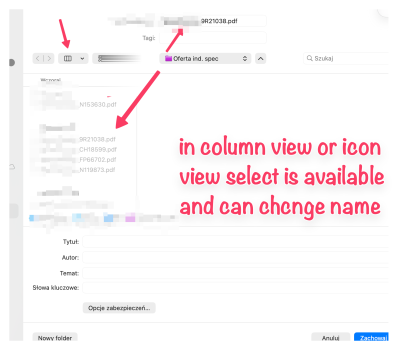
 
Done via FB App.

Below how it looks like
 

Attachments

  • SCR-20260619-huqe.png
    SCR-20260619-huqe.png
    273.7 KB · Views: 45
  • SCR-20260619-htya.png
    SCR-20260619-htya.png
    300.3 KB · Views: 48
  • SCR-20260619-htpa.png
    SCR-20260619-htpa.png
    434.1 KB · Views: 54
Last edited:
Nice job. I suspect that will be quickly fixed. The file pickers are system wide. If it has a bug, it’ll be seen by everyone.
 
I checked this on the same MacBook with a brand-new user account and I’m seeing the exact same issue. It seems to be a system-wide bug rather than a user-specific problem. Can anyone else confirm?
 
  • Like
Reactions: chrash
I checked this on the same MacBook with a brand-new user account and I’m seeing the exact same issue. It seems to be a system-wide bug rather than a user-specific problem. Can anyone else confirm?
Yup, just checked it here and saw the same bug. I can select any file under "Columns" and "Icons" view for replacement, but nothing under "List" view works. (This was via the "Save As..." dialog in Safari.)
 
Thanks for checking. Yes, the issue also occurs in Safari and other applications when using “Save as PDF”. When the save dialog is in List View, existing files can’t be selected for replacement. Switching to Column or Icons View makes it work normally.

I’m wondering when the first beta fix will be available.
 
Confirming on a clean 27.0 b1 install on my MBP — same List View behavior in the NSSavePanel across Safari, Preview, and Pages. Column or Icons view selects fine. Looks like a regression in how the List rows handle the selectable state when the panel is in "Save" mode (it's fine in Open panels, which is a tell).

Workaround until they fix it: hit ⌘+2 (Icons) or ⌘+3 (Columns) inside any Save dialog and it'll stick per-app for that session. macOS remembers the last view per panel type so you only have to do it once per app per login.

The truncated Print button I think is just Liquid Glass label clipping — same thing's hitting "Move" buttons in some sheets too. Worth a separate Feedback radar so they don't roll the two together.
 
I checked this on the same MacBook with a brand-new user account and I’m seeing the exact same issue. It seems to be a system-wide bug rather than a user-specific problem. Can anyone else confirm?
Occurs in Pixelmator Pro pre-greed version.
 
Today update beta 2 fix only "PDF" button view. Now look OK PDF not "P..", as was.
Still not fix issue with: select any file under "List" view for replacement.
 
Register on MacRumors! This sidebar will go away, and you'll see fewer ads.