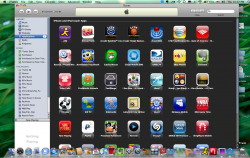
B billyfoil macrumors member Original poster Jun 25, 2009 #1 just got my macbook pro today and transfered everything from old computer. I hit a wall when I could not resize my itunes screen its to big for computer. how do i do this look at image below, Thanks Attachments Picture 1.png 943.7 KB · Views: 156
just got my macbook pro today and transfered everything from old computer. I hit a wall when I could not resize my itunes screen its to big for computer. how do i do this look at image below, Thanks
A Apple all life macrumors 6502 Jun 25, 2009 #4 No that doesnt fix it I have the same problem. I only know how to fix it by connecting it to an external monitor
No that doesnt fix it I have the same problem. I only know how to fix it by connecting it to an external monitor
B billyfoil macrumors member Original poster Jun 25, 2009 #5 Lone Deranger said: Press the green button! 🙂 Click to expand... Ok this is what I get then!
motulist macrumors 601 Jun 25, 2009 #6 click the green button while you're holding down the "option" key on your keyboard.
motulist macrumors 601 Jun 25, 2009 #8 billyfoil said: this is what I get Click to expand... see my comment above.
A Apple all life macrumors 6502 Jun 25, 2009 #9 motulist said: click the green button while you're holding down the "option" key on your keyboard. Click to expand... He is right ^^^^^^^^^^^ do that thank you
motulist said: click the green button while you're holding down the "option" key on your keyboard. Click to expand... He is right ^^^^^^^^^^^ do that thank you
B billyfoil macrumors member Original poster Jun 25, 2009 #10 this is what I get sorry! Attachments Picture 2.png 355.6 KB · Views: 85
B billyfoil macrumors member Original poster Jun 25, 2009 #11 motulist said: click the green button while you're holding down the "option" key on your keyboard. Click to expand... That worked thanks! 😀
motulist said: click the green button while you're holding down the "option" key on your keyboard. Click to expand... That worked thanks! 😀
motulist macrumors 601 Jun 25, 2009 #12 billyfoil said: That worked thanks! 😀 Click to expand... You're welcome. 🙂
J jshelton macrumors 6502a Jun 26, 2009 #13 motulist said: You're welcome. 🙂 Click to expand... Holy crap. That has driven me crazy for 2 years. I guess I could have asked huh. I always fixed it by connecting it to my monitor.
motulist said: You're welcome. 🙂 Click to expand... Holy crap. That has driven me crazy for 2 years. I guess I could have asked huh. I always fixed it by connecting it to my monitor.
alphaod macrumors Core Jun 28, 2009 #15 EMKarelia said: lol just press the green button. You'll get used to it. Click to expand... No that doesn't always work. Don't forget the green button in iTunes changes the player to the mini-player.
EMKarelia said: lol just press the green button. You'll get used to it. Click to expand... No that doesn't always work. Don't forget the green button in iTunes changes the player to the mini-player.
K kloan macrumors regular Jun 28, 2009 #16 This happened to my mom's computer and I couldn't figure it out... I eventually found an Apple script that fixed it. Option+green button = way better solution! Easier to remember too... 🙂
This happened to my mom's computer and I couldn't figure it out... I eventually found an Apple script that fixed it. Option+green button = way better solution! Easier to remember too... 🙂
T tehibn macrumors newbie Jun 30, 2009 #17 im having the same problem everytime i quit itunes and reopen it. is this due to the new itunes version or something?
im having the same problem everytime i quit itunes and reopen it. is this due to the new itunes version or something?