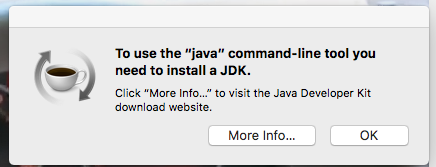
yellowscreen macrumors regular Original poster Oct 27, 2016 #1 why am i still getting this warning even after i updated java?
inarush macrumors member Oct 27, 2016 #2 Make sure you have downloaded and installed the latest JDK release from Oracle: http://www.oracle.com/technetwork/java/javase/downloads/jdk8-downloads-2133151.html (file jdk-8u112-macosx-x64.dmg) Reactions: yellowscreen
Make sure you have downloaded and installed the latest JDK release from Oracle: http://www.oracle.com/technetwork/java/javase/downloads/jdk8-downloads-2133151.html (file jdk-8u112-macosx-x64.dmg)
yellowscreen macrumors regular Original poster Oct 28, 2016 #3 inarush said: Make sure you have downloaded and installed the latest JDK release from Oracle: http://www.oracle.com/technetwork/java/javase/downloads/jdk8-downloads-2133151.html (file jdk-8u112-macosx-x64.dmg) Click to expand... thank you for your response! but now i get this strange box on the linked page, cant click on anything thank you very much for your assistance
inarush said: Make sure you have downloaded and installed the latest JDK release from Oracle: http://www.oracle.com/technetwork/java/javase/downloads/jdk8-downloads-2133151.html (file jdk-8u112-macosx-x64.dmg) Click to expand... thank you for your response! but now i get this strange box on the linked page, cant click on anything thank you very much for your assistance
inarush macrumors member Oct 28, 2016 #4 yellowscreen said: thank you for your response! but now i get this strange box on the linked page, cant click on anything thank you very much for your assistance Click to expand... Sorry, never seen that before. Perhaps it's an ad? Here's the direct link though: http://download.oracle.com/otn-pub/java/jdk/8u112-b16/jdk-8u112-macosx-x64.dmg
yellowscreen said: thank you for your response! but now i get this strange box on the linked page, cant click on anything thank you very much for your assistance Click to expand... Sorry, never seen that before. Perhaps it's an ad? Here's the direct link though: http://download.oracle.com/otn-pub/java/jdk/8u112-b16/jdk-8u112-macosx-x64.dmg
yellowscreen macrumors regular Original poster Oct 31, 2016 #5 inarush said: Sorry, never seen that before. Perhaps it's an ad? Here's the direct link though: http://download.oracle.com/otn-pub/java/jdk/8u112-b16/jdk-8u112-macosx-x64.dmg Click to expand... no, its the 'accept license' question. it just shows that blank box so i cant click on accept, any ideas? thank you!
inarush said: Sorry, never seen that before. Perhaps it's an ad? Here's the direct link though: http://download.oracle.com/otn-pub/java/jdk/8u112-b16/jdk-8u112-macosx-x64.dmg Click to expand... no, its the 'accept license' question. it just shows that blank box so i cant click on accept, any ideas? thank you!
MacUser2525 Suspended Oct 31, 2016 #6 yellowscreen said: no, its the 'accept license' question. it just shows that blank box so i cant click on accept, any ideas? thank you! Click to expand... Could always use a different browser to see whether you get the accept button. Reactions: yellowscreen
yellowscreen said: no, its the 'accept license' question. it just shows that blank box so i cant click on accept, any ideas? thank you! Click to expand... Could always use a different browser to see whether you get the accept button.
mastermind6192 macrumors member Nov 1, 2016 #7 Install the legacy version of Java available at https://support.apple.com/kb/dl1572 then restart. I have seen this work on dozens of Macs. Reactions: yellowscreen
Install the legacy version of Java available at https://support.apple.com/kb/dl1572 then restart. I have seen this work on dozens of Macs.
yellowscreen macrumors regular Original poster Nov 2, 2016 #8 MacUser2525 said: Could always use a different browser to see whether you get the accept button. Click to expand... mastermind6192 said: Install the legacy version of Java available at https://support.apple.com/kb/dl1572 then restart. I have seen this work on dozens of Macs. Click to expand... i just used chrome to download java. the problem was with the 'accept cookies' query. thank you all for your help!
MacUser2525 said: Could always use a different browser to see whether you get the accept button. Click to expand... mastermind6192 said: Install the legacy version of Java available at https://support.apple.com/kb/dl1572 then restart. I have seen this work on dozens of Macs. Click to expand... i just used chrome to download java. the problem was with the 'accept cookies' query. thank you all for your help!