Become a MacRumors Supporter for $50/year with no ads, ability to filter front page stories, and private forums.

Retroworldnews

macrumors 6502
Original poster
If you guys know, I used to post my M3 iMac screen suddenly have " Flickering lines " appear at the bottom of the screen upon using just one years or so. Some M series iMac users also claim the same. Whereas some claim they so far never encounter.

Nevertheless I just order M4 iMac and happen come today. So I do all the migration etc. I even check the display settings to see all is it the same between this M4 iMac and M3 iMac.

I notice this M4 iMac , I just received. The screen brightness seem not say " White, bright " than the M3 iMac despite I have check the brightness , night shift, true tone even the colour profiles are all the same. The M4 iMac the screen look warmer side whereas the M3 iMac more whiter. So I go google, it claim


Factory Calibration Tolerances: No two LCD panels leave the factory exactly the same. One may naturally skew slightly warmer (yellower) or cooler (bluer).

I not sure is it due to many M series iMac users complain the flickering lines Suddenly appear upon using just one year or so. Apple change supplier? I do know come iPhone also have the same situation whereby some folks iPhone the screen look whiter than others whose screen is more warmer.
 
I followed your post a few months ago about the flickering M3 iMac display, and I saw your new article about the M4 iMac screen running warm, which is exactly what I experienced.

I went through the exact same thing you did, except in my case it was an iMac M1 that was about 3 years old. Long story short, I bought a new iMac M4 because even when I tried other 5K displays (Asus PA27JCV) with the same 218 PPI as the iMac's screen, I never got color accuracy that truly matched the iMac or other Apple devices.

After the M4 arrived home (I didn't buy it directly since there's no official Apple Store in Indonesia, only resellers), I set it up with a lot of excitement, adjusting various settings to match my laptop as closely as possible (I happen to also have a MacBook Air M1). True Tone was off, Night Shift was off too, but somehow when I placed it side by side with my MacBook Air, the M4 iMac's screen looked slightly "warmer."

Even with the screen off, the reflection of light off the iMac and MacBook screens looked different. I brought it to iBox (a reseller in Indonesia) and compared it with their display unit, and found the same thing, my unit was "warmer" compared to theirs.

I tried every setting I could find (including the calibration settings) and nothing worked. The screen was genuinely warmer even when the computer was off, so I'm assuming this is a hardware issue. Maybe Apple switched display suppliers or something, but it's clearly different from the M1 series screens.

In the end, fortunately I was allowed to return the unit and got a full refund.

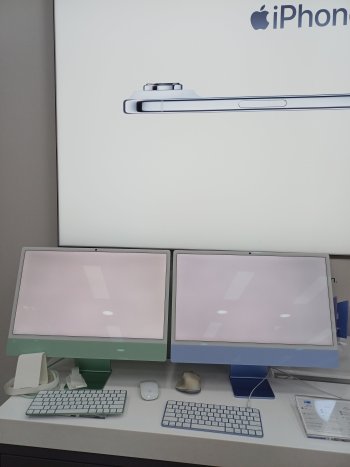
I'm attaching photos showing the difference I experienced.
In the video, my M4 iMac (Green), and I also brought it to iBox (an Apple reseller) to compare with their display unit (Blue)


Also, here's the explanation from the seller regarding this case:

"Good morning, we'd like to inform you of the results of our internal team's investigation regarding the iMac from yesterday. Based on our inspection, the unit was found to have no factory defects. The "warmer" display color difference seen on the M4 iMac is actually present in the latest production batch. Our team compared it with other M4 iMac units from the same latest batch and got similar results. Compared to previous iMac generations like the M1 or M3, the display color characteristics on this latest M4 do appear different. This is likely due to changes in screen coating, differences in display panel vendors, or other production factors that are outside the control of Apple's Indonesian distributor."
 

Attachments

  • 20260430_145642.jpg
    20260430_145642.jpg
    1.4 MB · Views: 97
  • 20260430_150017.jpg
    20260430_150017.jpg
    1.4 MB · Views: 64
  • 20260430_185310.jpg
    20260430_185310.jpg
    724.4 KB · Views: 97
  • 20260430_185327.jpg
    20260430_185327.jpg
    954.9 KB · Views: 100
  • 20260430_151223.jpg
    20260430_151223.jpg
    1.4 MB · Views: 91
Last edited:
If you hadn't compared it side by side with another screen, you probably wouldn't have noticed it. But as it happens, I did notice it.
 
If you hadn't compared it side by side with another screen, you probably wouldn't have noticed it. But as it happens, I did notice it.
Thanks for the info you post about the M4. Yes, As I already mention I check all the display settings , true tone etc side by side with my M3 iMac which has lines. I noticed the M3 screen is " whiter " whereas M4 screen is more on " Warm side "

In fact, way past years back. This issue been discuss on iPhone in fact. I used to remember people discuss on it as both users having the same iPhone yet one claim his screen is whiter whereas other claim his is warmer. After that they got Apple reply claim due to " different supplier of their screen ". I do google , search around on M series iMac.

It claims Apple have two supplier come screen. One is Samsung another is LG. They have two suppliers because is to ensure the production is smooth. Thus I feel my M3 the screen is either from Samsung or lG whereas likewise same for M4 and happen I have two different vendors screen thus noticed one iMac the screen is whiter another is warmer.

hmmm Perhaps Apple do know a lot M series users complain the screen suddenly have lines after one year of usage so they change the screen for M4? I don't know...

A lot claim buy a Mac mini better as the screen can replace easily. For me is I don't like having external screen and speakers . I like all in one this iMac is suit for me. Well.... just finger cross
 
That's right, I agree with you too. I also prefer an all in one PC rather than having to buy separate peripherals, that's why I feel the same way as you about this iMac situation. If we lived close to each other, I'm sure we'd have a lot to talk about.

I also had a chat with one of the technicians here, and you're right, besides LG and Samsung, it turns out there's also Sharp. If you recall, I also replied to your thread about the M1 iMac I took apart myself, the panel I found in mine was from LG.

If you still have that M4, try going to the Display Calibrator Assistant and adjust the "select target white point," try changing it to around 6500 and see if you notice any difference. Unfortunately I already returned my M4 iMac so I can't test this myself, but if it works, I might consider buying another one and adjusting that setting (if I run into the same issue).
 

Attachments

  • SCR-20260615-oyje.png
    SCR-20260615-oyje.png
    382.7 KB · Views: 38
Last edited:
Yes, screens are a lottery and for the most part nobody really notices or at least doesn’t notice for long. It remains eternally frustrating for me, although generally only when I have multiple screens operational at once. Good look with your efforts!
 
That's right, I agree with you too. I also prefer an all in one PC rather than having to buy separate peripherals, that's why I feel the same way as you about this iMac situation. If we lived close to each other, I'm sure we'd have a lot to talk about.

I also had a chat with one of the technicians here, and you're right, besides LG and Samsung, it turns out there's also Sharp. If you recall, I also replied to your thread about the M1 iMac I took apart myself, the panel I found in mine was from LG.

If you still have that M4, try going to the Display Calibrator Assistant and adjust the "select target white point," try changing it to around 6500 and see if you notice any difference. Unfortunately I already returned my M4 iMac so I can't test this myself, but if it works, I might consider buying another one and adjusting that setting (if I run into the same issue).
interesting how come you know that Display calibrator setting set to 6500? the tech tell u ? for me well I don't particular now is it the screen is white or warm. I more concern the Quality. Which I already say here few times likewise for some M series iMac users comment , feedback " Suddenly lines and flickering lines appear on the screen Upon using one year or so. " .. More concern is the Build i mean here.
Yes, screens are a lottery and for the most part nobody really notices or at least doesn’t notice for long. It remains eternally frustrating for me, although generally only when I have multiple screens operational at once. Good look with your efforts!
i happen to see a video from Youtube which this guy is a graphic designer also into taking photos.. As we know these people are very serious come the colour. He do show the M series iMac colour is not good when been display. Is like don't look " Nature " at least to the eyes.
 
interesting how come you know that Display calibrator setting set to 6500? the tech tell u ? for me well I don't particular now is it the screen is white or warm. I more concern the Quality. Which I already say here few times likewise for some M series iMac users comment , feedback " Suddenly lines and flickering lines appear on the screen Upon using one year or so. " .. More concern is the Build i mean here.

6500 is the native setting, that's where the "true" white point is supposed to be calibrated. Below that it'll look more 'warm', and above that it'll look more 'cold'. What I mean is, if you adjust it from there, say nudging it up to around 6600 or so, would that answer your question about why the M4 iMac's screen feels warmer now. And if that works (raising it to around 6600K) and makes your iMac's colors more "balanced," I might just buy a new M4 iMac and apply the same setting.
 
6500 is the native setting, that's where the "true" white point is supposed to be calibrated. Below that it'll look more 'warm', and above that it'll look more 'cold'. What I mean is, if you adjust it from there, say nudging it up to around 6600 or so, would that answer your question about why the M4 iMac's screen feels warmer now. And if that works (raising it to around 6600K) and makes your iMac's colors more "balanced," I might just buy a new M4 iMac and apply the same setting.
I see no difference. I mean is due to " different vendor screen ". I guess as you mention , the tech tell u the latest batch of M4 the screen warm. Maybe due to war supply chain a bit been disturb so they swap to another vendor screen OR maybe Apple Do know that flicking lines issues they change the screen or something inside the screen which we don't know.
 
I see no difference. I mean is due to " different vendor screen ". I guess as you mention , the tech tell u the latest batch of M4 the screen warm. Maybe due to war supply chain a bit been disturb so they swap to another vendor screen OR maybe Apple Do know that flicking lines issues they change the screen or something inside the screen which we don't know.

Yeah, it does seem that way. I hope the iMac M5 comes out soon and I'll give it a try.
 
Register on MacRumors! This sidebar will go away, and you'll see fewer ads.