Become a MacRumors Supporter for $50/year with no ads, ability to filter front page stories, and private forums.
The Kuycon has piqued my interest quite a bit; however, I am absolutely at a loss as to which vendor to purchase from. There is:

ClickClack.io
Kuycon.us
Alibaba

Which is the preferred vendor? Kuyconmonitors dot com claims they are the official site with ClickClack an authorised vendor. But so many others are claiming to be authorised as well. Confusion reigns. :)

Thanks
I believe the relatively-new Amazon “official” account is legitimate as well. But Alibaba remains the best option, because that is factory direct and we’ve seen here in this thread just recently (with the new firmware update) why this is helpful.
 
I believe the relatively-new Amazon “official” account is legitimate as well. But Alibaba remains the best option, because that is factory direct and we’ve seen here in this thread just recently (with the new firmware update) why this is helpful.

I have an Alibaba account, so that is no issue for me. I am concerned, though, about firmware updates as I do not have a Windows computer. I am following the thread to see what members' results are. I would really be dismayed to get a monitor I needed to update and have no way to do so.
 
  • Like
Reactions: tenthousandthings
I have an Alibaba account, so that is no issue for me. I am concerned, though, about firmware updates as I do not have a Windows computer. I am following the thread to see what members' results are. I would really be dismayed to get a monitor I needed to update and have no way to do so.
Then simply ask Alibaba if you can already get a monitor with updated firmware. Their online support is quite good.
 
  • Like
Reactions: FatLouie
@ksred @Geneman14 "...instructions on how to update, alongside a file named MonitorCustomerTool_V1_5(1).7z which extracts into a runnable program called RCDTool.exe. They explicitly said that it must be performed on Windows."

How did you connect the Win PC to the monitor - did the instructions require a specific method?

This is significant in determining the reason that Windows is necessary.
Older RealTek monitor boards need to transfer the firmware data over a DP to DP connection, using the DDC/CI protocol.

MacOS doesn't naturally support DDC/CI, and Windows does.
Maybe if a Mac can be made to support DDC/CI so the firmware update can be achieved using 'virtual Windows'?

Better Display is a good way to get MacOS to support DDC/CI, but I don't know if that can help prevent an update failure when no Windows PC support is available.

Because I do remember reading of people having success at running a .exe Windows updater on a Mac, but don't know how this was achieved.

 
I'm happy to share the files they provided me with here, if forum rules allow me to.
Just recently got my G32P as well and this would likely fix the HDR 8/10-bit thing for me as well. If you could share these files somehow, that'd be very useful for quite a few people here, I reckon.
 
@ksred @Geneman14 "...instructions on how to update, alongside a file named MonitorCustomerTool_V1_5(1).7z which extracts into a runnable program called RCDTool.exe. They explicitly said that it must be performed on Windows."

How did you connect the Win PC to the monitor - did the instructions require a specific method?

This is significant in determining the reason that Windows is necessary.
Older RealTek monitor boards need to transfer the firmware data over a DP to DP connection, using the DDC/CI protocol.

MacOS doesn't naturally support DDC/CI, and Windows does.
Maybe if a Mac can be made to support DDC/CI so the firmware update can be achieved using 'virtual Windows'?

Better Display is a good way to get MacOS to support DDC/CI, but I don't know if that can help prevent an update failure when no Windows PC support is available.

Because I do remember reading of people having success at running a .exe Windows updater on a Mac, but don't know how this was achieved.

This is what I received from Kuycon support:

“Only works with Windows computers. See if any of your friends have one and can lend it for an upgrade. You can use either a DP or a C port”

I tried to update the firmware with Parallels on my Mac but when I ran the supplied Monitor Update tool it failed and just reported an error.
 
My monitor OSD reads as:

HW:39T02 FW:KUY2505 PD:V175 CE:GK2.5

These values were the same pre-update, so nothing changed here.

The actual firmware file they provided is named as: G32P_English_251218(1).bin

They also provided a PDF with instructions on how to update, alongside a file named MonitorCustomerTool_V1_5(1).7z which extracts into a runnable program called RCDTool.exe. They explicitly said that it must be performed on Windows.

The update process outlined in the PDF is basically a case of opening RCDTool.exe, selecting the new .bin file, ticking a few boxes and then starting the update. The whole process took 5 minutes tops. I'm happy to share the files they provided me with here, if forum rules allow me to.
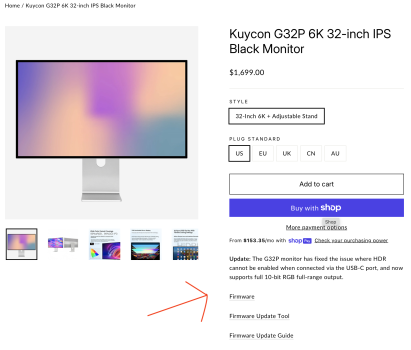
Click Clack has the files as downloads on their site, here:

https://clickclack.io/products/in-stock-kuycon-g32p-6k-32-inch-ips-black-monitor

Screenshot 2025-12-26 at 11.38.26 AM.png
 
I got mine from clickclack.io customer support earlier, working for me.

Received my units this week, going to test it with my Calibrite Display Plus HL. Any quick recommendations on test softwares, preferably free? There seems to be a lot out there.
 
Damn, this new firmware update fixes alot of issues. I just installed it, and tried with my old M1 Pro Macbook and 10 Bit RGB 4:4:4 is working immediately.
Pretty sure it fixes also my issue I had with the Dock. I need to try tomorrow.
 
With the new firmware, HDR is also now available running off my M1 Ultra whereas it previously was not.
Shame about the requirement for a Windows PC to perform the update, though. I tried via Parallels and Crossover, but since the programming goes directly via HID and not a serial port, no dice. Had to create a Windows2Go USB stick and boot off a Linux PC I had laying around to get the updater to run to completion.
 
Damn, this new firmware update fixes alot of issues. I just installed it, and tried with my old M1 Pro Macbook and 10 Bit RGB 4:4:4 is working immediately.
Pretty sure it fixes also my issue I had with the Dock. I need to try tomorrow.

I can confirm that it is now also working with my Caldigit TS5 Dock. Awesome.
I also noticed, that also my original Apple Thunderbolt 4 cable 1,8m which previouly did not worked, is working now.

HDR 12 Bit also working.
 
Last edited:
How did you connect the Win PC to the monitor - did the instructions require a specific method?
Support didn't actually specify that I have to use a certain method on my Windows PC, but I did indeed happen to be using DisplayPort for it and it worked smoothly with no issues on Windows 11.
 
I can confirm that it is now also working with my Caldigit TS5 Dock. Awesome.
I also noticed, that also my original Apple Thunderbolt 4 cable 1,8m which previouly did not worked, is working now.

HDR 12 Bit also working.
And did you like the HDR mode? I'm curious because I could have enabled HDR in Windows a long time ago, but I decided to leave it turned off.
 
And did you like the HDR mode? I'm curious because I could have enabled HDR in Windows a long time ago, but I decided to leave it turned off.

Thank you. I burned a downloaded Win11 .iso from Microsoft and burned it to a USB stick with an NTFS system. Used Linux. When booting, I get the request for drivers...Well, I have no driver disk as I am doing this on a Debian 13 computer. :) I enabled TPM, Secure Boot, etc., and I still get the driver request.

I truly dislike the companies that make a product that can only have FW updates via a Windows box. It is just so damn easy to give the customer a .dmg or a package with a bootable image that can be put on a USB.

As I write this, I remember that I have a Ventoy USB stick, so I may try that later today with the 11 .iso.
 
@FatLouie
Maybe this is missing driver?
It’s possible that RealTek uses DDC/CI to update the firmware.

Maybe your Windows installation or the GPU driver is missing this?
 
Last edited:
  • Like
Reactions: FatLouie
Just finished color calibrating for the monitor. Here are the numbers and key takeaways:

Brightness ~45 / White luminance: 120;
Red ~115, Green ~100 Blue ~115; RGB at 6553K.

The G32P default color profile was blue-shifted, there is a creamy feel overall. The calibrated end result is much warmer and vibrant. Could be my personal preference, but the default color profile was not really meeting my expectations. I'm fairly new to monitor at this price point though. I'm very curious how much more can Apple Pro Display XDR can deliver on the color front with 2.5X premium?
 
Last edited:
  • Like
Reactions: xoa and Geneman14
Can anybody notice any difference in colors after the update?
I'm trying to weigh in, does it worth getting a Windows machine somehow and update mine as well or not?
 
I find it funny that this monitor is targeted at Apple users as an alternative to the Pro Display XDR/Studio Display, yet you need Windows in order to carry out the firmware update.
 
Do you think that when Apple updates its monitors to include ProMotion, among other improvements, Kuycon will make an equivalent monitor?

My dream monitor would be 120 Hz, OLED/QLED/micro-LED, with True Tone, built-in speakers and no webcam. If it did include a webcam, there would need to be a physical slider to block it. I don’t care that it’s only active when the green light is on. I’ve seen some monitors that already have a webcam slider or cover.

Does Apple even allow an application to update the firmware to be made?
🤷‍♂️
 
Do you think that when Apple updates its monitors to include ProMotion, among other improvements, Kuycon will make an equivalent monitor?

My dream monitor would be 120 Hz, OLED/QLED/micro-LED, with True Tone, built-in speakers and no webcam. If it did include a webcam, there would need to be a physical slider to block it. I don’t care that it’s only active when the green light is on. I’ve seen some monitors that already have a webcam slider or cover.


🤷‍♂️

I already asked them about that. They said, that at the moment there are no 6k 120hz panels available so I think they will do such monitor once panels are available.
 
  • Like
Reactions: P K
Register on MacRumors! This sidebar will go away, and you'll see fewer ads.