
Got a tip for us?
Let us know
Become a MacRumors Supporter for $50/year with no ads, ability to filter front page stories, and private forums.
Kuycon P27Z Impressions
- Thread starter citivolus
- Start date
- Sort by reaction score
You are using an out of date browser. It may not display this or other websites correctly.
You should upgrade or use an alternative browser.
You should upgrade or use an alternative browser.

Bigwaff
Contributor
You may want to check out this thread…
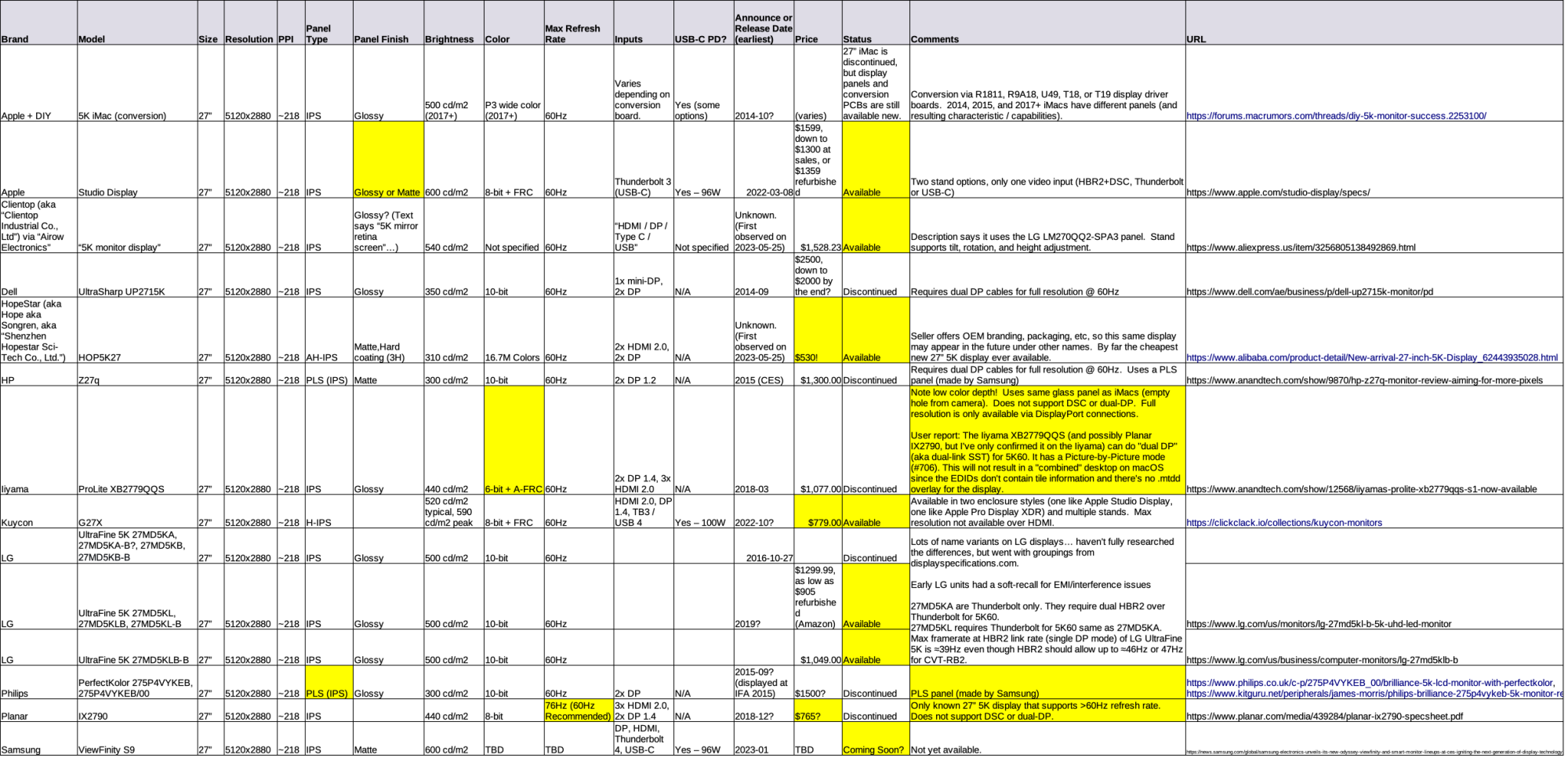
 forums.macrumors.com
The *COMPLETE* list of 27" 5K Displays?
[Update 26 May 2026] This list follows the information format used for the 32" 6K and 8K *complete* list WikiPost threads. Specifications are based on the manufacturer's claims. YMMV. The list is divided into six ► sections: Announced (not yet shipping); Available (pre-orders and shipping)...
forums.macrumors.com
Thanks, I am following that thread but given its size and breadth I was interested in a dedicated thread to discuss just this model.

I own two of these as well as a pair of original Studio Displays. They look identical to me. The killer feature for me is the multiple inputs so I can easily switch between my PC and my Mac. My Mac Studio is an M1 that only drives at 60hz but my PC takes advantage of the higher refresh rates no problem. Only downside that I found was when I tried to connect a third computer (another Mac) via one of the two HDMI inputs on the monitor and couldn't get it to output 5K. Not sure if that was a Mac or Kuycon limitation.
Dark-Signature
macrumors 6502a
Do you really have two Kuycon P27Zs, or are they still the ancient G27Ps?I own two of these as well as a pair of original Studio Displays. They look identical to me. The killer feature for me is the multiple inputs so I can easily switch between my PC and my Mac. My Mac Studio is an M1 that only drives at 60hz but my PC takes advantage of the higher refresh rates no problem. Only downside that I found was when I tried to connect a third computer (another Mac) via one of the two HDMI inputs on the monitor and couldn't get it to output 5K. Not sure if that was a Mac or Kuycon limitation.
If they're the P27Zs, how good are the 180Hz and 360Hz modes?
Yup, the P27Zs. I’ve only used the 180Hz mode so far from my Windows PC and it works fine in games and desktop apps. My M1 Ultra Mac Studio will only do 60Hz (I’m waiting for the new model to arrive). As for the previous question, display quality is consistent with what I’ve seen on my Studio Displays, meaning same backlight characteristics, etc. No better, no worse, no dead pixels. I’m probably not the best monitor reviewer in that regard. I was looking for a multi-input Studio Display that I could get to 180hz from my PC on (since getting TB5 video out of a Windows PC is a hell I didn’t want to deal with - getting a PC to do TB4/USB4 video reliably and then through a TB4 switch was enough for me).Do you really have two Kuycon P27Zs, or are they still the ancient G27Ps?
If they're the P27Zs, how good are the 180Hz and 360Hz modes?
According to the iPhone stopwatch app, about 3.7 seconds for wake from sleep (put the cursor in the sleep corner and waited for the display to go from no signal to full dark and then clicked to wake the Mac display back up) and about 4.2 seconds for switch from active Mac display to active PC display (changed input via the remote). I purchased these monitors from Amazon because I wanted the easy returns. These are the honeycomb design with speakers models.thanks @edanuff . can you please comment on:
How quickly does it wake from sleep when connected to your Mac and how long does it take to switch inputs?
Where did you buy it from?
How do the P27Z speakers compare to your Studio Display speakers?Yup, the P27Zs. I’ve only used the 180Hz mode so far from my Windows PC and it works fine in games and desktop apps. My M1 Ultra Mac Studio will only do 60Hz (I’m waiting for the new model to arrive). As for the previous question, display quality is consistent with what I’ve seen on my Studio Displays, meaning same backlight characteristics, etc. No better, no worse, no dead pixels. I’m probably not the best monitor reviewer in that regard. I was looking for a multi-input Studio Display that I could get to 180hz from my PC on (since getting TB5 video out of a Windows PC is a hell I didn’t want to deal with - getting a PC to do TB4/USB4 video reliably and then through a TB4 switch was enough for me).
Dark-Signature
macrumors 6502a
Did you enable HDR in both places?Just got my two P27Z's and I am really impressed so far. Still trying to figure out why the desktop appears very blue after I enabled HDR mode. any ideas?
Yes. I was hoping to avoid installing another app just for brightness and instead have the native brightness controls working in SDR mode but they only get enabled after turning on HDR.Did you enable HDR in both places?
Last edited:
I wanted to try out the higher refresh frequencies and connected my MacBook Pro with M5 Pro processor to the two monitors one via USB-C and the other via HDMI. The first monitor connected showed 165 Hz and the second one show 120 Hz with both of them at 5K. Even though I verified via the UFO website that those refresh rates were being reported, when I scroll in Safari, it gets jittery as the scrolling slows down and stops. I confirmed that scrolling on the same website doesn’t have this issue on the MacBook Pro display. I also confirmed the relevant Safari developer flags were disabled which force Safari into 60 Hz. Anyone have experience with connecting displays at higher refresh rates who can give some advice?

FatLouie
macrumors 6502a
I wanted to try out the higher refresh frequencies and connected my MacBook Pro with M5 Pro processor to the two monitors one via USB-C and the other via HDMI. The first monitor connected showed 165 Hz and the second one show 120 Hz with both of them at 5K. Even though I verified via the UFO website that those refresh rates were being reported, when I scroll in Safari, it gets jittery as the scrolling slows down and stops. I confirmed that scrolling on the same website doesn’t have this issue on the MacBook Pro display. I also confirmed the relevant Safari developer flags were disabled which force Safari into 60 Hz. Anyone have experience with connecting displays at higher refresh rates who can give some advice?
May not help, but I picked up the Safari update a few days ago....
Version 26.6 (20624.4.1.11.1)
It looks way too reflective, but I don't know the lighting of the room :my main concern with all kuycon monitors is reflectivity when using them in day time near a window (window at 90 degrees to display).
has the p27z improved on that?
I'd also like a user review.
My 2022 ASD doesn't reflect anything unless I watch very dark content. Lightning is perpendircular with curtains though.
So I’ve gone back to the Kuycon for more testing after I picked up a Mac Studio M4 Max. With this Mac, both displays connected at 5K 165Hz no problem. Here’s my quick assessment:
Pros:
- Really impressive quality and build for a knock-off
- I love the aluminum frame and cheese grater look. It’s just like the Pro Display XDR’s little brother
- With a powerful enough Mac (see above), it can easily do dual display at 5K 165Hz
- Multiple inputs allow for easy switching between home Mac, work laptop, and Xbox
- Built in speakers are usable for Teams calls
- Price is reasonable
Cons:
- Color uniformity is an issue--white has some light pinkish areas, and there are light greyish areas extending in about an inch or so from the borders. I believe this is on par with and somewhat similar to other IPS screens
- Glossy screen is extremely reflective
- Need to run it at full brightness to be workable in an average lighted room
- Fan is audible in a quiet environment and runs constantly, even with nothing connected
- Enabling HDR in Displays settings on macOS exposes a brightness slider (good) but messes up colors
- In a quiet room I can hear very faint electronic buzzing
- Menu navigation is clunky and requires a remote control as there are no buttons on the display
Overall I’ve decided the price difference is worth it to keep the Studio Display XDR’s and I will be sending the P27Z’s back.
P27Z on the left, Studio Display XDR on the right, both at full brightness.
Pros:
- Really impressive quality and build for a knock-off
- I love the aluminum frame and cheese grater look. It’s just like the Pro Display XDR’s little brother
- With a powerful enough Mac (see above), it can easily do dual display at 5K 165Hz
- Multiple inputs allow for easy switching between home Mac, work laptop, and Xbox
- Built in speakers are usable for Teams calls
- Price is reasonable
Cons:
- Color uniformity is an issue--white has some light pinkish areas, and there are light greyish areas extending in about an inch or so from the borders. I believe this is on par with and somewhat similar to other IPS screens
- Glossy screen is extremely reflective
- Need to run it at full brightness to be workable in an average lighted room
- Fan is audible in a quiet environment and runs constantly, even with nothing connected
- Enabling HDR in Displays settings on macOS exposes a brightness slider (good) but messes up colors
- In a quiet room I can hear very faint electronic buzzing
- Menu navigation is clunky and requires a remote control as there are no buttons on the display
Overall I’ve decided the price difference is worth it to keep the Studio Display XDR’s and I will be sending the P27Z’s back.
P27Z on the left, Studio Display XDR on the right, both at full brightness.
Attachments

It's a shame that Kuycon can't invest in plasma deposition process for their AR coating - just like Apple use on the ASD. It would fix one of the major cons of their monitors. I guess the machine to do that is expensive.
I hear very good things about BenQ's nano gloss soft coating (MA270S etc.), some say it's even better for text clarity than the ASD as it appears closer to you.
I hear very good things about BenQ's nano gloss soft coating (MA270S etc.), some say it's even better for text clarity than the ASD as it appears closer to you.