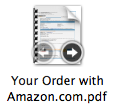
I don't know what combination of keys I pressed but now I have large desktop icons with options when you highlight them you can play music or go through the pages of a document, etc. What is this called and how do I get my normal icons back?

Yeah, interacting with the icons is new in SL. The default icon size is 64x64, but you can make it so you dont interact with it by making it any size smaller than that (such as 60x60). 64x64 and up is what they decided was big enough to be usable. Also, if youd rather not shrink your icons below the default, theres another option to turn off icon previews, which will also mean you cant interact with them. However, you wont see the little preview of what the document is without opening Quick Look this way.
Sorry, the 64x64 is the default in SL now (since SL added the ability to interact with them). If youre using Leopard or earlier, itll probably still be 48x48.
You get used to it. I now prefer the look of the bigger icons.
Maybe if you did an upgrade rather than clean install they stayed at 48x48. By interact with them, I mean play video and audio files and page through documents.
Those controls appear when you mouse over the icons. It only works if the icon is 64x64 or above, because for a tiny icon it wouldn’t be usable anyway.
You get used to it. I now prefer the look of the bigger icons.
Maybe if you did an upgrade rather than clean install they stayed at 48x48. By interact with them, I mean play video and audio files and page through documents.
Those controls appear when you mouse over the icons. It only works if the icon is 64x64 or above, because for a tiny icon it wouldnt be usable anyway.
Ahh yes, I forgot about that. I don't know if I can get used to the larger icons. Maybe because of my smaller screen. And yes, I did do an upgrade, not a full install. I'm waiting for Quicken QFL to do that.
Im on a 13 screen too. But maybe it was easy to get used to cuz I dont keep a lot on my desktop (and by not a lot, I mean pretty much nothing, all thats there now is my Time Machine drive).