Become a MacRumors Supporter for $50/year with no ads, ability to filter front page stories, and private forums.

spacebiscuit

macrumors member
Original poster
I'm trying to run a keyboard/mouse client application run on my iMac which has just had a fresh install Sequoia via OpenCore patcher. Previously I was running Monterey and the application run - allowing me to use my shared keyboard and mouse to logon to the Mac.

I've tried creating a LaunchDaemon, I created a plist file which I have saved in /Library/LaunchDaemons/com.foobar.plist

<?xml version="1.0" encoding="UTF-8"?>
<!DOCTYPE plist PUBLIC "-//Apple//DTD PLIST 1.0//EN" "http://www.apple.com/DTDs/PropertyList-1.0.dtd">
<plist version="1.0">
<dict>
<key>Label</key>
<string>com.symless.synergy</string>
<key>RunAtLoad</key>
<true/>
<key>KeepAlive</key>
<true/>
<key>UserName</key>
<string>root</string>
<key>GroupName</key>
<string>wheel</string>
<key>ProgramArguments</key>
<array>
<string>/Applications/Synergy.app/Contents/MacOS/synergyc</string>
</array>
</dict>
</plist>

I've changed ownership of the synergyc application to root/wheel. But when i reboot the service is not running.

Am I doing anything obviously wrong?
 
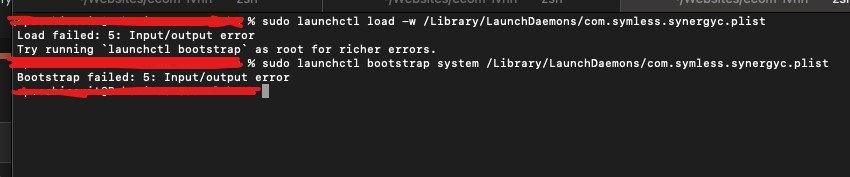
I get:

Load failed: 5: Input/output error
Try running `launchctl bootstrap` as root for richer errors.
 
Give Full Disk Access to Terminal and try again. If it still doesn't work, try:
Code:
sudo launchctl bootstrap system /Library/LaunchDaemons/com.foobar.plist
 
the load command returns:

Load failed: 5: Input/output error
Try running `launchctl bootstrap` as root for richer errors.

I then gave full disk access to terminal and the bootstrap command gives:

sudo launchctl load -w /Library/LaunchDaemons/com.foobar.com

Load failed: 5: Input/output error
Try running `launchctl bootstrap` as root for richer errors.
 
As requested thanks!
 

Attachments

  • Screenshot 2025-04-08 at 15.38.53-.jpg
    Screenshot 2025-04-08 at 15.38.53-.jpg
    31.2 KB · Views: 130
so, just to be clear, the application works fine if you manually launch it, but fails when you try to launch it at boot?
 
Yes that is correct, it is a keyboard and mouse sharing client, at present I have to login via a plugged in keyboard, once logged in th application starts automatically and I am able to use the shared peripherals.

Also to highlight that I installed the OS via opencore patcher since my iMac is a 2011 model.
 
That can happen when the plist text is not encoded in UTF-8 and it causes hidden characters in the whitespace of the plist file. Try making sure the encoding is correct or just ask AI to output it in UTF-8 with no special characters in the whitespace.
 
I opened the file in cursor and asked the agent to output the file as suggested, I resaved the output but the result is the same.

The original file was created using vim in terminal.
 
Run

plutil -lint /path/to/your/plist

to check the syntax. I made a test file using your output and got an OK message. If you get anything other than OK, it's an encoding problem.
 
Tested and working in 15.4:
Launch daemon
Code:
<?xml version="1.0" encoding="UTF-8"?>
<!DOCTYPE plist PUBLIC "-//Apple//DTD PLIST 1.0//EN" "http://www.apple.com/DTDs/PropertyList-1.0.dtd">
<plist version="1.0">
    <dict>
        <key>Label</key>
        <string>com.symless.synergy3</string>
        <key>ProgramArguments</key>
        <array>
            <string>/Applications/Synergy.app/Contents/MacOS/synergy-service</string>
            <string>-d</string>
        </array>
        <key>KeepAlive</key>
        <dict>
          <key>SuccessfulExit</key>
          <false/>
        </dict>
        <key>WorkingDirectory</key>
        <string>/Applications/Synergy.app/Contents/MacOS/</string>
        <key>StandardOutPath</key>
        <string>//Users/admin/Library/Logs/Synergy/com.symless.synergy3.log</string>
        <key>StandardErrorPath</key>
        <string>//Users/admin/Library/Logs/Synergy/com.symless.synergy3_error.log</string>
    </dict>
</plist>

Change admin to your user name, place com.symless.synergy3.plist in /Library/LaunchDaemons/ and run:
Code:
sudo chown root:wheel /Library/LaunchDaemons/com.symless.synergy3.plist

The daemon should appear in Settings - General - Login Items - Allow in the Background as Symless Ltd - 1 item affects all users.

If you have com.symless.synergy3.plist in ~/Library/LaunchAgents, delete it.
 
Sorry still no dice.

I created the file per previous post in /Library/LaunchDaemons/ - then chown root/wheel

The commands:

sudo launchctl load -w /Library/LaunchDaemons/com.symless.synergy3.plist
Load failed: 5: Input/output error
Try running `launchctl bootstrap` as root for richer errors.

sudo launchctl bootstrap system /Library/LaunchDaemons/com.symless.synergy3.plist
Bootstrap failed: 5: Input/output error

I can see Synergy is listed under login items, and in "allow in background"/

By the way in my Synergy folder I have:

synergy
synergy-core
synergyc
synergys
syntool

I don't have "synergy-service" per the recommended plist in previous post. I did try 'synergy' and 'synergys'

Remember I need this to run before or at login, not after login.
 
I understand now, you are referring to https://github.com/DEAKSoftware/Synergy-Binaries that is no longer maintained.

You should use the new https://github.com/deskflow/deskflow “Deskflow is a free and open source keyboard and mouse sharing app.”
The service part of Deskflow, that can be run as a daemon, is /Applications/Deskflow.app/Contents/MacOS/deskflow-server
Run /Applications/Deskflow.app/Contents/MacOS/deskflow-server -h in Terminal to see the options and the important note: “If no configuration file pathname is provided then the first of the following to load successfully sets the configuration: settings/Deskflow
/Users/admin/Library/Deskflow/Deskflow.conf
/Library/Deskflow/Deskflow.conf”

The daemon plist for Deskflow (deskflow-server.plist) should look something like this
Code:
<?xml version="1.0" encoding="UTF-8"?>
<!DOCTYPE plist PUBLIC "-//Apple//DTD PLIST 1.0//EN" "http://www.apple.com/DTDs/PropertyList-1.0.dtd">
<plist version="1.0">
<dict>
    <key>KeepAlive</key>
    <true/>
    <key>Label</key>
    <string>deskflow-server</string>
    <key>ProgramArguments</key>
    <array>
        <string>/Applications/Deskflow.app/Contents/MacOS/deskflow-server</string>
        <string>--daemon</string>
    </array>
    <key>RunAtLoad</key>
    <true/>
</dict>
</plist>

To install it, copy the plist into /Library/LaunchDaemons/ and run
Code:
sudo chown root:wheel /Library/LaunchDaemons/deskflow-server.plist

If you insist on using Synergy 1.14.6, the service part of that app is /Applications/Synergy.app/Contents/MacOS/synergys

Again, run /Applications/Synergy.app/Contents/MacOS/synergys -h in Terminal to see the requirement:
“If no configuration file pathname is provided then the first of the following to load successfully sets the configuration: /Users/admin/.synergy.conf
/etc/synergy.conf”

The daemon plist synergys.plist
Code:
<?xml version="1.0" encoding="UTF-8"?>
<!DOCTYPE plist PUBLIC "-//Apple//DTD PLIST 1.0//EN" "http://www.apple.com/DTDs/PropertyList-1.0.dtd">
<plist version="1.0">
<dict>
    <key>KeepAlive</key>
    <true/>
    <key>Label</key>
    <string>synergys</string>
    <key>ProgramArguments</key>
    <array>
        <string>/Applications/Synergy.app/Contents/MacOS/synergys</string>
        <string>--daemon</string>
    </array>
    <key>RunAtLoad</key>
    <true/>
</dict>
</plist>

To install it, copy the plist into /Library/LaunchDaemons/ and run

Code:
sudo chown root:wheel /Library/LaunchDaemons/synergys.plist
 
  • Like
Reactions: spacebiscuit
Thanks - I will try deskflow-server, but for now I am trying with the version of synergy that I have currently.

The issue appears to be the service rather than my plist file. If I use the following command:

/Applications/Synergy.app/Contents/MacOS/synergys --address 192.168.0.13:24800

Synergy does not start - no errors are reported. 192.158.0.13 is the IP address of the iMac's wifi adapter. I laos tried without the --address parameter. I've also saved a configuration file: /Users/foo/.synergy.conf
 
I’m sorry, I think you were correct. The Synergy version you are using has different binaries for server and client.

So, /Applications/Synergy.app/Contents/MacOS/synergyc is the correct one.

Try to run

Code:
sudo /Applications/Synergy.app/Contents/MacOS/synergyc --address=192.158.0.13

or to see the errors

Code:
sudo /Applications/Synergy.app/Contents/MacOS/synergyc --debug ERROR --address=192.158.0.13

Make sure Synergy and Terminal have Accessibility and Local Network permissions enabled.
 
Register on MacRumors! This sidebar will go away, and you'll see fewer ads.