
Got a tip for us?
Let us know
Become a MacRumors Supporter for $50/year with no ads, ability to filter front page stories, and private forums.
Launchpad remove parallels icons?
- Thread starter neorf
- Start date
- Sort by reaction score
You are using an out of date browser. It may not display this or other websites correctly.
You should upgrade or use an alternative browser.
You should upgrade or use an alternative browser.

Stonefly
macrumors regular
Delete the app from your computer. That is the only way.
Thank you, I had the same problem. 🙂

rorschach
macrumors 68020
i've deleted folder "/users/username/Applications/Windows 7 Applications", but the problem is still there. That folder at the moment is inside Trash. Maybe if i empty trash everything is ok?
Yeah empty the trash. That should fix it.
icosahedron
macrumors newbie
You can also delete the Windows icons from Launchpad by choosing to not sure Windows applications inside the configuration of your VM in Parallels.
This way the Applications themselves aren't deleted, but the icons are.
This way the Applications themselves aren't deleted, but the icons are.
volodymyrqa
macrumors regular
i've deleted folder "/users/username/Applications/Windows 7 Applications", but the problem is still there. That folder at the moment is inside Trash. Maybe if i empty trash everything is ok?
thank u 4 that great post !
Parallels windows icons are still showing in launchpad
I deleted the windows 7 from /users/username/application/ and empyted the trash and I even restarted and nothing happened the icons are still showing in lauchpad. Also I don't know why but the windows 7 folder was the only thing inside the /users/username/application/ and now that I have deleted it I have 0 items inside that folder.
Any advice?
thanks
Carlos
I deleted the windows 7 from /users/username/application/ and empyted the trash and I even restarted and nothing happened the icons are still showing in lauchpad. Also I don't know why but the windows 7 folder was the only thing inside the /users/username/application/ and now that I have deleted it I have 0 items inside that folder.
Any advice?
thanks
Carlos
Ok i found a solution a pretty annoying solution but it did the trick. For some reason after I deleted the windows 7 folder from users\username\applications folder and emptied the trashcan the icons in launchpad didn't go away. But when I tried clicking on one of the icons a ? appeared and I was then able to delete it by holding down the option/alt key..
Delete the Application folder in the folder of your account name. This is where all parallels windows application shortcuts are.
Then
Finder>Go
~/Library/Application support/Dock
delete the .db file here.
Terminal> killall Dock
this worked for me...hope it helps
Then
Finder>Go
~/Library/Application support/Dock
delete the .db file here.
Terminal> killall Dock
this worked for me...hope it helps
Last edited:
Launchpad Cleaner
Here's an easy way to delete or restore launchpad apps without using terminal commands or deleting/uninstalling any apps: 🙂
LaunchpadCleaner: A small, simple and free app that allows you clean up your Launchbar with a single click: http://zoltanb.co.uk/launchpadcleaner/

Here's an easy way to delete or restore launchpad apps without using terminal commands or deleting/uninstalling any apps: 🙂
LaunchpadCleaner: A small, simple and free app that allows you clean up your Launchbar with a single click: http://zoltanb.co.uk/launchpadcleaner/
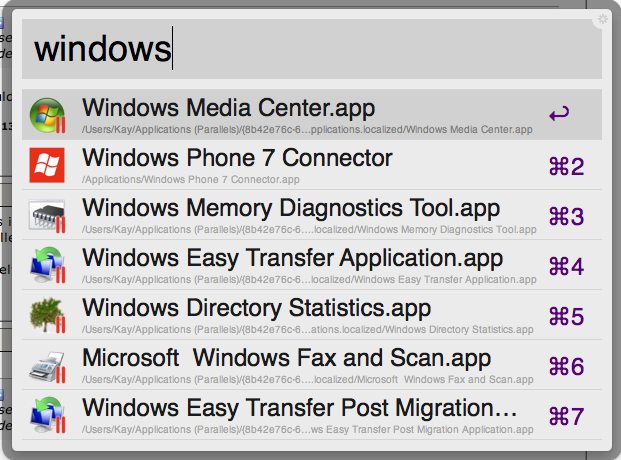
I tried using LaunchpadCleaner but the icons kept coming back. I found the best way to permanently get rid of them was to do a Spotlght search. Search based on version and put in "Windows" (see screenshot below). Select all of them and move it to trash.
Attachments


This Was It!
Thank you soooo much! I've been having this problem for months and couldn't figure out a fix. This totally worked!!!
Delete the Application folder in the folder of your account name. This is where all parallels windows application shortcuts are.
Then
Finder>Go
~/Library/Application support/Dock
delete the .db file here.
Terminal> killall Dock
this worked for me...hope it helps
Thank you soooo much! I've been having this problem for months and couldn't figure out a fix. This totally worked!!!

Deviant Relic
macrumors newbie
I tried using LaunchpadCleaner but the icons kept coming back. I found the best way to permanently get rid of them was to do a Spotlght search. Search based on version and put in "Windows" (see screenshot below). Select all of them and move it to trash.
This post saved me two years of frustration trying to get rid of the Parallels Icons and Windows application associations in finder. The typical uninstall of Parallels nor clean up tools caught those files. Thank you.