

This is a bit long, but very important...
Ok, not to totally blame Leopard but....
Ever since "upgrading" to Leopard, I've had issues with my wireless internet connection, as have countless many of other users. However, my issues may be more or less related to my isp than Leopard, so that's what I'm here to find out.
I had similar issues with Tiger but not as often or as bad. Ok, here's what happens. Apparently I either lose signal from At&t or I lose signal from my iMac to the 2Wire router (not sure exactly). Anyway, this page will pop up when accessing a web page and the error occurs:
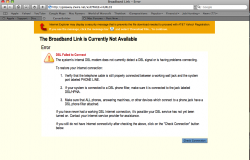
So I might wait a few seconds and then click refresh or just click the check connection button (which by the way looks like a pc style button now vs. the usual rounded clear shiny apple style button before safari 3 upgrade). If all goes well, I'll get this screen:
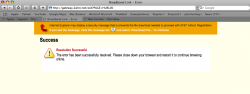
Great! However when I type the url or click the bookmark of the page I was tryign to access when this error occurred, I get stuck on the above posted page. I can navigate to another web page just fine though. Resetting Safari, clearing cache, etc. has no effect on fixing the issue.
With Tiger, this happened maybe 2x a week, with Leopard this happens many times daily. Also, with Tiger, once the page said successful, all was good; I could reload webpage and move on. With Leopard, if I wait 15 min the page will magically load up fine or if I restart Mac, then all is fine. Even when this problem appears, I can open up another tab and keep navigating other pages so I'm obviously not losing connection as far as I can see. Anyone have any suggestions or similar experience using wireless and a 2wire router? (btw most of my d/c problems occurred when playing wow in tiger, now most of my d/c issues occur with surfing web in Leopard 😡)
Oh, and the PC computer also in this house using the network works flawlessly(well connecting to and keeping a connection to the internet wirelessly at least and also the HP printer drivers are superb, but that's another thread 🙄)
Ok, not to totally blame Leopard but....
Ever since "upgrading" to Leopard, I've had issues with my wireless internet connection, as have countless many of other users. However, my issues may be more or less related to my isp than Leopard, so that's what I'm here to find out.
I had similar issues with Tiger but not as often or as bad. Ok, here's what happens. Apparently I either lose signal from At&t or I lose signal from my iMac to the 2Wire router (not sure exactly). Anyway, this page will pop up when accessing a web page and the error occurs:
So I might wait a few seconds and then click refresh or just click the check connection button (which by the way looks like a pc style button now vs. the usual rounded clear shiny apple style button before safari 3 upgrade). If all goes well, I'll get this screen:
Great! However when I type the url or click the bookmark of the page I was tryign to access when this error occurred, I get stuck on the above posted page. I can navigate to another web page just fine though. Resetting Safari, clearing cache, etc. has no effect on fixing the issue.
With Tiger, this happened maybe 2x a week, with Leopard this happens many times daily. Also, with Tiger, once the page said successful, all was good; I could reload webpage and move on. With Leopard, if I wait 15 min the page will magically load up fine or if I restart Mac, then all is fine. Even when this problem appears, I can open up another tab and keep navigating other pages so I'm obviously not losing connection as far as I can see. Anyone have any suggestions or similar experience using wireless and a 2wire router? (btw most of my d/c problems occurred when playing wow in tiger, now most of my d/c issues occur with surfing web in Leopard 😡)
Oh, and the PC computer also in this house using the network works flawlessly(well connecting to and keeping a connection to the internet wirelessly at least and also the HP printer drivers are superb, but that's another thread 🙄)


