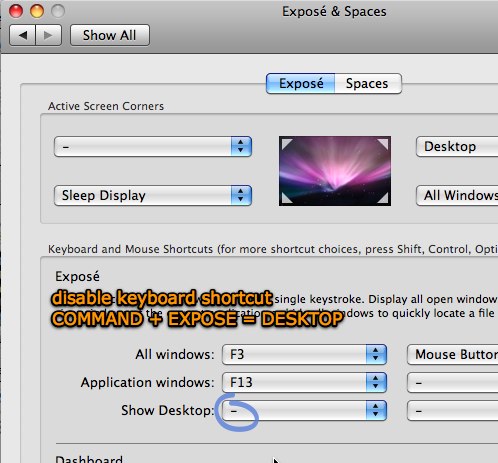
Is there something special I need to do to prevent F9/F11/F12 from being grabbed by the desktop?
In order to fully divorce myself from Windows; minus CIV4 as the Mac version is a stinking pile of poo; I use Mocha's 5250 client. The problem is that many function keys are ideally used to drive the green screen options; I can click the Fkey icons but that may require multiple clicks.
Is it at the app level or do I need to disable the keys for all apps?
In order to fully divorce myself from Windows; minus CIV4 as the Mac version is a stinking pile of poo; I use Mocha's 5250 client. The problem is that many function keys are ideally used to drive the green screen options; I can click the Fkey icons but that may require multiple clicks.
Is it at the app level or do I need to disable the keys for all apps?