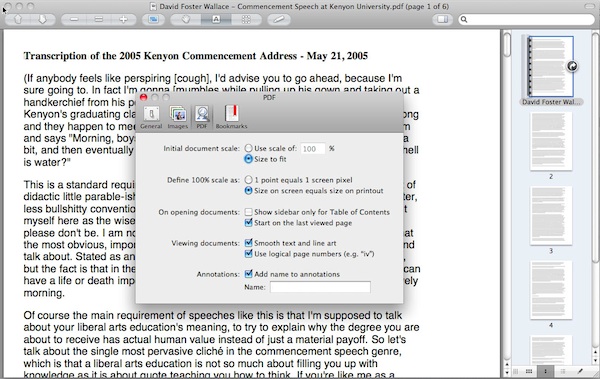
Running GM (11A511) and I've noticed that Preview's handling of PDFs, well, sucks. In 10.6, when you opened a PDF, one of the options was to set the default zoom to "page" (I forget what exactly it was called). In Lion, the only option you have is 100%. You can set 100% to be either 1:1 pixels, or "printed size." On a 27" monitor, neither solution yields a PDF that fits a single page to the screen. As a result, every PDF that will ever be opened in Lion (until they change this) will have to be resized to fit the screen. Does anyone know of a workaround?
(And while I'm at it, I might as well mention how annoying it is that I can't kill "Resume" just for Preview. Why Apple? Why? I hope they are raked over the coals for this "innovation." It should be something we can enable on an app-by-app basis, with an option for a global setting for apps we've not yet decided on. Currently, only the latter exists)
(And while I'm at it, I might as well mention how annoying it is that I can't kill "Resume" just for Preview. Why Apple? Why? I hope they are raked over the coals for this "innovation." It should be something we can enable on an app-by-app basis, with an option for a global setting for apps we've not yet decided on. Currently, only the latter exists)
Last edited: