Become a MacRumors Supporter for $50/year with no ads, ability to filter front page stories, and private forums.

Bare-E Raws

macrumors newbie
Original poster
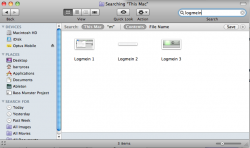
Alright so i read some old threads on this and none of them seem to have this issue with them. So i deleted all the files for logmein himachi and this little stupid icon wont leave my task bar... It sits there day after day pissin' me off. I force quit the process via activity monitor but it restarts every time! I cant find any other files i haven't deleted. I think I'm going to lose my mind over this please help me out folks!
 

Attachments

  • Logmein 1.png
    Logmein 1.png
    31.8 KB · Views: 319
  • Logmein 2.png
    Logmein 2.png
    9.4 KB · Views: 96
  • Logmein 3.png
    Logmein 3.png
    7.9 KB · Views: 299
Last edited by a moderator:
Alright so i read some old threads on this and none of them seem to have this issue with them. So i deleted all the files for logmein himachi and this little stupid icon wont leave my task bar... It sits there day after day pissin' me off. I force quit the process via activity monitor but it restarts every time! I cant find any other files i haven't deleted. I think I'm going to lose my mind over this please help me out folks!
The most effective method for complete app removal is manual deletion:
 
tried this dude process always restarts every time i try and end it. thanks for the reply though🙂
Then you haven't followed all the steps. It will remove all traces of the app if you do it right, especially step 1 and steps 5-7. If you remove all the files, then restart, it won't launch again.
 
Yes but how do i end a process that keeps restarting every time i quit it? It say i NEED to end the process...
 
I did. this is also messed up. I deleted the files and now if i search for files under logmein, log me in, or himachi nothing show up in the finder...
 
okay so here you are as i said earlier i can't do step one because i cant end the process so that may make the rest of the steps redundant. here are the pictures for you though.
 

Attachments

  • Logmein 4.png
    Logmein 4.png
    76.3 KB · Views: 95
  • Logmein 5.png
    Logmein 5.png
    110.7 KB · Views: 122
  • Logmein 6.png
    Logmein 6.png
    83.4 KB · Views: 107
okay so here you are as i said earlier i can't do step one because i cant end the process so that may make the rest of the steps redundant. here are the pictures for you though.
As I thought, you're not following all the steps. Read steps 5-7 and refer to the screen capture with the circled elements. Also, select View > As List in Finder.
 
Register on MacRumors! This sidebar will go away, and you'll see fewer ads.