Become a MacRumors Supporter for $50/year with no ads, ability to filter front page stories, and private forums.

DankeBrutus

macrumors regular
Original poster
I've been noticing for a while now that when I am not using my mini it tends to be warm to the touch. Not burning mind you, just warm. I was wondering if maybe the fan turns itself off after a while so I finally turned on logging with TG Pro and left it for on for about 48 hours.

What I found is interesting, but it isn't quite telling me what the cause is. I turned on TG Pro logging around 6:30 PM on June 4th and the average temperature (AT) was around 50˚. I was actively using the Mac for a couple hours and the AT went down to 40-41˚ and held there steadily. I logged off around 8:30 PM and the AT when unchanged from ~40˚. It stayed that way dropping down to ~38˚ here and there until 7:19 on June 5th when the AT jumped to 43˚ and started rising until it held ~57˚ around 7:30. It stayed there until 1:33 PM on June 6th (today). During this time the CPU average was over ~65˚. Whatever the mini is doing it is a CPU task as the GPU temp only seems to be changing as the AT rises and falls. The AT dropped to 36˚ with the CPU average being 41˚ until 2:36 PM when the CPU temp jumped to 60˚, eventually going back up to 65˚ about 10 min later, and the AT rose gradually back to it's previous ~57˚ mark until I logged in. Since then, like every other time, the temperature gradually falls as I use the computer.

For the record I have Content Caching on, Time Machine updates every hour, but as far as I know neither of those would explain what the CPU is working on for hours and hours at a time. Activity Monitor isn't useful as far as I can tell because it doesn't give me historical information that I could use with my log timestamps to figure out the culprit.

Does anyone have any suggestions?
 
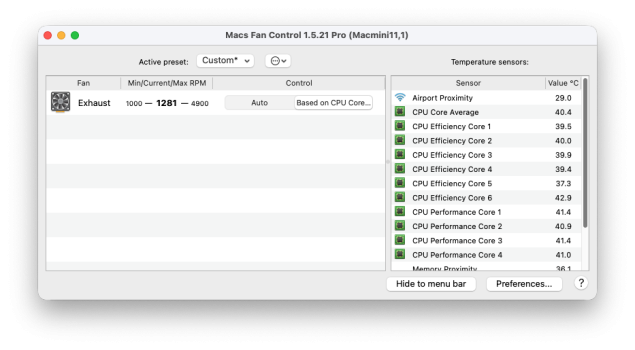
Your Mini temps query is indeed puzzling, I monitor my temps as the included examples show and at idle the temps are at a steady 40 to 41 always unless under load then I can instantly hear the fan ramp up but never the kind of fluctuations you described.

To get to the bottom of the matter, you may have to experiment by temporarily disabling Content Caching, I'd be hard pressed to think Time Machine would produce the kind of temp difference but just to throw caution to the wind, instead of a schedule of every hour, set it to daily instead and see if that improves the problem.

Sorry I can't be more direct and point to a cure but it maybe a case of experimenting with different settings to track down the cause, hope you find a solution.
Good luck.
 

Attachments

  • Screenshot 2026-06-07 at 10.25.44.png
    Screenshot 2026-06-07 at 10.25.44.png
    34.3 KB · Views: 48
  • Screenshot 2026-06-07 at 10.03.15.png
    Screenshot 2026-06-07 at 10.03.15.png
    124.6 KB · Views: 48
Last edited:
Sounds like there's a runaway process (or more than one) going on in the background when it seems to be "at idle"...
 
The recurring jump at 7:19 is the tell — that's a scheduled wake or a daemon kicking in, not Spotlight (mds would smear continuously across the day). Run `pmset -g sched` in Terminal first to see if anything's set to wake right at that time. Then open Activity Monitor → Energy, make the CPU Time and 12 hr Power columns visible, and sort by 12 hr — the usual heavy hitter at idle is backupd, photoanalysisd, or cloudd if you've got a big Photos library syncing.

My Studio sits at 38-40 idle but climbs every morning when photoanalysisd resumes its queue. Aluminum chassis spreads the heat well, so even a couple watts of sustained background work feels obvious to the touch.
 
  • Like
Reactions: eSaF-Eddie
Finally got around to checking this out again.
Run `pmset -g sched`
Running `pmset -g sched` returned with no output. I checked out Activity Monitor again and did see what may be the reason(?).

Screenshot 2026-06-19 at 06.26.35.png

Screenshot 2026-06-19 at 06.39.55.png

The Spotlight process in the first screenshot is interesting, but without a CPU time value associated with it I'm unsure if it in of itself is the cause. It could be that my index has a problem and needs to be rebuilt. TG Pro's impact is almost certainly from the logging feature being active. It's since been turned off as I have 10 days of logs now. In the second screenshot `kernel_task`, `WindowServer`, and `mds_stores` have the longest CPU time. IIRC `mds_stores` is related to Spotlight indexing?

For process of elimination I've turned off my Sharing settings for now. File Sharing, Content Caching, and Screen Sharing are now off. I'll check throughout today and tomorrow if that makes a difference. If the Mac is still warm when it's supposed to be idle I guess Spotlight is the next likely suspect, I'll just wipe the index and have it start over.

the usual heavy hitter at idle is backupd, photoanalysisd, or cloudd if you've got a big Photos library syncing.
backupd - CPU Time = 29:10
photoanalysisd - CPU Time = 1:18
cloudd - CPU Time = 5.97

At least for my Mac I'd say these values probably aren't out of the ordinary, if I am properly understanding them.
 
iStat Menus is a great tool for troubleshooting issues like this one.

Unlike Activity Monitor, it saves all sorts of metrics and graphs them.

There are other utilities like iStat Menus, it's just the one I use, do your own shopping, etc etc

Also, check Console for errors and warnings. It's a pain to use but it can uncover issues not visible in other ways.
 
OP:

Be aware that if you determine spotlight to be the source of your problems, it's possible to disable it, turn it right "off".

Since the very first time spotlight was introduced, I didn't care for it and turned it off. And I've never used it since (I use other tools for searching), and never will.
 
Be aware that if you determine spotlight to be the source of your problems, it's possible to disable it, turn it right "off".
I personally like Spotlight, I do turn off any explicitly internet-related things though.

Also, check Console for errors and warnings.
I didn't think to check Console, thank you! It'll probably suck to use ya but hopefully it will at least give me a hint at what's going on.
 
Okay so after letting Console stream for several hours -- is there a way to export the hundreds of thousands of messages it creates? -- I saw a lot of errors looking like "Failed to create NSXPCConnection." Looking into it a NSXPCConnection allows two processes to communicate with each other. There were a variety of causes for the error but the most recent were related to `searchpartyuseragent`, which is apparently Find My related, and `mediaanalysisd`. I also pulled a system diagnostic related to Spotlight that specifically noted high CPU usage and a log for `launchd` that was, obviously, about a lot of different things but did mention a bunch of repeated logs. This may be expected behaviour but after some Googling I found a thread on the Apple forums where system extensions were mentioned. I usually keep those clean but looking again I saw that `daemondo`, from MacPorts, was listed three times. It was the same executable though. I'm not sure if it's supposed to be listed multiple times...
Screenshot 2026-06-20 at 17.14.35.png

...so I disabled two of the entries. If something breaks I guess I'll find out later.

The repeated logs messages looked something like this:
`2026-06-20 15:38:24.678049 (gui/501 [100014]) <Warning>: denied lookup: name = com.apple.contactsd.persistence, requestor = imagent[1211], error = 159: Sandbox restriction`
Specifically `com.apple.contactsd.persistence` appears in over 1000 messages over the course of 30 minutes. Apparently `contactsd` does a lot of things with iCloud, Mail, and browsers. But nothing I'm seeing points to it being what is causing such prolonged CPU usage. It also doesn't look like my Sharing settings were the cause as turning them off didn't change anything.

I'm stumped, other than running `sudo mdutil -E /` to force Spotlight to reindex, and I'm not even 100% sure that Spotlight is the problem, it seems to me that the mini just decides to run all the background processes it can while it's "idle" and shuts all that down when I start using it again.
 
In Console, filter for only Errors and Warnings, then pay attention to the Errors (red dots).

Yes there are many ways of filtering and analyzing console output but it's too deep a subject to get into here.

I suggest - again - iStats menu and keeping an eye on CPU usage in the graphs.
 
I already saw the Errors and Warning filter, I was using it.

I've downloaded iStats and I get why you're recommending it but I don't see how exactly it helps for this specific scenario. As I've described whatever process the mini is working on is happening when idle and once I start using it again the temperature goes down, so clearly the process stops or just lowers in priority. Seeing a graph showing CPU usage is nice but without a "processes running during X hour" degree of specificity I'm still going to be just guessing.
 
I already saw the Errors and Warning filter, I was using it.

I've downloaded iStats and I get why you're recommending it but I don't see how exactly it helps for this specific scenario. As I've described whatever process the mini is working on is happening when idle and once I start using it again the temperature goes down, so clearly the process stops or just lowers in priority. Seeing a graph showing CPU usage is nice but without a "processes running during X hour" degree of specificity I'm still going to be just guessing.

Because you can see how your Mac is working when you are not using it.

Is it spiking CPU? Memory? Temperatures? If so which ones?

Yes, I also wish it would record a history of which apps were consuming CPU or memory at specific times. If you need to get to that level of granularity, a simple shell script will likely be quite useful for you.

However, I've found that just letting your Mac do nothing for a time will lead - eventually - to the situation where the Mac will start doing whatever is the issue. At that point, you can simply use the pulldown menu for iStats for CPU utilization and see the culprit. The Mac will not interpret your simple mouse movement and click the same as it would you opening up an app or actively using an app.

Another trick is to simply leave the iStats cpu pulldown active and wait.

I have been able to troubleshoot many issues similar to yours this way.
 
Could be crypto jacking. I’ve seen websites that use your resources if you leave the computer idle. When you start using the computer, it stops and waits till it’s idle again.

Simple test is to close down all browsers and let it idle. Notice if the computer gets warm and temps increase.

If it stops happening, determine which website is causing it and stop using it.

If it continues to happen, it could be a system compromise. Macs have been targeted more and more. One recent example are sponsored google ads for Claude code that directed users to a square space website that looked identical to anthropic’s instruction site. The only difference was the installation command. Instead of the normal command, it used an obfuscated command which downloads a malicious payload to your computer. It grabs all your session tokens, saved passwords, keychains, checks your folders for any documents that may contain sensitive or password/banking/crypto seed phrases information and uploads them all. It will install a rat for persistent access and install key loggers. It may even install crypto jacking applications.

In this scenario, youll need to lock down the computer, remove internet access. Use an uncompromised computer to revoke sessions, reset passwords (all the websites you frequent, password managers, email accounts, etc), potentially lock down credit cards. Once done, make sure you backup data on your compromised computer. Make sure you don’t backup any files that may include the malware. Mainly documents and photos in your drive. Seek professional help if needed.

Once you have your data backed up, for peace of mind and to ensure the threat is gone, wipe the device and create a new profile again.

Do not Time Machine restore your machine as it may contain malicious configurations. Instead restore individual files you know is safe.

There may be additional information that was not covered. Please use your best judgment and common sense in addressing the issue.

You will need to reconfigure everything back up to be on the safe side.

I hope this hasn’t happened, and I do not wish this upon anyone. In the event it has and people are experiencing unusual behaviour, there is a plan to help people out.

Be safe everyone. I hope this has helped.
 
Because you can see how your Mac is working when you are not using it.

Is it spiking CPU? Memory? Temperatures? If so which ones?
I am sure that it is a CPU process simply from the TG Pro logs, but I see what you mean. I'm starting to think it's really a bad Spotlight index putting the process in a loop or WindowServer acting up. Both processes consistently have high Energy Impact and when I checked just now WindowServer was fighting for the top process in iStats. I always have Ghostty as one fullscreen app and Safari as another, plus TG Pro and Little Snitch constantly monitoring in the menu bar. I'm not sure how much of an impact an app like Thaw (a Bartender-like app) would have on WindowServer as well. But I'll keep iStat running during the trial period. My "tests" are not very scientific, whenever I think about it I put my hand on the Mac to see how it's doing. So next time it feels warm I'll unlock the Mac and see what's going on in iStats.

Could be crypto jacking. I’ve seen websites that use your resources if you leave the computer idle. When you start using the computer, it stops and waits till it’s idle again.
This would require the site to be running either in the foreground or background, right? I really don't think this is what's going on. Not just because I'm careful with what I install on my computers but because the Mac has become warm even with Safari closed, so whatever is going on must involve an internal Mac process. Also, I would personally never download Claude or any LLM or generative model. This has also been going on for months. If I had installed malicious code that would steal my passwords and the like it's doing a pretty **** job lol.
 
I am sure that it is a CPU process simply from the TG Pro logs, but I see what you mean. I'm starting to think it's really a bad Spotlight index putting the process in a loop or WindowServer acting up. Both processes consistently have high Energy Impact and when I checked just now WindowServer was fighting for the top process in iStats. I always have Ghostty as one fullscreen app and Safari as another, plus TG Pro and Little Snitch constantly monitoring in the menu bar. I'm not sure how much of an impact an app like Thaw (a Bartender-like app) would have on WindowServer as well. But I'll keep iStat running during the trial period. My "tests" are not very scientific, whenever I think about it I put my hand on the Mac to see how it's doing. So next time it feels warm I'll unlock the Mac and see what's going on in iStats.

If you can, don't lock your Mac. (I realize you may not be able to do this)

Leave it running but don't use it. After a time MacOS thinks "aha, the machine is idle and the user isn't doing anything, let's do things in the background" - what those things are and how impactful they are to CPU is what you want to find.

WindowServer will always be a constant process running. Unless it's above 10% consistently I'd not worry about it.

The chances this is cryptojacking are very small - but the idea that a website is poorly coded and taking up a lot of CPU is exactly right.
 
After dinner I felt the Mac and it was warm. My Watch unlocked it immediately and whatever background process was running stopped. I checked out the iStats graphs.

Network Activity

A little burst at the same time every hour. I figured it was Time Machine and after checking I can confirm this was Time Machine updating my network backup.
CPU Power
Total Power

Screenshot 2026-06-24 at 17.20.05.png
Screenshot 2026-06-24 at 17.19.57.png
CPU Activity


So according to the CPU and Total Power graphs from ~2PM-3PM the Mac was actually idle and the CPU power went way down. Before and after that something was making the CPU work. I am more convinced now I'm looking at a bad Spotlight index because, once again, checking Activity Monitor shows Spotlight's impact is over 1800 yet again. It could be a failed index of the external HDD I have connected over USB via Thunderbolt, or it could be the Thunderbolt drive also connected directly to the Mac. I've run `sudo mdutil -E /` because it couldn't hurt to try.

Leave it running but don't use it. After a time MacOS thinks "aha, the machine is idle and the user isn't doing anything, let's do things in the background" - what those things are and how impactful they are to CPU is what you want to find.
Maybe this weekend I'll make it so the screen won't turn off and it won't lock to see if I can observe anything if rebuilding the index doesn't change anything.
 
Also check your disk accesses in iStat menus - if it's Spotlight you'll see a bunch of mds and other similar processes accessing your disk.

You can also see if it's indexing by invoking spotlight and typing a bunch of gibberish in the search area. If it's indeed indexing you'll see a thermometer bar pop up. Why that doesn't pop up immediately and is hidden, well, you'll have to ask Apple that.

Also, as HDDs take a while to index, you might just give it time. Or, you can just turn off indexing for that drive in Spotlight Privacy settings.
 
Register on MacRumors! This sidebar will go away, and you'll see fewer ads.