Become a MacRumors Supporter for $50/year with no ads, ability to filter front page stories, and private forums.
Just got a 11" Pro and started using. Cycle count is just 1. Hopefully the battery health will not be degrading fast due to my constant usage.

Looks like you are really submitting it to some heavy usage; as I am mine (my Cycle Count is something like 8) ;)
 
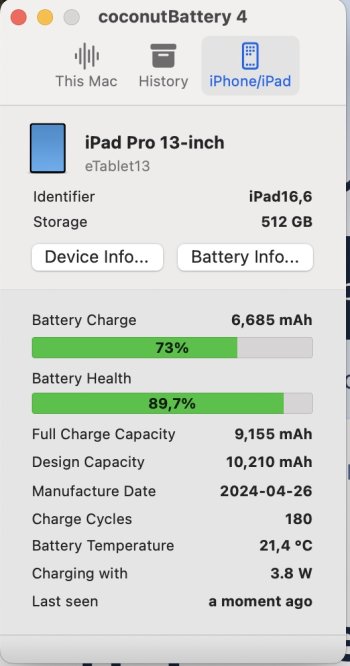
I bought M4 iPad Pro 13” with 38 cycles and 100% battery health a month ago. I set 80% charging limit always keep the battery between around 30% till 80%. So will say how it goes, now I have 47 cycles. Checked with CoconutBattery which says 102% and with Apple Support which said that everything in my iPad works fine (I bought it from a second hand so I wanted to be sure).
 
Last edited:
On my 11" iPad Pro M4, battery health is still 100% with 50 cycles. Bought it 4 months ago.
 
  • Like
Reactions: mganu
Honestly, your numbers don’t seem too far off from what others are reporting. iPads do tend to drop health a bit faster early on, then they stabilize after a while. Cycle count, usage habits, and even software updates can all make the percentages look inconsistent.


I’d keep an eye on real-world performance more than the health number itself — if it still lasts long enough for your daily use, you’re probably fine. If you want a bit more insight, feel free to check my bio for how mine has been holding up.
 
Has been 6 months with my cellular 11”. Battery life is still at 100% with 65 cycles.
 
  • Like
Reactions: mganu
hm. my m4 iPad pro 13 inch is at 100% with 52 cycles. First use june 2024. I think these estimates are a lil suspect sometimes. I'm not using the 80% charge limit setting. Are you noticing that the battery is dying quickly for you?
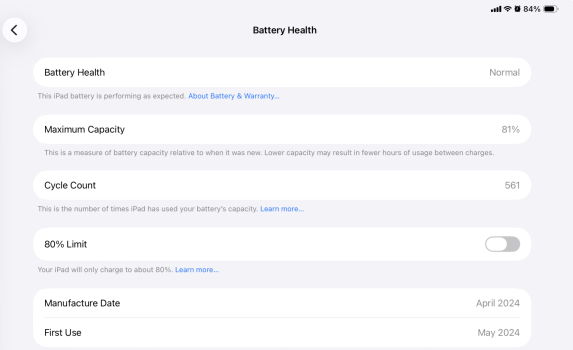
Not really. I forgot I was the OP of this thread and checked again. It’s at 81% and out of warranty, but still says “Healthy.”
 

Attachments

  • IMG_2409.png
    IMG_2409.png
    249.4 KB · Views: 8
Not really. I forgot I was the OP of this thread and checked again. It’s at 81% and out of warranty, but still says “Healthy.”

80% seems to be the threshold for “healthy”. You might find if/when it drops below 80, it changes to “needs service”.
 
M4 from 5/24, 202 cycles, 87% battery health. I think the reason for this is poor charge protection in older versions of the OS. My iPad is connected to a display when it is usually at rest on my desk, meaning it is on charge most of the time. When I got the device, charge protection at the time seemed a lot more rudimentary (80% limit would cause more charge cycles because it kicked in the second it dropped below 80%, and the monitor connection wouldn’t sleep the monitor during iPad sleep, just blank it out, so the parasitic drain was a lot higher) and I think having it on charge. Also, I’ve gone through a few of the OS betas, and the charge protection often degrades during the beta process. On 26, I’m seeing no hit to having it connected to a monitor so much, with no change in battery health since the public release of 26.

 
Register on MacRumors! This sidebar will go away, and you'll see fewer ads.